
Turn on suggestions
Auto-suggest helps you quickly narrow down your search results by suggesting possible matches as you type.
Showing results for
Please log in to access translation
Turn on suggestions
Auto-suggest helps you quickly narrow down your search results by suggesting possible matches as you type.
Showing results for
Community Tip - Your Friends List is a way to easily have access to the community members that you interact with the most! X
- Community
- Creo Elements Direct
- Drafting
- Re: Save STL not available
Translate the entire conversation x
Please log in to access translation
Options
- Subscribe to RSS Feed
- Mark Topic as New
- Mark Topic as Read
- Float this Topic for Current User
- Bookmark
- Subscribe
- Mute
- Printer Friendly Page
Save STL not available


Jan 22, 2019
05:09 AM
- Mark as New
- Bookmark
- Subscribe
- Mute
- Subscribe to RSS Feed
- Permalink
- Notify Moderator
Please log in to access translation
Jan 22, 2019
05:09 AM
Save STL not available
Hi,
I work with Creo Elements/Direct Modeling 18 on two different machines. One of them lists STL in save>file type while the other does not. The software version is the same, the model I'm working on is loaded from the same pkg.
Any ideas?
Thanks a lot!
Solved! Go to Solution.
Labels:
- Labels:
-
General
ACCEPTED SOLUTION
Accepted Solutions


Jan 22, 2019
07:32 AM
- Mark as New
- Bookmark
- Subscribe
- Mute
- Subscribe to RSS Feed
- Permalink
- Notify Moderator
Please log in to access translation
Jan 22, 2019
07:32 AM
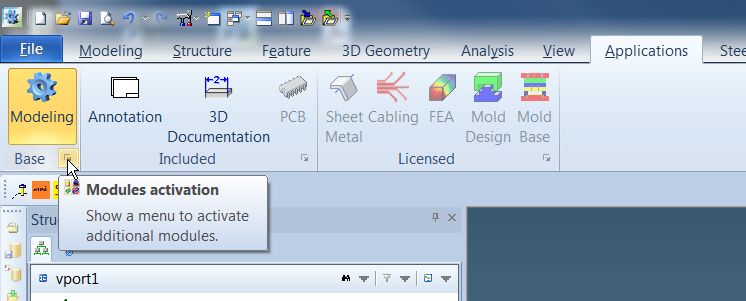
The STL Data interface must be turned on.
1. From the Applications tab, click on the corner arrow of the Base module.
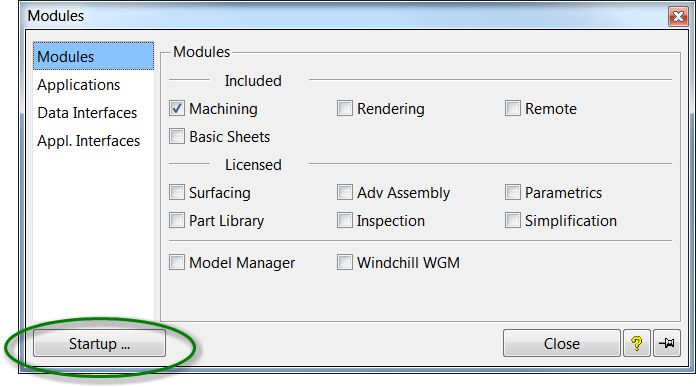
2. From the Modules box, click on Startup.
3. From the Modules list, select STL from the Data Interfaces section.
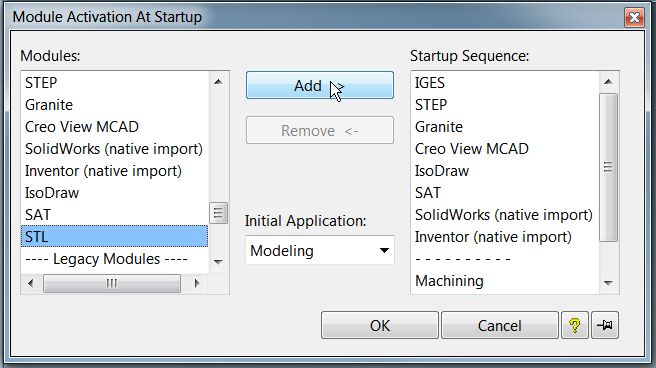
4. Click on Add to add it to the Startup Sequence.
5. Click OK
6. Restart Modeling.
Creo Element\Direct Modeling 20.6.0.0.0
2 REPLIES 2
Jan 22, 2019
07:32 AM
- Mark as New
- Bookmark
- Subscribe
- Mute
- Subscribe to RSS Feed
- Permalink
- Notify Moderator
Please log in to access translation
Jan 22, 2019
07:32 AM
The STL Data interface must be turned on.
1. From the Applications tab, click on the corner arrow of the Base module.
2. From the Modules box, click on Startup.
3. From the Modules list, select STL from the Data Interfaces section.
4. Click on Add to add it to the Startup Sequence.
5. Click OK
6. Restart Modeling.
Creo Element\Direct Modeling 20.6.0.0.0
Jan 22, 2019
07:45 AM
- Mark as New
- Bookmark
- Subscribe
- Mute
- Subscribe to RSS Feed
- Permalink
- Notify Moderator
Please log in to access translation
Jan 22, 2019
07:45 AM
It works!
Many thanks again!

Announcements


Top Tags
