
Solved
Changing font color of 3d label
How to change font color of 3d label using javascript?
How to change font color of 3d label using javascript?
Hello
The code should work if your experience has a 3D label widget that has the StudioID set to 3DLabel-1.
An alternative is to create an application parameter (in my case, it is called labelColor) and set its value to the desired color.  Figure 1
Then, you will need to bind the application parameter with the font color property of your 3D label. In order to do that, you will have to click on the icon indicated by the yellow arrow and drag it onto your 3D label. The window shown bellow should appear. Here, select Font Color and click Bind.
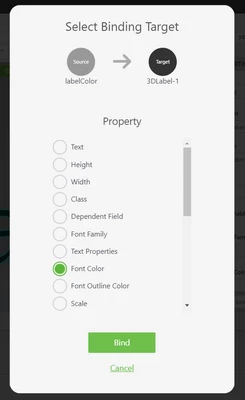
You can change the value of your application parameter using javascript like this:
$scope.app.params.labelColor = #FF0000;
Kind regards,
Lorena
Enter your E-mail address. We'll send you an e-mail with instructions to reset your password.