
12-Amethyst
July 18, 2024
Question

Custom User Picker Utility

  • July 18, 2024
  • 2 replies
  • 700 views

Version: Windchill 12.1


Use Case: Created a custom user picker utility, and a global reusable attribute of String type. Then, created an IBA on Problem Report.


Description:
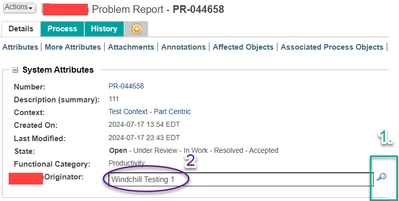
RG_11025060_1-1721274584961.png


  1. How can I get rid of the find icon next to textbox? In my usecase, the IBA should not be editable from this VIEW mode. It should be changed only in CREATE/EDIT mode.
  2. Can I get a link of the user? rather than just the full name. (exactly like created by/modified by attribute on most objects)

2 replies

avillanueva
23-Emerald I
23-Emerald I
July 22, 2024

What does it show if you use jcaDebug=true for that attribute in that view? Compare that to the create/edit wizard.  I suspect its using the wrong data utility for the view page.

HelesicPetr
22-Sapphire II
22-Sapphire II
July 24, 2024

Hi @11025060 

In your data utility you have to add a condition if the wizard is in edit or view mode and based on that condition remove the search icon.

The Returning object should contains a list of components that are shown on the page. 

PetrH