
16-Pearl
July 28, 2015
Solved

Check for Checked Out objects in the Affected Data section on a Change Request

  • July 28, 2015
  • 2 replies
  • 3898 views

I'm looking for some transition "complete" text that will check that all objects (primary business) are not Checked Out (or are Checked In).

I see some examples for Promotion Request but this is on a CR.

My problem is that we have users add "In Work" state objects to the CR, the workflow starts at a Submit CR task then we have them add approves at Assign CRB task. At both tasks, the authors could edit the objects in the Affected Data section but, if they are left Check Out then the workflow cannot change the state of the objects as the task moves to Doc Control to check the Change Request.

I already have a conditional that will Cancel the CR if any object in the Affected Data is not "In Work" as we do not want the users to set Released documents to Under Review.
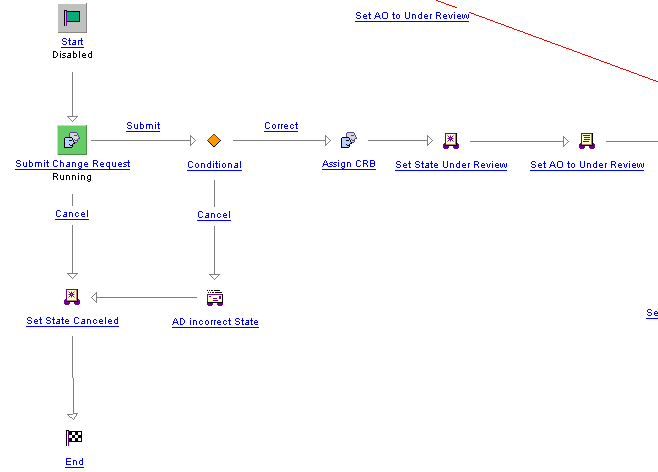
7-28-2015 3-03-03 PM.bmp

Best answer by satre-2

See attached document for implementing business rule for change request to check if affected objects is checked out.

Hope it helps !!!

Thanks

Shreyas

2 replies

1-Visitor
July 28, 2015

In the workflow you can use business rules engine to check the condition whether the PBOs are checked out - CHECKOUT_RULE

Read more about it here - http://www.ptc.com/cs/help/windchill_hc/wc102_hc/index.jspx?id=WCCG_BusLogicCust_ChangeMgmt_BusRules&action=show

Thanks

Binesh

Barry Wehmiller

1-Visitor
July 29, 2015

Since you already have condition to check if objects are not in in work state. you can add below line to check if object is checked out or not

boolean isCheckedOut=WorkInProgressHelper.isCheckedOut((Workable) object);

Hope it helps!!!

Thanks

Shreyas

lgrant16-PearlAuthor
16-Pearl
July 29, 2015

Thanks - I don't know xml. Is there a "sample" that has the xml for a conditional to check for Check Out objects?

1-Visitor
July 29, 2015

For sample xml files for Business Rule you can check zip files under \Windchill\loadFiles\ixbImport\ folder

ChangePreReleaseBusinessRulesObjects.zip contain business rule for Change.

Hope it helps !!!

Thanks

Shreyas