14-Alexandrite
October 19, 2021
Solved

Export all CAD from Windchill database

  • October 19, 2021
  • 8 replies
  • 11697 views

Hi,

One of my clients wants to shut down the old Windchill server. They probably won't use old files from the server but they want to export them and maybe use some of them in the future. 

Is it possible to export all data from Oracle Database using for example data pump and extract it? it will be possible then to open these exported files in Creo? 

Thanks in advance.


Best answer by d_graham

I saw your second post regarding this.  I still think if you are simply downloading/copying the content to a folder where you can zip it a java script to do this is the way to go.

The script could add the content directly to a zip file but I'm thinking it might be good to see the files in a folder before compressing it.


That said, I wrote script to do it and it works fine.  I did run it on a test system with a limited amount of data and for testing I limited it to all CAD Assemblies and CAD Components (Drawings, Formats and whatever can easily be added) but even so I used a direct dB sql select statement so that the script would have no limit on the number of objects it finds.

Before
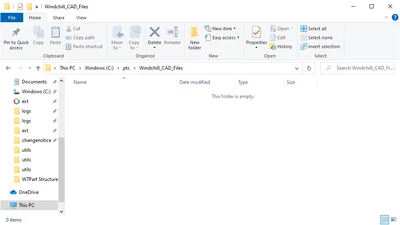
d_graham_0-1637021523942.png


Run script in Windchill shell.

Note the path to the file in the vault.
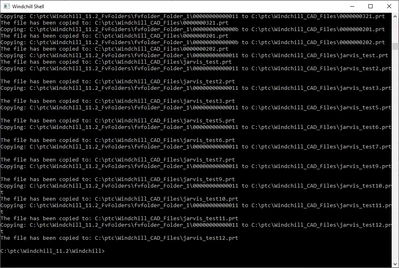
d_graham_1-1637021668687.png

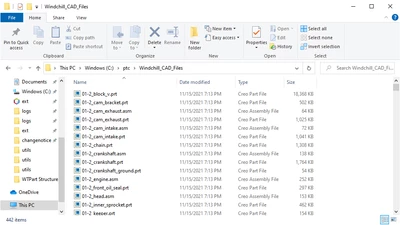
After

d_graham_2-1637021692050.png


Easy way to get CAD files out of Windchill.

I can also include a log of everything that was copied including and metadata associated with each object.

I think that might be helpful too.


David

8 replies

23-Emerald III
October 19, 2021

The CAD data is not in Oracle, only the metadata which contains the pointer from the actual file name to the sequential numbered files in the Vault. You can open the files from the vault and the file name is in the header information.

To maintain file structures and linkages, your best method is to open each drawing in Creo and do a backup to a single folder or a folder for each drawing. This will insure that you capture all related file to the drawing. It is time consuming as I had to do this for 35 drawings that a customer wanted from us. 

16-Pearl
October 19, 2021

Hello,


This is typical use case. If the properites wt.fv.forceContentToVault in wt.properties is set to true , all content will go to vault. Otherwise content will go to database.


You have below options available 

1. Take a snapshot of the system . e.g. amazon aws snapshot , vmware snapshot  along with db snapshot and then shutdown the system.

2. Export data manually in Creo

3. For larger number , you can use script like JLink script to download the files on the disk. 


Let me know if you need any further details.


Thanks and Regards

Ajit

MattPat14-AlexandriteAuthor
14-Alexandrite
November 10, 2021

Hi, 

thank you for your response.

Can you tell me more about JLink? I have thousands of files to download to the disk. I want only the last iteration and version of asm and prt files. 

11-Garnet
October 20, 2021

Hello,

there is one more option that I used. From the database you can find relation between CAD Name nad file name in the Vault. So you

can write simple bat procedure do rename Vault files. Then files can be directly opened in the Creo.


Best regards

HelesicPetr
22-Sapphire II
22-Sapphire II
December 13, 2021

Hello,

In this case there is one risk. Rename in the Windchill. (change filename)

It he CAD file is renamed in the Windchill and is not opened in Creo and checkedin again, then a old file name is pointed from ASM

This cases a regeneration conflict with missing models.


I wanted just point to mention this issue.


Best Regards


PetrH

18-Opal
December 14, 2021

@HelesicPetr good point.  As such I've include in the download tool utility I wrote a log of all cadname changes in chronological order.

This will allow anyone to find the correct filename if what you described happens.


The log output from test system looks like this (one line per CADDocument master).

Seems to work.


CADName Change History for the entire database
Code author: David Graham, email: <intentionally left blank> 
Date: 2021-12-14 10:57:32.239
The first CADName on each line is the original CADName.
The last CADName on each line is the current CADName at the time of download.


dummy_part_1.prt > dummy_part_.prt > dummy_part_1_xxx.prt > dummy_part_1.prt

dummy_part_1_.prt > dummy_part.prt

123456789.prt > 23456789.prt

23456789.prt > 123456789.prt

123456789.prt > 56789.prt

dummy_part_2_.prt > dummy_part_2_123.prt

dummy_part_2_123.prt > 123456890.prt

123456890.prt > 12345.prt

12345.prt > 12345555.prt

12345555.prt > 1234.prt

17-Peridot
October 20, 2021

You could create a Windchill Package of the data which would give you a ZIP of all the requested files.

https://www.ptc.com/en/support/article/CS22813

MattPat14-AlexandriteAuthor
14-Alexandrite
October 22, 2021

Hi, 

thank you for your answer. I read more about Creo Packages but where I should run the export command? Windchill Shell doesn't recognize WPCExport command. 

Thanks in advance

17-Peridot
October 22, 2021

There is no WC shell commands for Packages. Everything is defined in the application UI.

  • Create a new package
  • Add the desired items using Collector to gather all dependencies
  • Lock the package
  • Create a delivery
  • ZIP the delivery
  • Download the ZIP
18-Opal
October 21, 2021

Matt,


Is the content stored in file vaults or in BLOBs in the dB? Could be one or the other or a mixture of the two. Anything is possible.

As always, it’s a good to know the ground rules before doing anything.


Are you looking to get all iterations of every number?

Just the latest iteration of each revision of every number?

Just the latest iteration of every number?


If just latest it would be easy to write code that downloads the CAD files (with the correct filename) to a folder on a server.


If you need more that just the latest iteration I suggest appending a “.#” to the filename. For example, let’s say you have ten iterations of the same number. Save the latest widget.prt.10, the next latest as widget.prt.9, etc.


This can easily be automated by writing code to do the entire dB. Just write a query to get all EPMDoc masters. For each master query all iterations (or all versions whatever you need). Get the size of the query (this would be used as the number you append to the filename subtracting 1 for each iteration).

Loop thru the iteration query streaming the content to your folder with the appropriate filename.

If ten iteration the query size is 10 so the first iteration streamed is <filename>.10, the second is <filename>.9, etc.


I would also suggest having the code write a log that records the filename version.iteration (and any other metadata you’d be interested in).


Thats how I’d do it. Wouldn’t take much to write it either. Run it from a Windchill shell and your done 👍


Hope this is helpful.

If you decide to go this route and need help with the code let me know.


David

16-Pearl
November 11, 2021

Since you are just looking to export the latest of the .asm and .prt files, I'd suggest the following as an alternative method to packages or custom programming. Also, I believe that packages have a limit to the number of items that can be included in the package, but that would need to be verified.


1. Modify the limit on the number of resulting items in a search and table display. This will allow you to search for all .asm and .prt files and get the results in a single search results table.
2. In a Creo Parametric session, search for all objects of type CAD Document. Since you've specified searching for just CAD Documents, you can set the criteria to "Filename=*.asm" or "Filename=*.prt". [If you want the drawings, skip the criteria settings and just use a keyword of *]. You can save the search if you plan on running this multiple times [for testing, etc.].
3. Change the search results table display to include the location [full context folder path] of the objects, and the filename [not the name or number, but the real Creo Parametric filename]. You should also include any other columns that are of interest; name, number, description, version, last modified, etc.
4. Export the search results table to a .csv file. This file can be used as a record of what was in the database that includes some of the database metadata (the columns you added to the search table results).
5. Add everything in the search results table to a new workspace (WS). No dependents (because you searched for everything), no drawings, no family table, no generics (if you have nested family tables), and latest iteration. If your family tables are clean, there should be no conflicts/errors.
6. You should now have every .asm and .prt file in a WS. Modify the WS table display to only show CAD Documents and filter out family table instances [Instance NE Yes] because family table instances don't have a real file to export. Include the filename and location again.
7. Save the table display to a .csv file. This will serve as a record of what was actually exported. It can also be used later to build a folder structure identical to the Windchill folder structure.
8. Export everything from your WS. No dependents, no drawings, no secondary content, etc.
9. You now have every .asm and .prt file in a single directory on your hard drive. Compare the directory listing against the WS .csv file to validate that everything was successfully exported.
10. Optionally, you can create a small script to recreate the folder structure from Windchill on disk and move the exported files into the appropriate folders. The WS .csv file contains the "location" information from Windchill along with the filename.


Regards,


Dan N.

d_graham18-OpalAnswer
18-Opal
November 16, 2021

I saw your second post regarding this.  I still think if you are simply downloading/copying the content to a folder where you can zip it a java script to do this is the way to go.

The script could add the content directly to a zip file but I'm thinking it might be good to see the files in a folder before compressing it.


That said, I wrote script to do it and it works fine.  I did run it on a test system with a limited amount of data and for testing I limited it to all CAD Assemblies and CAD Components (Drawings, Formats and whatever can easily be added) but even so I used a direct dB sql select statement so that the script would have no limit on the number of objects it finds.

Before

d_graham_0-1637021523942.png


Run script in Windchill shell.

Note the path to the file in the vault.

d_graham_1-1637021668687.png

After

d_graham_2-1637021692050.png


Easy way to get CAD files out of Windchill.

I can also include a log of everything that was copied including and metadata associated with each object.

I think that might be helpful too.


David

15-Moonstone
November 29, 2021

Hi!

A bit off topic, but related to extracting data...

We're possibly coming up with a requirement to extract pdf-files from Attachments of EPMDoc drawings and the same for wtDocuments linked to a wtPart structure. Extract would be 'triggered' from a subassembly or the top wtPart. Drawings are with Calculated association to wtPart and wtDocs with Referenced by links. Also, we're using baselines to capture the BOM and the above mentioned content versions which should be considered.


Based on your experiences to extract files do you see the above doable?


18-Opal
November 29, 2021

@HJ1 , the answer to your question is yes.

All of what you describe is very doable. As long as there is sound logic provided (which you have 👍) code can be written to get the attachments you described.


How do you intend to trigger the ‘extraction’ of the attachments? Admin runs code in Windchill shell? User runs code from the part’s page?


If you need help with this let me know.


David


PS

Interesting that you mention how you’re capturing the BOM. I just wrote a utility to display a “released” part structure where the parts’ lifecycles each include multiple states that are considered “released” states.


BTW, for those of you following this post. The original poster has subsequently told me that the data he needs to get out of the database is in fact stored in BLOBs in the dB not in file vaults. Therefore I adjusted my code to work regardless of where the data is stored. Could be in BLOBs, file vaults or a combination of the two. Now it’s bombproof 😀

avillanueva
23-Emerald I
23-Emerald I
February 9, 2022

Just out of curiosity, how many CAD objects are there in the server?  That could guide your decision. What CAD type?

10-Marble
March 4, 2024
Hi, document of approximately 260,000 each