
Turn on suggestions
Auto-suggest helps you quickly narrow down your search results by suggesting possible matches as you type.
Showing results for
Please log in to access translation
Turn on suggestions
Auto-suggest helps you quickly narrow down your search results by suggesting possible matches as you type.
Showing results for
Community Tip - Have a PTC product question you need answered fast? Chances are someone has asked it before. Learn about the community search. X
- Community
- PLM
- Windchill Discussions
- How do I map a windchill id to a file in the vault...
Translate the entire conversation x
Please log in to access translation
Options
- Subscribe to RSS Feed
- Mark Topic as New
- Mark Topic as Read
- Float this Topic for Current User
- Bookmark
- Subscribe
- Mute
- Printer Friendly Page
How do I map a windchill id to a file in the vault?


Sep 27, 2012
12:23 PM
- Mark as New
- Bookmark
- Subscribe
- Mute
- Subscribe to RSS Feed
- Permalink
- Notify Moderator
Please log in to access translation
Sep 27, 2012
12:23 PM
How do I map a windchill id to a file in the vault?
How do I map a windchill id to a file in the vault? I took a look at the database and I saw the EPMDOCUMENTMASTER which contains the windchill id's. The FVITEM table contains the file names. But I'm not sure how these tables relate. Also the FVITEM table contains about 20 thousand rows which matches the number of files. But the EPMDOCUMENTMASTER contains about 44 thousand rows. Does that mean that not all the object in windchill have a vault file?
Any help that you can give me with this would be greatly appreciated.
Henry
Labels:
- Labels:
-
Other
12 REPLIES 12


Sep 27, 2012
01:05 PM
- Mark as New
- Bookmark
- Subscribe
- Mute
- Subscribe to RSS Feed
- Permalink
- Notify Moderator
Please log in to access translation
Sep 27, 2012
01:05 PM
You've gotta explore the api. Hopefully this is enough to get your started.
String oid = "OR:wt.doc.WTDocument:00000000";
ContentHolder holder = (ContentHolder) new ReferenceFactory().getReference(oid).getObject();
QuerySpec holderToContentQS = new QuerySpec(HolderToContent.class);
holderToContentQS.appendWhere(new SearchCondition(HolderToContent.class,HolderToContent.ROLE_AOBJECT_REF + ".key",SearchCondition.EQUAL,PersistenceHelper.getObjectIdentifier(holder)),new int[]{0});
QueryResult holderToContentQR = PersistenceHelper.manager.find((StatementSpec)holderToContentQS);
while(holderToContentQR.hasMoreElements()) {
HolderToContent htc = (HolderToContent)holderToContentQR.nextElement();
ContentItem ci = htc.getContentItem();
if(ci instanceof ApplicationData) {
ApplicationData ad = (ApplicationData)ci;
ObjectReference sdRef = ad.getStreamData();
if(sdRef != null) {
if(FvItem.class.isAssignableFrom(sdRef.getReferencedClass())) {
FvItem fvItem = (FvItem)sdRef.getObject();
if(fvItem != null) {
System.out.println(fvItem.getInternalStorageLocation());
}
}
}
}
}


Sep 27, 2012
06:26 PM
- Mark as New
- Bookmark
- Subscribe
- Mute
- Subscribe to RSS Feed
- Permalink
- Notify Moderator
Please log in to access translation
Sep 27, 2012
06:26 PM
I created a query builder report that accepts a Document Number and returns the filename on disk in the vault.
Sep 27, 2012
07:05 PM
- Mark as New
- Bookmark
- Subscribe
- Mute
- Subscribe to RSS Feed
- Permalink
- Notify Moderator
Please log in to access translation
Sep 27, 2012
07:05 PM
I'm a bit inexperienced with this product so I hope you'll bear with me. I'm trying to pick this up after someone in the company left so I don't have any training. I'm accessing Windchill through a web interface. I also have access to the server that it's running on so I can query the database and open the vault files.
I don't know how to use the api's. We haven't written any code to access Windchill. All I really have is Oracle SQL Developer with allows me to read from the database. From your code, it looks like you are using the oid in HolderToContent table then connecting it to the ApplicationData table and then to the FvItem table. But I can't figure out how all these tables are related.
Is it possible to figure this out through the database or should I switch over and try working with the api? It just seems to me that this is something I should be able to get from the database.
I don't know what a "query builder report" is but it anyone can guide me through creating one, I'd really appreciate it.
Sep 28, 2012
09:48 AM
- Mark as New
- Bookmark
- Subscribe
- Mute
- Subscribe to RSS Feed
- Permalink
- Notify Moderator
Please log in to access translation
Sep 28, 2012
09:48 AM
I like Mike's approach. Go to Site/Utilities/Report Manager and create a "report' using WC's Query Builder. I've never looked at access control on report templates but that's something to think about. This way, it would be stored by the application and you'd never lose it once you get it worked out.
Sep 28, 2012
11:42 AM
- Mark as New
- Bookmark
- Subscribe
- Mute
- Subscribe to RSS Feed
- Permalink
- Notify Moderator
Please log in to access translation
Sep 28, 2012
11:42 AM
Creation / editing of Query Builder reports are accessible via: Site, Utilities, Reports. They are VERY helpful.
Contact me if you like for more info on this.
949-753-6516

Sep 28, 2012
08:41 AM
- Mark as New
- Bookmark
- Subscribe
- Mute
- Subscribe to RSS Feed
- Permalink
- Notify Moderator
Please log in to access translation
Sep 28, 2012
08:41 AM
Here is one I use. It is written for SQL Server so you may have to make modifications to get i to work on Oracle.
SELECT
EPMDocumentMaster.CADName "FileName"
,FvVault.name "VaultName"
,FvFolder.name "VaultFolder"
,sys.fn_varbintohexsubstring(0,CAST(FvItem.uniqueSequenceNumber AS VARBINARY(7)),1,0) "FileInFolder"
,FvItem.idA2A2 "ItemID"
FROM
HolderToContent
,ApplicationData
,EPMDocumentMaster
,EPMDocument
,FvFolder
,FvVault
,FvItem
WHERE
EPMDocument.idA3masterReference = EPMDocumentMaster.idA2A2
AND HolderToContent.idA3A5 = EPMDocument.idA2A2
AND HolderToContent.idA3B5 = ApplicationData.idA2A2
AND ApplicationData.idA3A5 = FvItem.idA2A2
AND FvItem.streamId IN (
SELECT
FvItem.streamId
FROM
FvItem
,FvFolder
,FvMount
WHERE
FvItem.idA3A4 = FvFolder.idA2A2
AND FvMount.idA3A5 = FvFolder.idA2A2
)
AND FvFolder.idA3A5 = FvVault.idA2A2
AND FvFolder.idA2A2 = FvItem.idA3A4
AND EPMDocumentMaster.CADName = 'someCreoOrProeFilename.prt';
Sep 28, 2012
11:29 AM
- Mark as New
- Bookmark
- Subscribe
- Mute
- Subscribe to RSS Feed
- Permalink
- Notify Moderator
Please log in to access translation
Sep 28, 2012
11:29 AM
Query builder report here (for WTDocument - would need to create similar for EPMDocument)
http://communities.ptc.com/docs/DOC-3088?uploadSuccess=true
Much, much easier than SQL and safe - make availablel to regular users via the Windchill web page.


Jun 10, 2013
12:31 AM
- Mark as New
- Bookmark
- Subscribe
- Mute
- Subscribe to RSS Feed
- Permalink
- Notify Moderator
Please log in to access translation
Jun 10, 2013
12:31 AM
Hello Mike,
Can this qml be made to output xml or text file?
Thanks,
Ravin
Jun 10, 2013
02:50 PM
- Mark as New
- Bookmark
- Subscribe
- Mute
- Subscribe to RSS Feed
- Permalink
- Notify Moderator
Please log in to access translation
Jun 10, 2013
02:50 PM
Qny qml can be generated as a variety of outputs. We generally output as csv.
Sep 28, 2012
03:09 PM
- Mark as New
- Bookmark
- Subscribe
- Mute
- Subscribe to RSS Feed
- Permalink
- Notify Moderator
Please log in to access translation
Sep 28, 2012
03:09 PM
I really want to thank all you guys for taking the time to read my post and responding to my question.
The sql that Joe Kent (thank you!) posted works but when I put in a value for EPMDocumentMaster.documentnumber, sometimes it returns no results and sometimes multiple results. Why is that?
Maybe I don't understand the vault system. The EPMDocumentMaster table contains 45 thousand rows which I'm assuming is the number of objects in windchill. But the FvItem table only has 20 thousand which matched the number of files in the \vaults\defaultsystemvault\folder1 directory. But I also see a \vaults\defaultuploadvault directory which contains 180,000 files. What is in this directory and why doesn't the FvItem refer to files in the defaultuploadvault directory?
I"d like do this in sql as opposed to Query builder because I want to pull this data into another database to do some reporting. This is a process which will need to be automated.

Dec 26, 2012
08:16 AM
- Mark as New
- Bookmark
- Subscribe
- Mute
- Subscribe to RSS Feed
- Permalink
- Notify Moderator
Please log in to access translation
Dec 26, 2012
08:16 AM
Would you check the automatic cleanup of older content is activated on your defaultuploadvault ? seems not.
That's the cache vault by oposite to the system vault.

Oct 01, 2012
05:50 PM
- Mark as New
- Bookmark
- Subscribe
- Mute
- Subscribe to RSS Feed
- Permalink
- Notify Moderator
Please log in to access translation
Oct 01, 2012
05:50 PM
- Open Windchill Shell, Run Windchill wt.fv.tools.WContentVerify –checkBusinessObject
- Authenticate
- Select the type of document that you are looking for:
- Once selected, input the requested parameters:
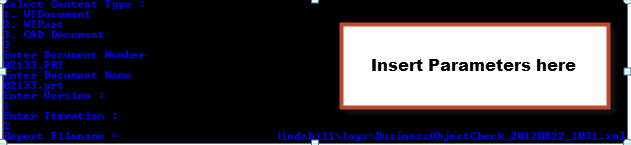
The tool will now output an XML file to the logs directory of whichever node you are on, if in a cluster.
The XML will show you the exact location on the vault of whatever file it is you needed.
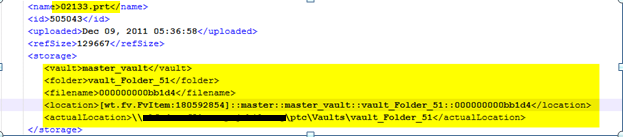
5. Go to the vault and find the file.


