
15-Moonstone
September 11, 2024
Question

How to add additional attribute options to the drop down list for advance search criteria windchill?

  • September 11, 2024
  • 1 reply
  • 1309 views

Version: Windchill 11.1


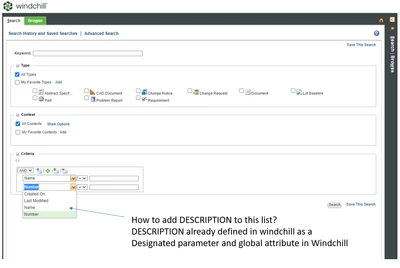
Use Case: I would like to search for Creo Parametric parts that have "bushing" included in the DESCRIPTION parameter in the part file that are stored in Windchill. The DESCRIPTION attribute hasn't been assigned to the Windchill advance search Criteria drop down list. How do I add it to the list?

Description:

I have multiple Creo Parametric parameters that are designated their global attributes have been defined in Windchill.

I would like to search for Creo Parametric parts that have "bushing" included in the DESCRIPTION parameter in the part file that are stored in Windchill. The DESCRIPTION attribute hasn't been assigned to the Windchill advance search Criteria drop down list. How do I add it to the list?

danders238_0-1726063884655.png

Thank you for any help you may provide,

Don A

1 reply

Fadel
23-Emerald I
September 11, 2024

Start by removing all types in the Search types and keep only CAD document type :

Fadel_0-1726064737559.png

if attribute stil missing we can debug further 


Buiꓘa
15-Moonstone
September 11, 2024

Hi Fede,


With the settings you suggested above, I'm not able to select the attributes from the drop down list.
If the Creo Parametric Parameter exists in windchill as a global attribute, should they be visible in the drop down list or do we need to go and modify a template to add them as options for the template drop down list?


Thanks for your help,

Don A

Fadel
23-Emerald I
September 12, 2024

would you take a look at  https://www.ptc.com/en/support/article/CS51485 , let me know if you need help with that 

Buiꓘa