12-Amethyst
January 19, 2024
Question

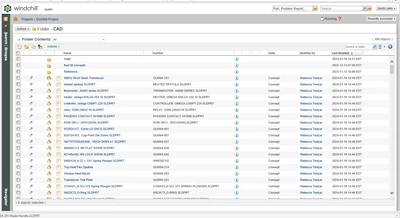
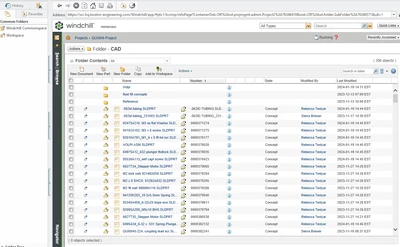
Missing "Open in Solidworks" icon from Project commonspace

  • January 19, 2024
  • 1 reply
  • 2557 views

We're running SW2022 with Windchill 11.01 M020 CPS23


One of our users has reported her "open in Solidworks" icon has disappear from  a Project commonspace.  It's present in Products, just not in Projects.  Anyone ever experience this?  The first pic is how it usually looks, the second is what it looks like now.  
 

MicrosoftTeams-image (11).png

MicrosoftTeams-image (10).png

1 reply

16-Pearl
January 19, 2024

Hello,


Try this.

  • Please add the solidworks file from projectlink in workspace.
  • Open that file.


After opening , return to project link folder. You might have "Open in Solidworks" action available.


Please let us know.


Thanks 


16-Pearl
January 22, 2024

Hi,

@MikeMarcoux @Ajit_Kulkarni 

I was thinking if the Workspace View "All" still has the column "Open in CAD"(Something like that). If the above method did not work, please check this what I mentioned.

I might have sounded silly., just thinking aloud.


Best Regards

Hari

12-Amethyst
January 22, 2024

Thanks Hari, 


We'll take a look.  It's an odd occurrence for sure.