
1-Visitor
May 17, 2017
Question

trying to figure out where attributes are stored in db tables

  • May 17, 2017
  • 1 reply
  • 6396 views

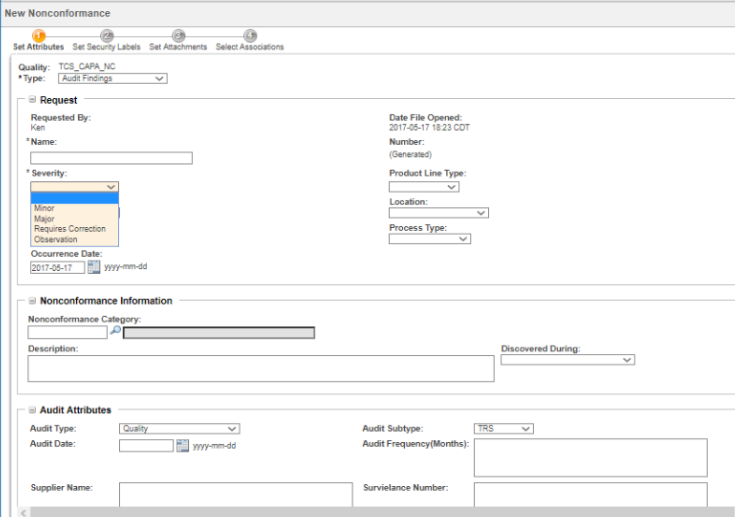
We are using windchill 11 with the quality management system extension.  Our current project involves developing a user interface to windchill using Thingworx.  I would like to be able to make calls into windchill database (oracle) and pull out attributes using the database connectivity extension in thingworx.  As an example shown in the image below (showing the creation of a Nonconformance page) I would like to pull in the values for Severity into a Thingworx Mashup list.  Does anyone know how I can determine what tables hold the various attributes that I am interested in?
Capture1999.PNG

1 reply

1-Visitor
May 18, 2017

Most of the information which you are looking for are stored in global attributes. You have to deal with 4 tables here

1. Type Information - from LWCTypeDefinition

2. GlobalDefinition tables - Depending on the type of the field the data will be in one of the tables.

·         BooleanDefinition

·         FloatDefinition 

·         IntegerDefinition

·         RatioDefinition

·         ReferenceDefinition

·         StringDefinition

·         TimestampDefinition

·         UnitDefinition

·         URLDefinition


3. Valuetables - For each global definition there is a corresponding value table

·         BooleanValue

·         FloatValue 

·         IntegerValue

·         RatioValue

·         ReferenceValue

·         StringValue

·         TimestampValue

·         UnitValue

·         URLValue

4. LWCIBAATTDefinition table - This is where the type specific iba is stored.

Now the joins

1. LWCTypeDefinition's ida2a2 = LWCIBAATTDefinition's ida3a5

2.  Definitiontable's ida2a2 = LWCIBAATTDefinition's ida3a7

3. Value table's ida3a6 = Definition table's ida2a2

It is a bit tough task if you have to write queries to extract all the information you see in the creation wizard.

I am not sure whether you already tried this option, since you are in WC11, you can use RESTful Webservice to make calls to Windchill to get object type and the iba's. Since PTC is heavily in to developing RESTful api access to their products, a solution developed around this will be optimal from a support and maintenance perspective.

https://support.ptc.com/appserver/cs/view/solution.jsp?n=CS204047&art_lang=en&posno=1&q=rest%20api&source=search

1-Visitor
May 19, 2017

Another option is to create a report with all the required attributes using report manager and call the report from Thingworx using Restful service. This is super easy. Thanks to James Paschetto‌ from PTC for this idea, he has built some really useful mashups in Thingworx.

First create a report in Windchill using Report Manager functionality. Take a note of the oid of the report template. In the below example I am using OOTB change request report and the report's oid is 67198.

Report_Template_-_All_Open_Change_Requests.png

Now if you call the rest service http://plmapp01.us.txxxx.com:80/Windchill/servlet/rest/reports/67198/results, it will return a JSON array with the list of attributes.

Swagger.png