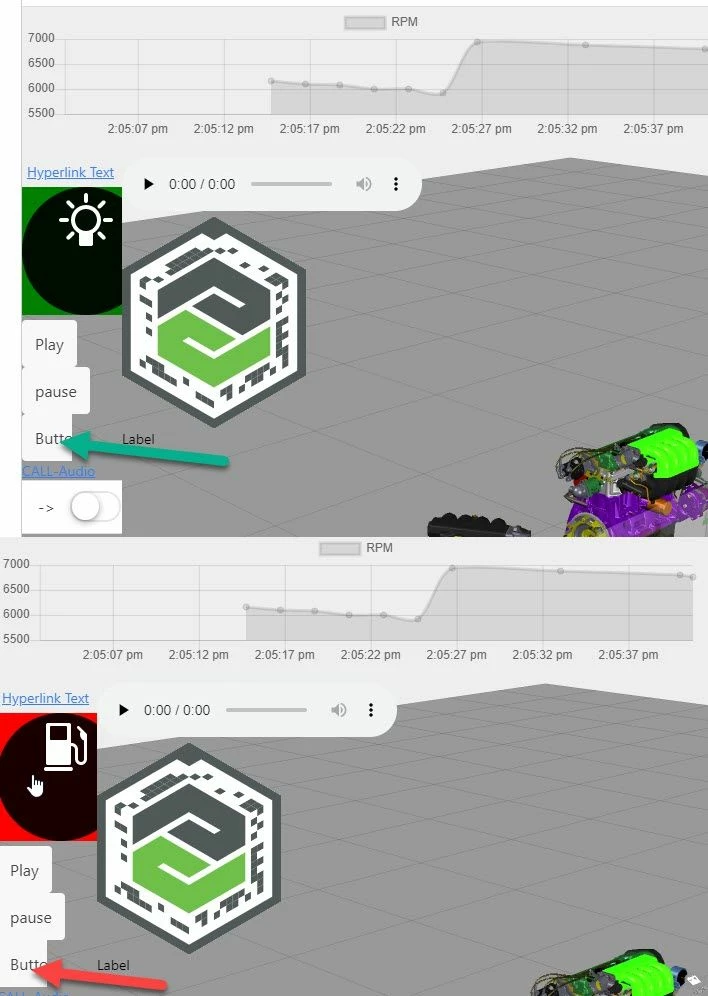
after further check I think I found a way how to set it.
Currently it seems that the default css definition in the system-wdiget-extension.css could be overriden only on load time when we use the default name for the definitons in the Application (app.css) :
...
.twxChalk {
 display: inline-block;
 text-decoration: none;
 color: #6dbd52; }
 .twxChalk a {
 text-decoration: none;
 color: #6dbd52; }
 .twxChalk.horizontal .twxChalkText {
 display: block;
 float: left;
 line-height: 48px;
 padding-left: 10px; }
 .twxChalk.horizontal .twxChalkIcon {
 float: left; }
 .twxChalk.vertical {
 text-align: center; }
 .twxChalk.vertical .twxChalkText {
 display: block;
 line-height: 18px;
 padding-top: 5px; }
 .twxChalk.vertical .twxChalkIcon {
 margin: 0 auto; }

.twxChalkIcon {
 background: url("../extensions/images/Chalk.svg");
 background-repeat: no-repeat;
 background-color: #6dbd52;
 background-position: center center;
 display: block;
 height: 48px;
 width: 48px; }
...
So means when we define in the Applicaiton (app.css) classes with the name twxChalkIcon or twxChalk this will override the current default properties. Setting a class property of the chalk widget will set/override at most the twxChalk but will do not have any effect for the Icon properties.
The only way I found is to ovrride particularly this defintion (.twxChalkIcon) on a runtime.
So, I created 2 files with the names:
style1.css
.twxChalkIcon {
 background: url('../Default/vu_lightbulb.svg');
 background-color: green;
 background-position: center center;
 display: block;
 height: 150px;
 width: 150px; }
}
and :
style2.css
.twxChalkIcon {
 background: url('../Default/vu_fuel-pump.svg');
 background-color: red;
 background-position: center center;
 display: block;
 height: 150px;
 width: 150px; }
}
Then copied the both files /uploaded them (style#.css) to the Upload resource folder (app/resources/Uploaded)
Then I used the following code for a definition of function which should be called from a button. The function will change the apperance of the widget Icon according to the definition of style#.css
$scope.ChalkButtonStatus=1
//--------------------------------------------------------
// call this function from button
//--------------------------------------------------------
$scope.testChalk= function()
{
if($scope.ChalkButtonStatus==1)
$scope.ChalkButtonStatus=2
else $scope.ChalkButtonStatus=1

 $scope.loadjscssfile("app/resources/Uploaded/style"+$scope.ChalkButtonStatus+".css", "css")
}
//--------------------------------------------------------
//this is utility function to load the style or javaScript
//--------------------------------------------------------
$scope.loadjscssfile= function(filename, filetype){
 if (filetype=="js"){ //if filename is a external JavaScript file
 var fileref=document.createElement('script')
 fileref.setAttribute("type","text/javascript")
 fileref.setAttribute("src", filename)
 }
 else if (filetype=="css"){ //if filename is an external CSS file
 var fileref=document.createElement("link")
 fileref.setAttribute("rel", "stylesheet")
 fileref.setAttribute("type", "text/css")
 fileref.setAttribute("href", filename)
 }
 if (typeof fileref!="undefined")
 document.getElementsByTagName("head")[0].appendChild(fileref)
}
so when we can test it in a demo project: