7-Bedrock
September 3, 2014
Question

Windchill 10.2 HTTP Server will not start.

  • September 3, 2014
  • 1 reply
  • 4821 views

Ok, I was here a few weeks ago with a problem with Windchill 10.2, and how it couldn't get it properly installed. I managed to get through that, get it installed and get it up and working.

Today, I went back to the Windchill server I built and noticed that it was not running. So I went through my startup process to get it running, and I noticed that for some reason my HTTP server will not start up with the rest of Windchill. The directory server Control Panel states that HTTP is Disabled.
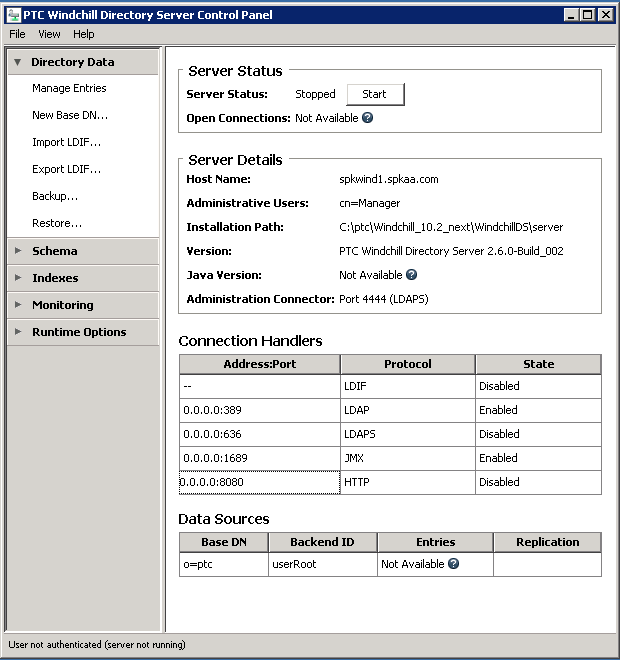
WindchillDS_NoHTTP.PNG

I have no idea what happened to this or why it isn't now working. I've skimmed though various log files and error files, but I haven't seen anything that looks like an error.

Any assistance would be greatly appreciated.

Regards,

Steve

1 reply

7-Bedrock
September 4, 2014

Okay, I found another thread that pretty much described my problem to a "T". The answer there was to run the following command:

"ant -f config.xml installService" from the <Windchill root folder>\HTTPServer

the first time I got "ant" is not recognized as an internal or external command....

Figuring this was a path problem I executed the following command:

<Windchill root folder>\Windchill\ant\bin\ant -f config.xml installService from the same directory as above

The script started off with an error "Unable to locate tools.jar. Expected to find it in C:\Program File\Java\jre7\lib\tools.jar

but other than that the script seemed to run to a successful conclusion:

BUILD SUCCESSFUL

Total time: 6 seconds

Unfortunately, that didn't seem to solve my problem. It didn't start up the HTTP server, and when I tried restarting the Windchill directory Server via the Control Panel, the HTTP server still did not come up.

Any advice would be greatly appreciated.


1-Visitor
September 5, 2014

Are you running these commands from a windchill shell? You should have them in the path. I have <Windchill>/bin; <Windchill>/ant/bin; <JAVA_HOME>/jre/bin; <JAVA_HOME>/bin; at the start of the path in a windchill shell. In my wt.properties I have "wt.env.JAVA_HOME=$(wt.jdk)" and "wt.jdk=<my java install dir>"