1-Visitor
April 18, 2020
Solved

Complex Air Duct Sweep Help

  • April 18, 2020
  • 5 replies
  • 12034 views

Hi Modelers,


Using Creo 4.


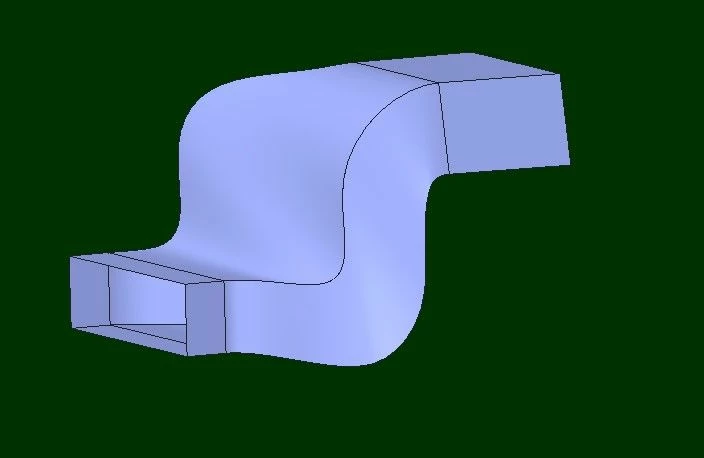
I am designing a complex air duct. The duct has two different inlet/out profiles, sweeps downward and moves right to left. There is an mid wall inside the duct which at the inlet end sits about a third to the left hand side and then finishes in the middle at the outlet.


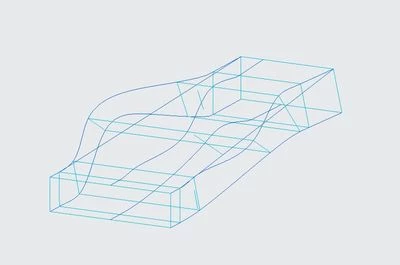
My design approach has been to complete a wire frame of reference sketches, datum points and splines to achieve the shape. I then use boundary blends to make up the different duct wall sections. I then merge the walls, thicken and remove the excess.
Capture1.JPG

Wire frame

Capture2.JPG

Boundary blends

Capture3.JPG

Thickened - Outlet End

Capture7.JPG

Rear Iso View - Inlet End


The challenge I face is to maintain a constant (or close to) smooth inner duct chamber profile on both sides. As air flows through each duct chamber the goal is for a stable airflow speed (little increase) and minimal pressure drop at the outlet. This is achieved by transitioning between the start/end profiles in a smooth fashion without collapsing the profile and keeping the cross sectional area as constant as possible.
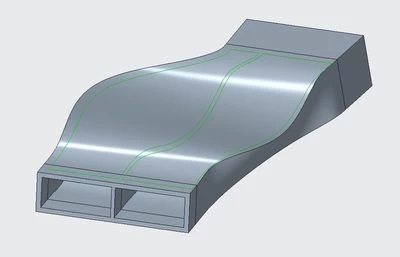
Capture8.JPG

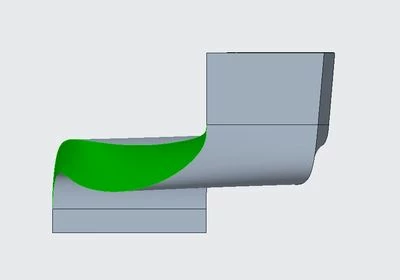
The green lines shown the internal chamber profiles. The main problem is here as they are not smooth.

Please note I am aware of the mid duct wall not looking right. This is an easy fix (tuning of datum points). Outside profile solution is the main issue.


The below views show the areas of the duct geometry which aren't controlled and have blown out.
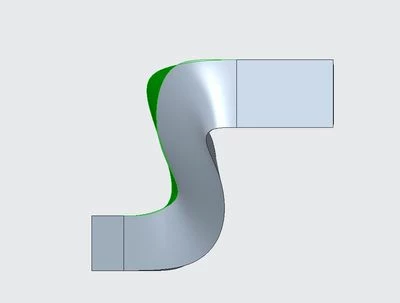
Capture4.JPG

Side Elevation

Capture5.JPG

Front Elevation

Capture6.JPG

Plan View


My questions:
1. This this the right modeling approach to tackle this part?
2. Or do I just need more reference sketches to control the sweep?

Appreciate anyone who can help.

File attached.

Cheers,

Ray

Best answer by BHOoi

I would say you should sketch out the path, "S" sections both on top and side. The intersection of these will  give you the 3D curve you need on the middle span. You can then sketch out the X-sections with reference to these 3D curves.


I attached an example  to illustrate the above approach using you existing end sections.

dduct.jpg


Hope this helps.


5 replies

16-Pearl
April 19, 2020

I just blend your sketched sections and this is the outcome:

duct.jpg

 The new features are grouped in "new" and new layers are with prefix "1-".

keaner1-VisitorAuthor
1-Visitor
April 19, 2020

Cheers BHOoi,


Thanks for spending your time looking at this, appreciate it.


I've gone through your model tree and like your approach. Way more simple.


My plan is to modify the reference sketches that make up the middle body of the duct and use your approach to blend the inlet and outlet portions.


I will share my results in a day or so.


One question. What was the relevance of making the two reference sketches 4 and 5? I didn't see them being used in your features.

Capture22.JPG

Cheers,


Ray

16-Pearl
April 20, 2020

ooos, I should have deleted those 2 secs. I wanted to use sweep and added those 2 sketches as its trajectories  but realised later simple blend is  easier in this case. Sorry for the confusion.

Patriot_1776
22-Sapphire II
April 21, 2020

Be aware that with Boundary Blends (or anything really), it's way too easy to OVER control it, and get ripples.  The rule of thumb is always use the least amount of sections and/or control curves.  I didn't add any intermediate sections and it's symmetric about the centerline, but one of the main tools of a Boundary Blend you didn't mention:  End Conditions.  When you use tangency, that's exactly ONLY what you get, but when you specify "Curvature" you can "Show Drag Handles" and push and pull on resultant surface to get what you want.  I've attached my quick "Duct" part, you can see from the "zebra" analysis that it's a very smooth transition.

Smoooooottttthhhhh....Smoooooottttthhhhh....

keaner1-VisitorAuthor
1-Visitor
April 22, 2020

Hi Frank,


Thanks for the tip and sharing your model.


Always good to see another approach and reasoning behind the method.


Very valuable.


Cheers,


Ray

Patriot_1776
22-Sapphire II
April 22, 2020

Did you get a chance to play with the drag handles?  If so what did you think?  That's a VERY powerful tool that you can use to get exactly the shape you want, smoothly, without over-constraining things and getting ripples.

Patriot_1776
22-Sapphire II
April 29, 2020

Smooooth.Smooooth.

Ok, I played with it a little using your file as a starting point.  First, I took your Boundary Blends and made them with the "Piece To Piece" option, which allowed me to immediately get the 2mm thickness with me changing the Absolute Accuracy to .01.  That cleaned it up, but, I wanted to do something better.  I still don't like the way Creo made it 3 different surfaces (down from the "Natural" option's 5) for the quilt.  So, I created all 4 surfaces so large that they always extended the extents of any other quilt.  This made the quilts all one single surface.  Then it was just a matter of merging them.  If you do a "zebra" surface analysis you'll see you're not going to get smoother surfaces.  Sorry, I did delete some of your features further down the model tree before I thought you might need them later for something else.  The surface came out a little wonky on the inlet end because of that weird trapezoid surface (no surprise) so I extended then trimmed it after the thicken.  My features are all labeled and my surfaces are purple.


Is there going to be a CFD (flow) analysis done?  MY advice would be so make sure the surfaces do not double back on themselves ("S") if you can, and make your most abrupt turns on the inlet side so you can make the turns on the outlet side as smooth as possible.  You need time and distance to smooth out airflow, and the outlet end is the place to do it.  The perfect SUB-sonic shape is a raindrop because basically only surface tension, gravity, and aerodynamics are working on the shape to allow it to fall to earth as fast as possible.  Aerodynamically, it's more important to "close" the airflow over an object than it is to part it.  That's why raindrops are pretty blunt from the from to the maximum diameter, but have a long tail (like a LeMans race car), so there's time to close the airflow down.  Same thing when air is flowing INSIDE and object rather than OVER it.  Smoothing it at the end is most important.


Good luck, let us know how it works out (I'm curious), and I don't know if you can mark more than one post as the solution, but if not, you could "Kudo" it for me if you please.  It seems there's a ton of interest in this thread, but not a lot of comments.  Interesting...


Frank

Patriot_1776
22-Sapphire II
April 29, 2020

On second thought, perhaps an exaggerated "S" MIGHT work better (if space/clearance permits) for smooth flow because it would give the airflow a longer distance/time to straighten itself out.  Hmmmm...  A CFD analysis would be able to tell.


Also, one thing we did at the exit of the plenum and before the start of the area where the models were placed in the 'tunnel, was there was a square grid that the airflow had to go through in order to straighten it out.  A separate plastic piece with a square or even hex pattern places in the outlet would be a simple solution.  You could even make all the bars a raindrop cross-section with the pointed end facing out and that would help.  Yes, there would be a little restriction (not too much for a raindrop shape), but if the ultimate goal is turbulence-free airflow, it might be worth it.  Looks like this is for a car HVAC system.

keaner1-VisitorAuthor
1-Visitor
April 29, 2020

You're a smart cookie Frank 🙂


Correct an exaggerated "S" is where the next CFD cut got us. This shape (below) allows the air increased time to straighten and deliver more uniformly upon existing.


20200423_duct_side_elevation.jpg

Challenge now is trying to model this in Creo. Other duct sizes are required in future. So a controllable 'family table' part would be the desired outcome. The other option is to import from the CFD. I have imported the CFD STEP model into Creo. It needed a little repair before I could solidify, but it worked. 


On adding a diffuser section part. I like this idea, but fear a pressure drop. It's all about the trade offs and what desired outcome you require.


Cheers,


Ray

Patriot_1776
22-Sapphire II
May 6, 2020

Well, this has been fun.  Learned a few new tricks, thanks Ray!

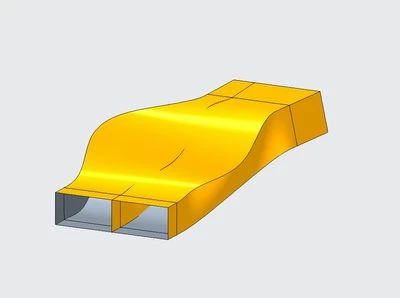
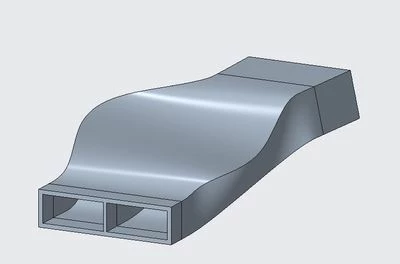
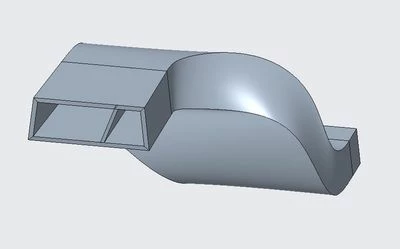
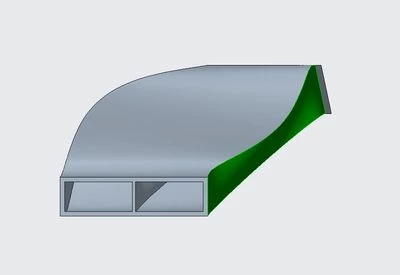
FS-MOD3_864976_DUCT_A_ISO-01.jpgFS-MOD3_864976_DUCT_A_ISO-02.jpgFS-MOD3_864976_DUCT_A_TOP-01.jpgFS-MOD3_864976_DUCT_A_ROTATED_RIGHT-01.jpg

Patriot_1776
22-Sapphire II
May 6, 2020

This makes me want to do one for fun where the outlet end is twisted a little but still parallel to the inlet.  Then maybe.....  😉

Patriot_1776
22-Sapphire II
May 8, 2020

Man, this center rib was a PITA to get a nice consistent 2mm thickness and not violate the outer surfaces, especially since the rib was severely offset on the inlet end AND twisted.