1-Visitor
July 1, 2019
Solved

Datum curve will not draw at real bounds of arccos(x)

  • July 1, 2019
  • 4 replies
  • 3916 views

I am modelling the nose cone of a rocket (Haack series) whose shape is described by the following equations:
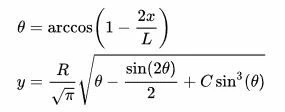
haack_series_equation.JPG

Where:

  • C = 0
  • R = 49     (R is the radius of the cone)
  • L = 560    (L is the full length of the cone)

I've used a datum curve defined by the equation in order to do a revolved extrusion. The problem is that the curve will fail to generate if I set the domain of x to draw over the full length of the cone 0 x 560 .

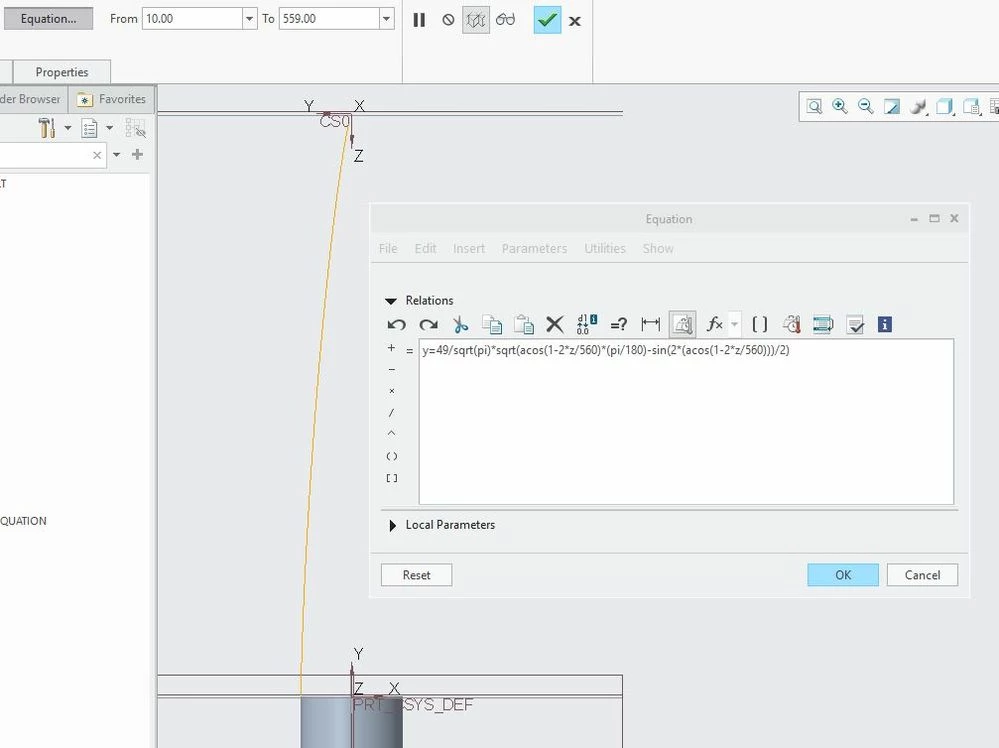
Creo will only generate the curve over 10 x 559 .

 partial_datumcurve.JPG

Seems like the first equation is the source of the problem because you cannot have arccos(x) for x > 1 or x < -1.0 without getting complex numbers and even just getting x close to those numbers seems to make Creo cry.


What can I do to get the curve to draw over the entire length?

I tried bashing my face against the keyboard but, that didn't work.

Best answer by KenFarley

Usually when I'm having troubles with this kind of thing I find it easier to debug if I just make a quick relation, so I can see the actual value that's being generated. I made a quick spreadsheet to show the values for x and y using the equations you defined, and they look nice. Then, I made the following relations to plug in values for "xValue" to see what "yValue" is calculated.

L = 560
R = 49
xvalue = 1
theta = acos ( 1 - ( 2 * xvalue / L ) )
yvalue = ( R / sqrt ( PI ) ) * sqrt ( ( acos ( 1 - ( 2 * xvalue / L ) ) ) * pi / 180 - sin ( 2 * acos ( 1 - ( 2 * xvalue / L ) ) ) / 2 )

The values agree, no problems calculating y(x=0) = 0, y(x=1) = 0.554451, etc.

When I define a curve using the exact same equation, setting the "t" value to a range of 0.0 to 560.0

x = t
y = ( R / sqrt ( PI ) ) * sqrt ( ( acos ( 1 - ( 2 * t / L ) ) ) * pi / 180 - sin ( 2 * acos ( 1 - ( 2 * t / L ) ) ) / 2 )
z = 0.0

I get a nice nosecone shape, agreeing with the excel results. Perhaps you are missing a parenthesis or some such? I tend to be overly cautious with them in Creo.


<EDIT>

Looking at it again, I notice your equation has "z" where I have the "t"? Could that be what is causing your troubles?  The "t" value is the parameter whose range you are setting along the curve...

4 replies

KenFarley
KenFarley21-Topaz IIAnswer
21-Topaz II
July 1, 2019

Usually when I'm having troubles with this kind of thing I find it easier to debug if I just make a quick relation, so I can see the actual value that's being generated. I made a quick spreadsheet to show the values for x and y using the equations you defined, and they look nice. Then, I made the following relations to plug in values for "xValue" to see what "yValue" is calculated.

L = 560
R = 49
xvalue = 1
theta = acos ( 1 - ( 2 * xvalue / L ) )
yvalue = ( R / sqrt ( PI ) ) * sqrt ( ( acos ( 1 - ( 2 * xvalue / L ) ) ) * pi / 180 - sin ( 2 * acos ( 1 - ( 2 * xvalue / L ) ) ) / 2 )

The values agree, no problems calculating y(x=0) = 0, y(x=1) = 0.554451, etc.

When I define a curve using the exact same equation, setting the "t" value to a range of 0.0 to 560.0

x = t
y = ( R / sqrt ( PI ) ) * sqrt ( ( acos ( 1 - ( 2 * t / L ) ) ) * pi / 180 - sin ( 2 * acos ( 1 - ( 2 * t / L ) ) ) / 2 )
z = 0.0

I get a nice nosecone shape, agreeing with the excel results. Perhaps you are missing a parenthesis or some such? I tend to be overly cautious with them in Creo.


<EDIT>

Looking at it again, I notice your equation has "z" where I have the "t"? Could that be what is causing your troubles?  The "t" value is the parameter whose range you are setting along the curve...

UrsaMajor1-VisitorAuthor
1-Visitor
July 24, 2019

Double post. Sorry. See below.

tbraxton
22-Sapphire II
22-Sapphire II
July 1, 2019

I would agree that having an interactive plot (e.g. Excel graph) of the function to refer to while creating the curve can be helpful for debugging. If you know what it should be yielding in Creo then perhaps you can follow this approach to aid in writing what become lengthy equations in text format which can get difficult to track order of operations.


This definition of the curve relations gives a shape that looks like a nosecone. I just broke down some of the terms for y(x) and defined them as stand alone variables (q1, q2, q3) which are then used to write y(x) more readily.

Note this is the general form of the equation you referred to (includes evaluation of non zero values for C).

Curve relations to follow:


R=49
L=560
C=0

x=t

/*convert to rad in y(x)
theta=acos(1-(2*x/L))

/* define terms used in Y equation
q1=R/sqrt(pi)
q2=sin(2*theta)/2
q3=(sin(theta))^3

y=q1*(sqrt(theta*pi/180-q2+C*q3))

/* Define planar curve
z=0


CFE Nose.jpg

24-Ruby III
July 2, 2019

Hi,

just a couple of notes ...

y=49/sgrt(pi)*sgrt(acos(1-2*z/560)*(pi/180)-sin(acos(1-2*z/560)))/2)

  • instead of z variable use t variable
  • y definition is wrong ... /2) at the end is incorrect ... see picture below

zavorky.png

Patriot_1776
22-Sapphire II
July 3, 2019

A Von Karman, Tangent Ogive, or Secant Ogive isn't good enough for you?  Sheesh...  🙂