12-Amethyst
January 6, 2025
Solved

helical groove which returns to origin

  • January 6, 2025
  • 5 replies
  • 1300 views

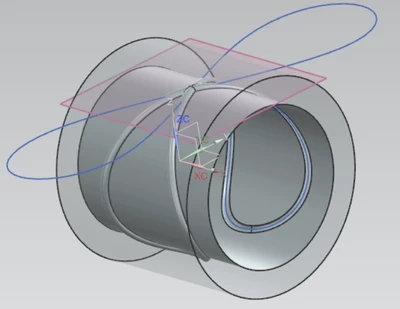
I want to create a groove around the internal bore of a component, for an oil groove, the drawing dimensions show the start and end points as the same, so a continuous loop, but the groove moves along a helical sweep to its position 180 degrees from start, then returns to the origin.  Ive been looking at curves from equations to create the sweep profile, but struggling.  Attached a pic of the groove.

Best answer by tbraxton

If you want to use curve from equation functionality then this pic shows one approach. Generate a planar parametric curve using equation and then wrap it on the cylinder to get the sweep trajectory. You will likely need to use at least two sweep trajectories if there are intersections when you actually cut the solid. You will subdivide the wrapped trajectory curve so that it works as a valid sweep trajectory for two sweeps for the geometry shown here. There is also the issue of Creo splitting circles/cylinders so pay attention to that when wrapping the planar curve.


tbraxton_0-1736181879852.png


5 replies

tbraxton
22-Sapphire II
22-Sapphire II
January 6, 2025

Check out this previous thread for creating oil grooves.

Solved: FIGURE 8 OIL GROOVE - PTC Community

tbraxton
22-Sapphire II
tbraxton22-Sapphire IIAnswer
22-Sapphire II
January 6, 2025

If you want to use curve from equation functionality then this pic shows one approach. Generate a planar parametric curve using equation and then wrap it on the cylinder to get the sweep trajectory. You will likely need to use at least two sweep trajectories if there are intersections when you actually cut the solid. You will subdivide the wrapped trajectory curve so that it works as a valid sweep trajectory for two sweeps for the geometry shown here. There is also the issue of Creo splitting circles/cylinders so pay attention to that when wrapping the planar curve.


tbraxton_0-1736181879852.png


kdirth
21-Topaz I
21-Topaz I
January 6, 2025

Wrapping a curve would be the easiest way to create the path.


Measure the circumference, create a wrap using the measurement for the length, and sweep a cut.


kdirth_0-1736183592076.png

There is always more to learn.
Patriot_1776
22-Sapphire II
January 6, 2025

It actually looks like it could simply be planar, and where the tilted plane intersects the inside cylinder wall, that's your trajectory.  Some bearings use more advanced grooves like others have shown, but from the picture you posted, it looks planar to me, just on a compound angle.


Best of luck!

Community Moderator
January 27, 2025

Hi @stu-aspinall,


I wanted to see if you got the help you needed.

If so, please mark the appropriate reply as the Accepted Solution. It will help other members who may have the same question.
Of course, if you have more to share on your issue, please pursue the conversation. 


Thanks,
Anurag