1-Visitor
October 24, 2019
Question

How to Sweep this

  • October 24, 2019
  • 6 replies
  • 14267 views

Hello Masters Creo Modelers,


Here in CREO 2.0 M080 ...

In the many topics about Sweeping, i have never found Sweep so straight and short ! ! !


After many tries with Sweep or Sweep Blend, there's not a good surface created by these functions.

I manage to create something with Boundary Blend but it is not enough smooth as I want.


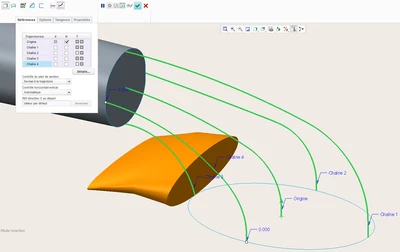
This is the base of the problem. Sweep the ellipse (5x3.5) to the face of the solid !
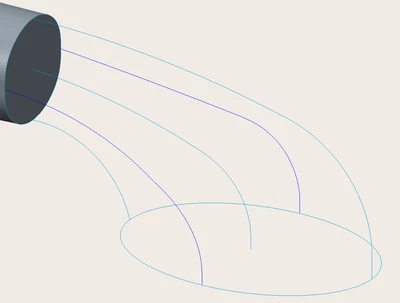
Sweep_Base Lines.PNG

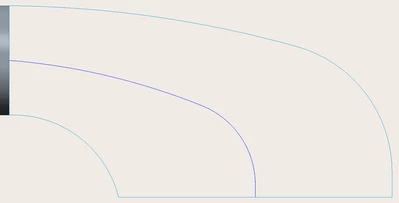
Sweep_Base Lines_Side View.PNG

Even if I create the section just after the selection of the normal trajectory.

Creo don't want to make the intention modeling.
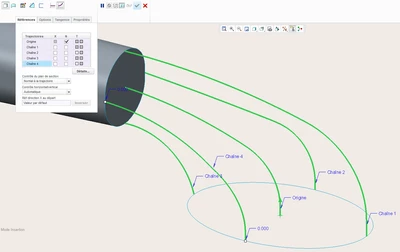
Sweep_Trajectories.PNG Sweep_Trajectories + Sections_Preview Model.PNG


and it reworks the section has you can see ! 


Does anyone think HE CAN manage to make this modeling ? ?


THANKS FOR YOUR HELP ! !

6 replies

tbraxton
22-Sapphire II
22-Sapphire II
October 24, 2019

In the context of the construction geometry you have shared I would suggest using a variable section sweep. Using the trajectories shown in your picture. If you constrain the sketch  to the trajectories to maintain your design intent it should work.


There are other methods that could create this but without the context of design intent you may not get the most relevant suggestions.

kdirth
21-Topaz I
21-Topaz I
October 24, 2019

Don't know exactly the output you are looking for.  Following 5 curves is difficult.  The result probably would not be circular in the middle.


A swept blend would give a nice result if it fits your needs.  Here is an example:

pipe.jpg

I had to manually divide the end sketch to get the arcs to line up correctly and made the result tangent at one end and perpendicular at the second.

There is always more to learn.
Patriot_1776
22-Sapphire II
October 24, 2019

You're trying to control it with too many trajectories.  This would probably be best done with a boundary blend with just the circular edge of the tube and the elliptical curve, with a curvature continuous (if possible, if not use tangent) condition used on the "tube" end, and a normal condition used on the curve end.  It appears that you care more about the cross-section at both ends, and not so much about what goes on in the middle as long as the surface is smooth, and the above method would give you exactly that.  Also, you can adjust the parameters for the curvature and normal conditions by varying the value or enabling the drag handles.

1-Visitor
October 25, 2019

Thanks for giving your comments, tbraxtonkdirthFrankSSchiavone


So find here what I have at the beginning !

Sweep_Base Lines_Originals-1.PNGSweep_Base Lines_Originals-TopView.PNG

As you can see, it is not juste a circle at the end of the solid.

And in side view (first message) the lower curve doesn't arrived normal to the plane of the ellipse.

The long curve is made of line ┴ to ellipse plane + arc tangent + arc tangent ┴ to the solid.


@ tbraxton

With Variable Section Sweep, even if i select one of the 3 planes for Direction X or check X to the second trajectories (the lower curve) on the list, or begin on the solid face :

the creation section appears like this !

It is not on the ellipse plane or on the solid face.

VaraibleSectionSweep_SectionCreation.PNG

so it will give the same result preview as shown on the first message.


@ kdirth

With Swept Blend, the trajectories and the sections have the same number of elements (the lower curve was divided in 3), the ends still in free :

the function doesn't show a preview ... so it means it is impossible.

Swept Blend.PNG


@ FrankSSchiavone

With Boundary Blend and simple curves like ellipse to circle and 2 ellipse as trajectories arriving normal to ellipse plane and circle plane, let me go the end of the creation and obtain the solid.

Boundary Blend_EllipseToCircle_2.PNG

Boundary Blend_EllipseToCircle_1.PNG

But as I said on the first message, the first boundary I make with too many section also on the middle lets make the surface ... but don't want to solidify.


I think the difficulty comes near the lower curve that doesn't arrive normal to the ellipse plane.

One colleague I have meet and many posts or tutos tell that Variable Section Sweep was the best way but here the issue seems hard to solve.

tbraxton
22-Sapphire II
22-Sapphire II
October 25, 2019

See this picture for something to try using VSS. Create a curve along the center of the section as it will be swept between the proximal and distal ends of the sweep.

I could tell you more if I had them model to look at. If you do post the model it must be in Creo4 or earlier for me to open it.


VSS setup1.jpg

1-Visitor
October 25, 2019

Here you have the original and it comes from CREO 2.0

Patriot_1776
22-Sapphire II
October 28, 2019

Not having your actual geometry, I eyeballed it.  Using both loops as-is resulted in a weird "pinched" area on the bottom inside surface, leading me to add more control to stop that.  I made one B/B (boundary blend) surface from the vertical centerline plane of the part, assigned continuous conditions to the ends, and normal conditions to the Front datum, then simply mirrored and then merged it.  I didn't bother making a solid.

What I did that was a little trick I learned, was that I could have used a datum curve on the Front datum and simply assigned a curvature continuous on both ends.  But I don't like that because you can't specify HOW "continuous" it is.  That's why, I added features 12 thru 15.  This way, I can add a B/B to use as a edge and use the extruded layout surfaces to be continuous to, and use the drag handles (Constraints tab, "Display Drag Handles") to pull the shape into what I want, something you CAN'T do with a simple datum curve.  I use this technique a lot when I want more control.  I could have cleaned it up more in the area of the solid itself, but I think this illustrates the point.


BOUNDARY BLEND.jpg

1-Visitor
October 29, 2019

Hi FrankSSchiavone,


With basics curves like arc and ellipse the function works quite easily !

You don't see the original model sent in a message to tbraxton..... to work and try with the right problem.


I will still in the firts idea since my beginning despite of the recommandation of one colleague (but i couldn't see the file, he's working currently with CATIA) .... i think BoundaryBlend is the best choice in this case.

tbraxton also think the same !!


Thanks for your answer


🙂 do you apply a little touch of Render Studio 🙂

Patriot_1776
22-Sapphire II
October 29, 2019

Dunno what kind of file that was, but I tried to open it and couldn't.  The technique I attached in the other post should work regardless.  I'm on Creo 3 so if you're on 2 you won't be able to open it.

Patriot_1776
22-Sapphire II
October 30, 2019

Anyone else able to open my file and see what I did?

kdirth
21-Topaz I
21-Topaz I
October 30, 2019

Works for me in Creo 4.0

There is always more to learn.
Patriot_1776
22-Sapphire II
October 30, 2019

Cool.  Any of that look interesting to ya?  The small center section in the ellipse could be made bigger to adjust the look, and as I mentioned the drag handles for the extruded surfaces as well as the BB surf can be pulled to adjust shape as well.