17-Peridot
February 25, 2014
Question

I'm getting tired of this! - helical sweep failures.

  • February 25, 2014
  • 4 replies
  • 12331 views

I finally open a case on this after yesterdays threaded rod discussion.


I opened up a case on this because it doesn't make sense that we have to jump through hoops to get a thread complete on a shaft using helical sweep. This should be a simple one-button command and all too often it fails. All kinds of "solution" are provided here on the forum and the Pro|WorkAround feature, but a useful explanation still escapes us.


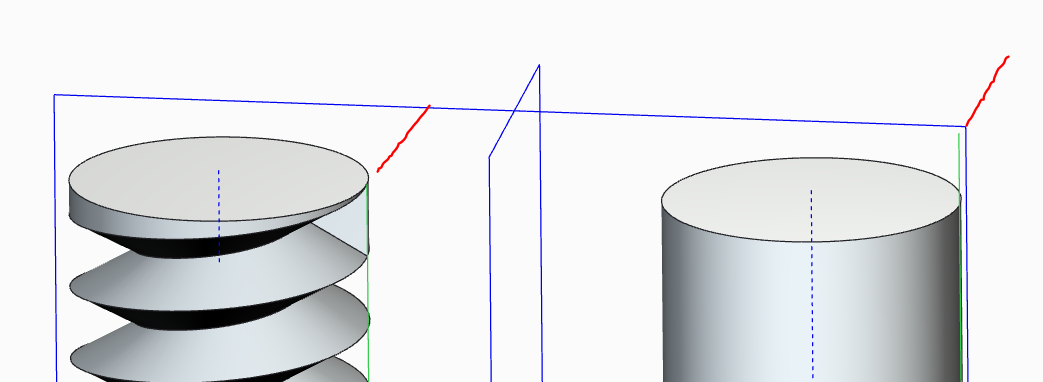
The problem is a helical sweep where the "theoretical" thread cut as a perfect triangle (60/60/60) where the legs are equal to the thread's pitch.


Seems simple enough, right? Reasonable request that you can run that cut feature right off the end of the part, right?


Excusses aside... there is no reason for this feature to fail. And it doesn't fail if you stop short of the end.
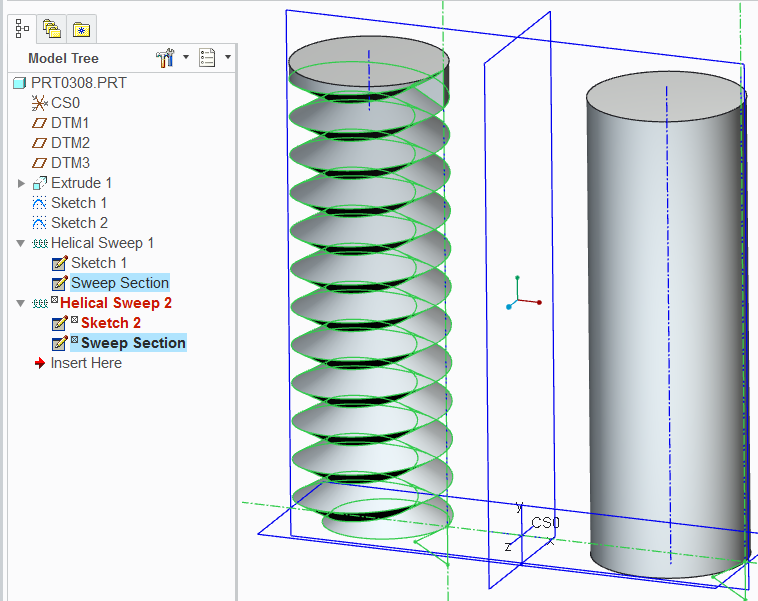
 

helical_sweep1.PNG


The rod is 1" and the pitch is .25. The sketch is tangent both to the surface and the edges are "sharp". Most of us think this simply cannot be done... but obviously it can, just not the way we need it to in 95% of use-cases.
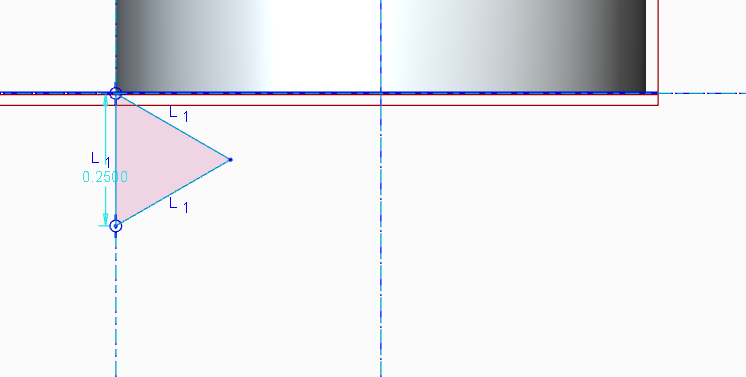
 

helical_sweep2.PNG


This is the only difference:


helical_sweep3.PNG


And if you don't use the remove material option:
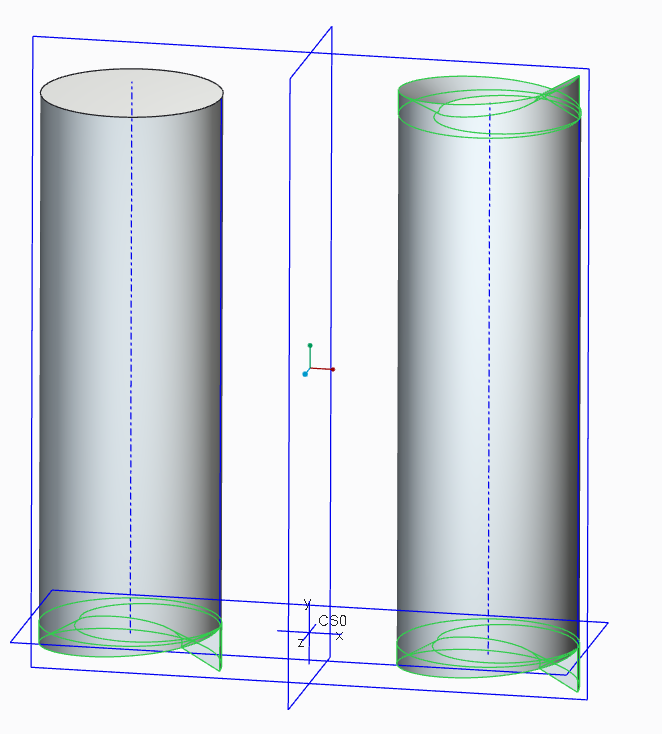
 

helical_sweep4.PNG

Post your experience with this. We need this fixed if it hasn't been already. I'm still on Creo 2.0 M040.


I will update this post when I receive input from customer service.


{steps off soapbox}

4 replies

1-Visitor
February 25, 2014

This is why real threads have a flat or round on the thread crest instead of a sharp edge. The sharp ones fail.

Patriot_1776
22-Sapphire II
February 25, 2014

I feel your pain. I'd found that the helical sweep definately has it's limitations. What I usually did, if I used it at all, was make sure the section was normal to the axis (actually how the thread angle is measured), and made it a surface that extended slightly beyone the solid. No matter if the surface self-intersected, but I found that was causing a lot (pretty much all) of the failures if it was a SOLID cut. The solid self-intersected and failed. Then I used the surface to remove material. I found that seemed the most robust way. Once I started doing that, I had very few failures.

Best of luck!

@David. Yup. there's even a controlled root-radius thread, UNJF class, if I remember, for highly-stressed environments. And, also, even if you could actually get a cutting tool with a true sharp point, a couple turns of removing material and it'll soon have a radius......

17-Peridot
February 26, 2014

I actually do work with suppliers that create threads with a pointy bit (like a triangle flag) in the mill. They use it to cut very small, shallow, blind bottom threads in alloyed Ti. If you get the feed and speed just right in Ti, the tools actually wear quite well.

All fundamentals aside, you should be able to follow up this feature with a root diameter extrusion or sweep and an actual OD cut to trim off the points.

All too often I find myself trying to do a thread that I want properly mated in sections only to have to tweak the rotation of the part to get a good section. This should be easy to do with the basic numbers. When you have to "adjust" for the software's inadequacies, the sections become needlessly more complex. I don't do this for production stuff, but presentation invariably call for such detail.

17-Peridot
February 27, 2014

SPR 2213452 has been files with PTC R&D for further investigation.

Patriot_1776
22-Sapphire II
February 27, 2014

Check your personal e-mail.

17-Peridot
February 27, 2014

I forgot that I can make the guide surface (edge) using the helical sweep.

You got me pretty much seasoned on VSS

Wouldn't it be nice if we could just create curves directly with just a point feature in the sketch.

I quess that should be posted as an idea, huh

17-Peridot
March 3, 2014

Update: Today I got the engineering response tied to other SPRs where this issue is obviously a long time "excuse". The response pretty much said I was lucky it worked at all.

The Pro|WorkAround solution is to make 2 helical sweeps with half the cut. LAME!

I am pushing support to dig deeper but with this much pushback to many, MANY! users in the past, it may just be beyond their capability to care.

For further reading: https://www.ptc.com/appserver/cs/view/solution.jsp?n=CS110958 (if you have access to these)

So why does this work if you use a sweep along a guide creating exactly the same geometry? I think it is high time for this to work. I know the few of us have little clout to ge tthis resolved. Is anyone here part of the larger customer base that is willing to -demand- better performance int he core product?

1-Visitor
March 4, 2014

"So why does this work if you use a sweep along a guide creating exactly the same geometry?"

Because it isn't creating exactly the same geometry. It is only very similar, but not the same.

It probably works better with a sweep the same way general patterns fail less often than identical ones for geometry reasons. A sweep is probably slower with better error handling.

If PTC can't handle Generic -> Family Table Entry -> Material -> Appearance, which is simple book-keeping, PTC won't be changing geometry generation and the underlying difficulty of solution accuracy any time soon.

17-Peridot
March 4, 2014

It is certainly the same within the relative tolerance range. Every measure is identical to the Nth degree.