
10-Marble
January 27, 2017
Question

Rectangular helical sweep feature

  • January 27, 2017
  • 12 replies
  • 21896 views

Hello out there,

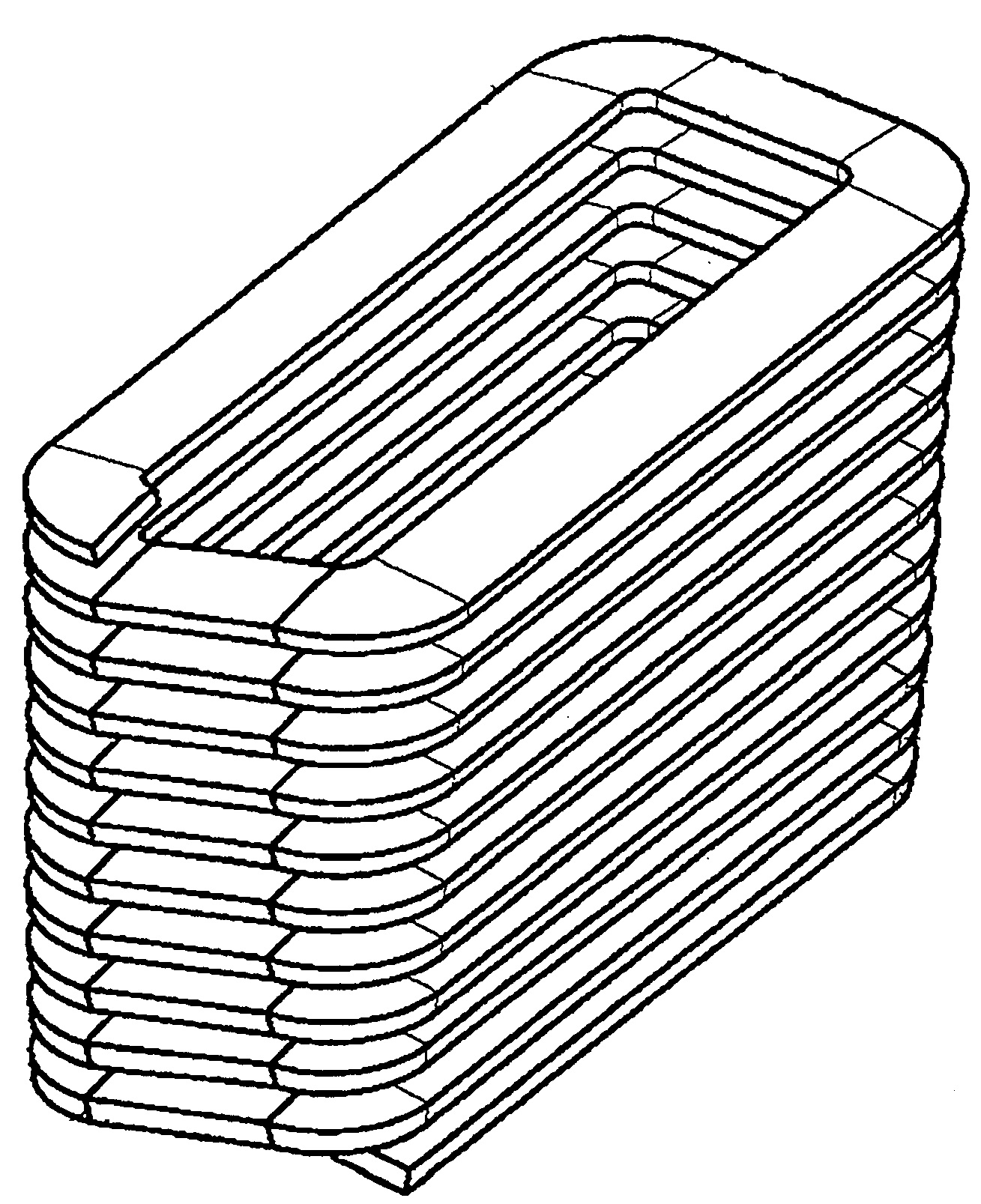
is there anybody out there who knows how to create a rectangular helical sweep Feature, as in the shown black and white Picture?
Rectangular helical sweep feature.jpg

I tried my best to get a solution, but it is not to be used. The gradient is somehow not constant in the red area to the blue area. The reason is the great difference between the inner radius and the outer radius. If the shape of the required rectangle increases, or edge lengths are the same length (quadrangle). Then the slope becomes more linear.
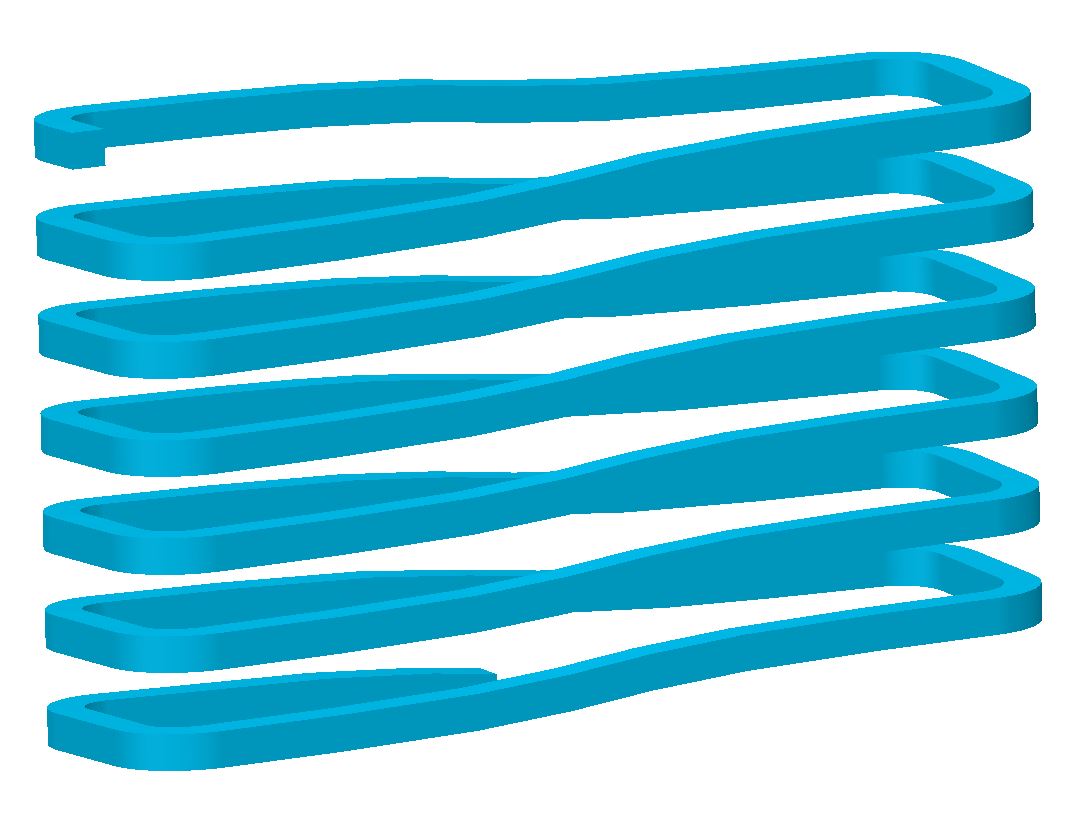
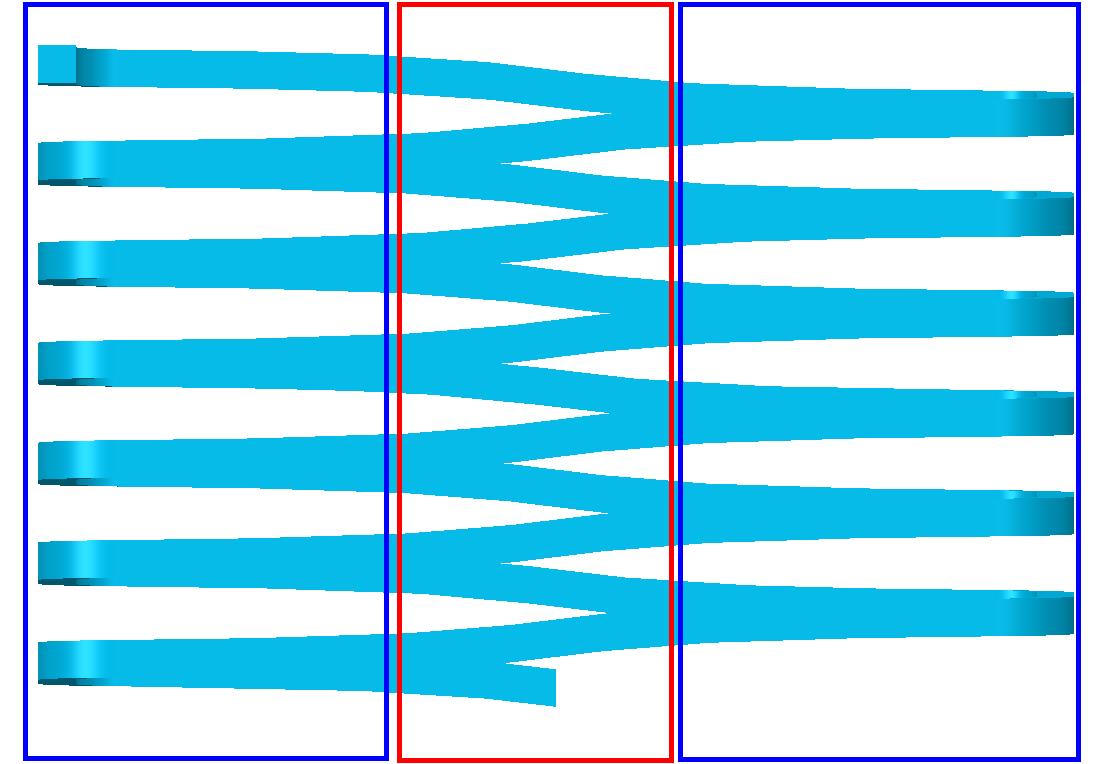
Rectangular helical sweep feature_I.jpgRectangular helical sweep feature_II.jpg

Is there any help out there?

Thanks Heiko

12 replies

1-Visitor
January 27, 2017

How about using the wrapped sketch, like this:

rectangular_helical_wrap_sweep.png+

hhagedorn10-MarbleAuthor
10-Marble
February 1, 2017

Paul Sobejko

Thank you for your also interesting solution (wrapped sketch) about my question.

Other views are always interesting.

  • But what I miss however is the possibility to specify the slope.
  • In addition, I find it not good that the Spin Center is no longer in the actual body center. This is beddened by the very long curve.

But again, thanks for your idea.

That's why I did a little Research to get a good solution. And here I need help again to have a solution ready for posterity.

Here I compiled a graph with an offset curve and a pattern. So far so good, .... it works mostly but not constant.

The curve in combination with the graph works very well. The Problem is the sweep Construction element.

Sometimes it works and sometimes not. If you change the profil in the sketcher or the pitch. Then the sweep fails

Could you have a look (or somebody else) on this, maybe you know why and what i did wrong about this Position??

Thanks in advance.

Bild1.jpg

1-Visitor
February 1, 2017

Unfortunately, I did a quick test and the wrap method will produce a consistent sweep.

Honestly, I'm not surprised that a sweep based on patterning copy-geometry type of features fails inconsistently.  I attribute this to poor numerical-error handling deep in the software.

Your first concern about not being able to specify the pitch can be addressed with some relations.  Note that the sketch to be wrapped is a simple line that starts at origin and ends at coordinates x,y.

So x = (number of wraps)*("perimeter" of the surface being wrapped)

and y = (number of wraps)*(pitch)

You get this perimeter by saving a length analysis.

graph_spirale.png

But I completely see your concern about how the sketch that needs to be wrapped around the surface throws off the spin-center of the model.

It is a very frustrating aspect of modeling and drawing in Creo software, because blanking such "construction" entities has no effect.

2-Explorer
February 1, 2017

Hello Heiko Hagedorn

see following video tutorial, maybe it can help:

Blog - Creo Tutorials | 4K Side

Regards

Milan Bonka

hhagedorn10-MarbleAuthor
10-Marble
February 1, 2017

Milan Bonka

thanks for your answer, it is also a nice version to get a helical sweep.

But does not solve my Problem, ..... unfortunately.

Your solution (YouTube Video) to get a helical sweep, is similar to the Feature "Helical sweep" under the Sweep Button.

There i get a very strange 3D curve, see in the first posting and with the YouTube solution:

trajpar_01.jpgtrajpar_02.jpg

The 3D curve isn't the Problem, this works with my "graph" solution very well. It is only the sweep who makes problems and isn't very stable.

sooooo it means, .... is there still any help out there?

1-Visitor
February 1, 2017

Your black and white picture is not a helical sweep. It is a series of horizontal segments with a sloped step. This would better be done by creating the sloped step, then a related horizontal segment and then patterning the sloped step and ref-patterning the horizontal segment.

17-Peridot
February 2, 2017

Glad someone noticed.  Make one revolution using evalgraph, then pattern. Done.

hhagedorn10-MarbleAuthor
10-Marble
February 9, 2017

Antonius Dirriwachter

sorry for the late reply and thank you for your comment.

Could you give me more Information about using the evalgraph?

Maybe could you create a fast creo model?

Regards Heiko

1-Visitor
February 9, 2017

Attached is an example of how to do this using evalgraph.  After you have setup a graph, you setup the relation in the section for the sweep.  I have also set a relation at the part level to set the pattern distance to equal the value set by the graph.

hhagedorn10-MarbleAuthor
10-Marble
February 10, 2017

Hello to all,

first of all thanks for all that help here!!!! Even there is still no perfect solution yet.

Antonius Dirriwachter‌ thanks for your explanation about how is a evalgraph working.

I think I have understood the function with the evalgraph and the trajpar. As far as I can tell. "I'm still a rookie about this"

, I tried to understand the example what you have attached. So far so good. But your example has one serious error.

The slope consists of 2 Sweep's and not one. AND the blue Sweep is completely flat along the curve. Only the green sweep has the slope.

evalgraph_trajpar.jpg

After this diagnosis I tried to use one curve (Skizze 1) where the profile is pulled along. But this only works when the start and end of the curve have a minimum distance.

curve_distance.JPG

However, this is technically wrong. It must be closed and only separated in one place.In order for the following curve (patterned) to be combined with the original curve. And no intermediate piece has to be patched.

>> However, if the curve is closed and only separated at one point, the sweep will fail. << I'm getting confused.

Still waiting for a good solution.

1-Visitor
February 10, 2017

Correct, I set it up as 2 sweeps, a flat section and a sloped section, as is shown in the black and white image you attached. If you're trying to do it as a constant slope it's the same process.  Attached is one with a constant slope.

1-Visitor
February 10, 2017

I used a normal sweep together with trajpar it should give the required geometry. to my suprrise the sweep feature in Creo 2 doesn't allow closed curves having a trajpar parameter

17-Peridot
February 10, 2017

The original angles the wide section; and it steps only in one of the two short sections.

This is the reason an evalgraph will work well.  It is not a constant rate of "anything" which trajpar can utilize.

However, you can bury the evalgraph in the trajpar statement.

It appears that the angle of the "blade" is constant.  Correct me if that is not true.

hhagedorn10-MarbleAuthor
10-Marble
February 13, 2017

Antonius Dirriwachter

you are absolutely correct with your explanation about the angles definitions in the white picture from the first post.

Shame on me, about the white example picture. It was only a fast screenshot, what should show what I like to have.

And I didn't realize which section (area) has the slope. I thought it is linear or. constant. My mistake, sorry about that.

And yes you are right, the "blade" is constant.

And I want to have a linear or constant slope over the complete sweep Feature.

16-Pearl
February 15, 2017

This is probably another way to model the geometry. It requires more steps  but I hope it does give you what you wanted. I apologize if I have misunderstood the intent.

Capture.JPG

17-Peridot
February 15, 2017

I am looking at your model and wish to make a couple of comments worth investigating.

This is the right way to do something when you have to know the system does what you expect.

In the end, the analysis tools provided by Creo will bring out a lot of little things that take a moment to understand.

1st comment is that the section needs to be normal to the trajectory is you are forming materials...

   which causes an unwanted twist to the geometry normally not noticed on round sections.

This is where that "trust" issue with the system comes in.  If it is "analysis critical", then you would have to manage the twist also.

We have done that in other posts, but in short, ...

   you create a guide curve for the Sweep feature as a chain (second pick) just to keep your section oriented throughout the sweep.

Also, I am no fan of copy geometry.  This one easily patterns.  If the sweep was solid, it would all merge automatically too.

hhagedorn10-MarbleAuthor
10-Marble
February 15, 2017

BH OOI‌ Thanks for your idea and a your way to get a solution with normal available on board Tools. Whether it is the right solution, it is a interesting point of view.

Antonius Dirriwachter‌ Your comments about the idea from BH OOI‌ are also very needful. And your are absolutely right with the your comment about the orientation from the sweep. It has to be normal to the trajectory. And you are talking about to manage the following twist.

Either my English is so bad or google translate. That's why I have still not understand the following question:

  • How do you get the twist from the curve or the sweep straightened?

Thanks in advance.

17-Peridot
February 15, 2017

You just make a "parallel" curve to your origin curve.

In you sweep sketch, you can use this Chain reference to orient your sketch.

The attached file won't fail without the additional chain, but you get the idea by interrogating the sweep feature.

17-Peridot
February 15, 2017

This would be my entry for this challenge.

It utilizes a wrap to manage the constant rise.

This is fairly simple to make parametric for a variety of shapes.

This method also does not require a "guide curve".

P.S. This is also Paul's solution above and with the clarification, I would suggest his answer is correct.

16-Pearl
February 20, 2017

I am getting obsessed  to this a little . I found a way to allow me to sweep along a closed contour in Creo and this allows me to create the helical spring with constant gradient. Just want to share it and please ignore if you are already aware of this trick:

Capture.JPG

17-Peridot
February 20, 2017

You might have just hit the nail on the head, BH.

Are you using trajpar in a sweep?

16-Pearl
February 21, 2017

yes, there is a relation in its sketched section. For some reasons, Creo does not allow trajpar to work on closed contour. You may educate me more on this. Thanks.

1-Visitor
February 28, 2017

Here is a solution using just three features.

It works also as conical version.

It was created with Creo 3.0. If you can`t open it I also can provide Creo 2.0.

Unbenannt 1.bmp

17-Peridot
February 28, 2017

I like your approach to this issue....