17-Peridot
August 26, 2014
Question

Thin plate + contact

  • August 26, 2014
  • 5 replies
  • 6812 views

Hi all,

I use Creo 2.

I would analyze this assembly where we have two identical parts composed by a thin plate with 8 holes (for bolts that are simulated as fasteners) and a thin tube that is weld on the plate.
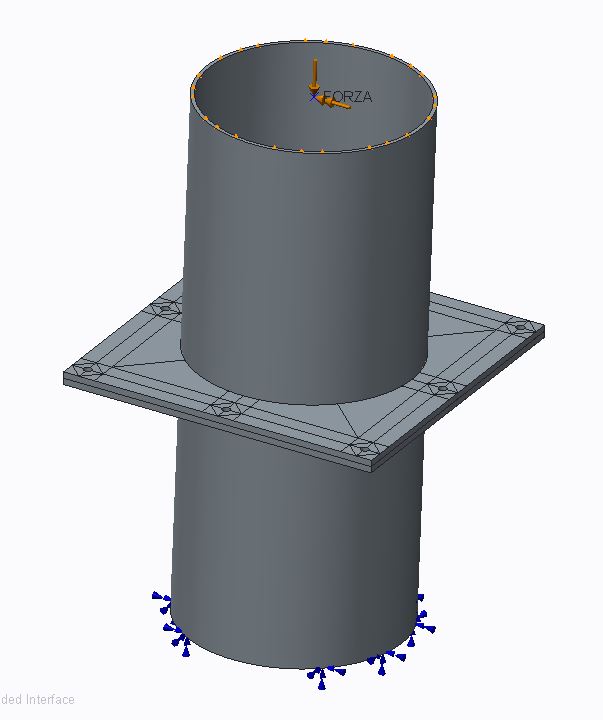
Cattura.JPG

This two structure are assembled together with the bolts, they are constrained at the bottom and there is a bending moment at the top.

In the first test I have meshed all with shells and I have inserted a contact surface between the two plates; but the shells don't support the contact regions.

In the second I have meshed the plates with tetra and the tubes with shells; Creo has meshed but there was so much tetra, due the very thin plate (6 mm) that I suppose it should take many hours to converge...if it can...

In the third case I've tried to mesh the plates with the mapped mesh control, in an attempt to have a more regular mesh with few elements. But I'm not able to link this mapped mesh with the tube above the plate.

Any suggestions?


This thread is inactive and closed by the PTC Community Management Team. If you would like to provide a reply and re-open this thread, please notify the moderator and reference the thread. You may also use "Start a topic" button to ask a new question. Please be sure to include what version of the PTC product you are using so another community member knowledgeable about your version may be able to assist.

5 replies

2-Explorer
August 27, 2014

You could use thin-solid elements, but I believe you can't use them in conjunction with the fastener tool; this means that you'd need to manually create your idealized fasteners. A key feature of thin solid elements is that the p-order on element edges through the thickness are limited; this helps reduce computational time but also means you mean apply the same restrictions as shell elements (essentially).

Thin+Solid.png

You could also use a prismatic mesh control to prevent the creation of tet elements in the plate. Since these are regular solid elements, you can use the fastener tool with them.

Prismatic.png

gfraulini17-PeridotAuthor
17-Peridot
August 28, 2014

Hi Shaun,

You could use thin-solid elements, but I believe you can't use them in conjunction with the fastener tool; this means that you'd need to manually create your idealized fasteners.

If I use thin elements (solid) I can't insert the contact surface between the two plates because the couple thin solid/contacts is not supported by the solver.

The same as I use shells/contacts.

I think it is due to the theory of thin elements treated like membranes here, if I remember well, you don't take in consideration the deformations in the verse orthogonal at the plate.

You could also use a prismatic mesh control to prevent the creation of tetra elements in the plate. Since these are regular solid elements, you can use the fastener tool with them.

I've tried before, in other assemblies, to use prismatic elements, but apart some simple cases, the mesher cannot create the mesh and it resorted to tetra elements.

Can you upload the assembly of your second photo?

Thanks

2-Explorer
August 28, 2014

I played around with your model and it looks like neither will work; both thin-solid elements and prismatic elements cause issues with pairing the linked elements (which is due to the contact interface). I'll have to play with it some more when I have more time, but as of now it looks like a standard tet mesh is your only option.

1-Visitor
August 28, 2014

Hello.

My 2 cents:

I just had a try and it took 40 minutes to solve the analysis with shell pair idealization (1536 elements) and 20 minutes without idealization (5342 elements) .

I have first removed the mapped mesh control, deleted surface regions, assigned material, added infinite friction to the interface, enabled contacts in the analysis definition and run the analysis with Quick check convergence method.

gfraulini17-PeridotAuthor
17-Peridot
August 28, 2014

I've assigned the material in the Model Properties . For this there are not the material assignment in the Simulate enviroment.

gfraulini17-PeridotAuthor
17-Peridot
September 2, 2014

Any suggestions to handle the issue of thin plates with contact region (the best manner) ?

1-Visitor
September 2, 2014

My suggestion...

-Use symmetry

-Bolts modeled as beams w. rigid links at endpoints

-Bolt preload modeled w temp. load

-shell elements in pipes

-solid elements in plates

-surface-surface contact interface

Capture.PNG

gfraulini17-PeridotAuthor
17-Peridot
September 2, 2014

Thanks Mats,

some questions:

- the horizontal plates do you have mesh them with tetra elements? Or else?

- Bolts modeled as beams with rigid links at end points gives you some benefits more than the fasteners features?

gfraulini17-PeridotAuthor
17-Peridot
September 2, 2014

So it seems that these cursed plates are intended to be meshed by tetra elements...

Or does someone know some special technique to do mesh between parts with the shape a little complicated?

In my experience "prismatic elements" works only on prismatic solids without holes; "mapped mesh" needs guide lines (I have done volume regions), so much time and it don't work if the entire assembly is not mesh with that tool.

gfraulini17-PeridotAuthor
17-Peridot
September 18, 2014

The utilization of prismatic elements is not possible if you want to use the fasteners to let the plates in contact. It seems that only tetra elements can "support" fasteners.

You can utilize prismatic elements with solid bolts preloaded with thermal load or the creo 2 preload feature but, if you want to maintain the contact surface between plates, you must remove the flag on the voice "Generate compatible mesh". This also means that, not having the compatibility between the nodes on the interface, probably it will require major time to get to convergence (maybe, I'm not sure 100%).

In all of this, I don't understand yet how to use the feature "Mapped Mesh" properly if not on simple single parts or assembly with few elements, always simple.