1-Visitor
September 19, 2014
Solved

Non-linear material properties in Creo Simulate?

  • September 19, 2014
  • 1 reply
  • 11921 views

Hello,

I have been using Creo Simulate 2.0 for a few months for linear static structural analysis of plastic parts.

Now I want to move on to non-linear analysis.

I am facing difficulties in understanding how Creo Simulate sets the non-linear material properties.

The plastic I am using is brittle in nature.

Following are the engineering values available from the vendor's material data sheet:

Young's Modulus = 7GPa

Stress at break = 115MPa

Strain at break = 2.6%

Flexural strength = 176MPa (Where do I put this value?)

Yield Strength is not available. So assuming = 70MPa

Here is what I put in Creo Simulate:
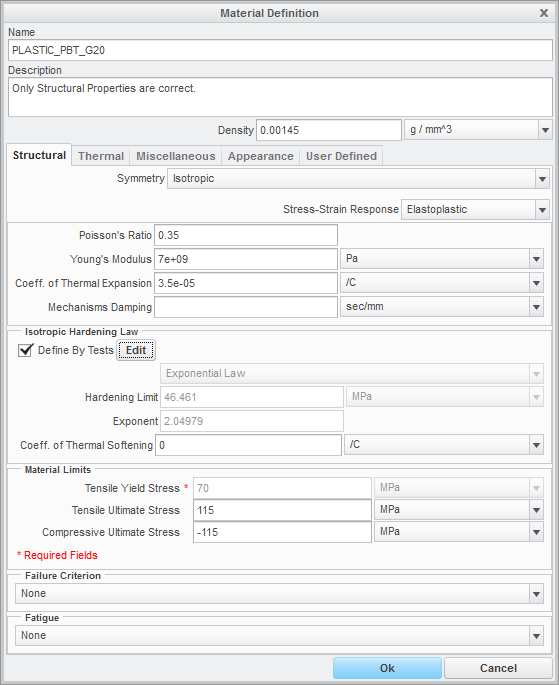
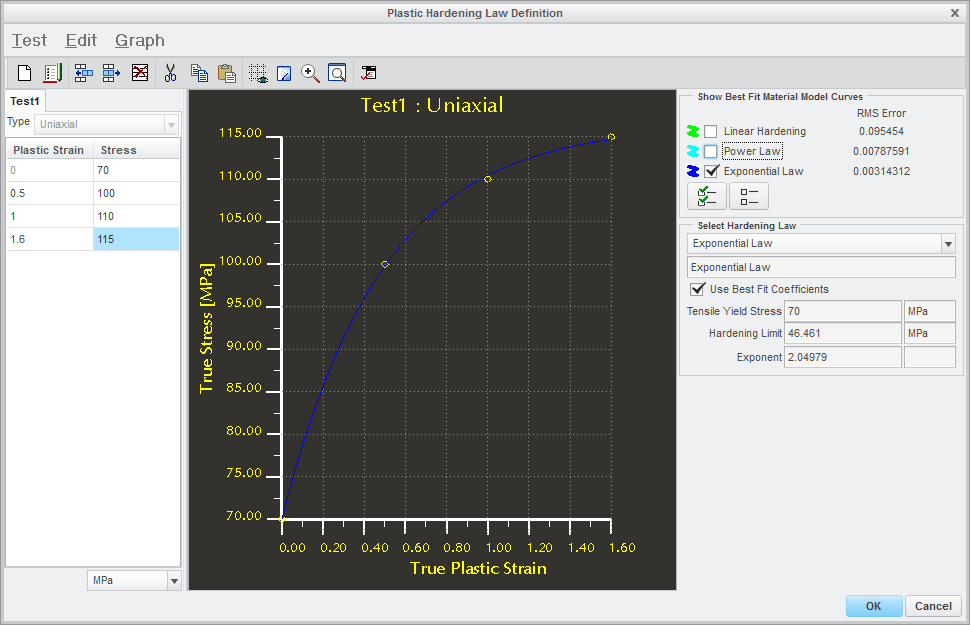
s1.png

s2.png

I have some questions:

1. Whatever I have done, is that right?

2. How do I see the entire stress strain curve for the material?

3. Does Simulate maintain tangency between the linear and non-linear curves?

4. Is there any significant difference in computation time between the 3 types of curves?

5. Does Simulate use the Yield Strength value for any type of simulation? In the sense that if I take the Yield strength value much lower than it is but maintain the same stress-strain curve, will it affect the results anyhow?


This thread is inactive and closed by the PTC Community Management Team. If you would like to provide a reply and re-open this thread, please notify the moderator and reference the thread. You may also use "Start a topic" button to ask a new question. Please be sure to include what version of the PTC product you are using so another community member knowledgeable about your version may be able to assist.
Best answer by ptc-5246840

@Giulio cannot upload any data due to company policy...

@Shaun the same file is shown during the diagnostics and sometimes gives helpful information.
But in this case it does not.

It seems that I have solved the problem.

The strain values I had entered (see graph in question) were in %. Simulate expects these in absolute terms. This solved the problem.

I strongly feel Simulate should give some hints for which units are to be used for corresponding type of analysis.

1 reply

17-Peridot
September 19, 2014

Look here

Bye

1-Visitor
September 19, 2014

Thank you for sharing that document!

But my questions still remain unanswered...

17-Peridot
September 19, 2014

1. Whatever I have done, is that right?

See here and here.

2. How do I see the entire stress strain curve for the material?
You see only the part of true stress-strain curve after the linear behavior.

3. Does Simulate maintain tangency between the linear and non-linear curves?
I really think yes.

4. Is there any significant difference in computation time between the 3 types of curves?
If the stresses are low and the material remains in linear behavior, I think the time don't change.
Otherwise you go into plastic behavior and the displacements became considerable, so you have to do a non-linear static analysis and here you are who choose the time step. The convergence time for each step is function of the mesh, the contact surfaces if there are, the gradient of the displacement...
Personally I don't think it is a problem the difference of time.

5. Does Simulate use the Yield Strength value for any type of simulation? In the sense that if I take the Yield strength value much lower than it is but maintain the same stress-strain curve, will it affect the results anyhow?

That value that you insert in the material tab serves only if you select a failure method, so the program can tell you if the component is broken or not and where.