

Flexible component done by Java Toolkit
Hi folks,
Please look at simple assembly flex_top_asm.asm. It contains one component flex_part2.prt.
In part thre are defined:
a) 3 dimensions as flexible (open file in new window, then File > Prepare > Model Properties > Flexible > Dimensions);
b) 3 parameters as flexible (open file in new window, then File > Prepare > Model Properties > Flexible > Parameters);
Based on PTC sample I've modified method, that should be started on asm level. As a result, component flex_part2.prt will be changed into flexible one, and in Varied Items table dimensions will be shown.
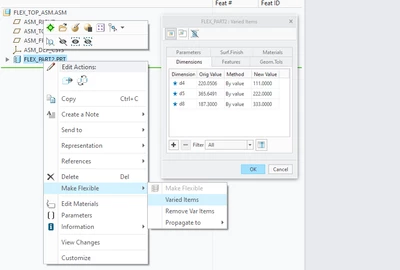
Question is:
How to do it with parameters. How to add them to Varied Items table??
Sample code:.
public static void makeFlexibleComponent(int componentID) {
ComponentFeat CFeat = null;
WComponentFeat WCFeat = null;
try {
FileWriter file = new FileWriter("AssemblyItemExample.txt");
BufferedWriter fp_out_asmitem = new BufferedWriter(file);
fp_out_asmitem.write("- gucioFlexibleComponent -");
fp_out_asmitem.newLine();
fp_out_asmitem.write("==============================");
fp_out_asmitem.newLine();
Session session = pfcSession.GetCurrentSession();
/* Open top assembly FLEX_TOP_ASM.asm in Creo Session */
Model CurrModel = session.GetCurrentModel();
Assembly PAsm = (Assembly) (CurrModel);
WAssembly WAsm = (WAssembly) (CurrModel);
Features Feats = PAsm.ListFeaturesByType(Boolean.FALSE, FeatureType.FEATTYPE_COMPONENT);
Model ItemOwner = null;
for (int i = 0; i < Feats.getarraysize(); i++) {
if (Feats.get(i).GetId() == componentID) {
fp_out_asmitem.write("For Feature ID: " + Feats.get(i).GetId());
fp_out_asmitem.newLine();
fp_out_asmitem.write("With Feature Number: " + Feats.get(i).GetNumber());
fp_out_asmitem.newLine();
CFeat = (ComponentFeat) (Feats.get(i));
WCFeat = (WComponentFeat) (CFeat);
intseq seq = intseq.create();
seq.set(seq.getarraysize(), componentID);
String ItemOwnerName = ((ComponentFeat) Feats.get(i)).GetModelDescr().GetFileName();
ItemOwner = session.GetModelFromFileName(ItemOwnerName);
}
}
boolean is_flex = WCFeat.IsFlexible();
fp_out_asmitem.write(" Is Component Already Flexible ? : " + (is_flex ? "YES" : "NO"));
fp_out_asmitem.newLine();
intseq dim_id_array = intseq.create();
dim_id_array.set(0, 8);
dim_id_array.set(1, 4);
dim_id_array.set(2, 5);
AssemblyItems AsmItemArray = AssemblyItems.create();
for (int i = 0; i < dim_id_array.getarraysize(); i++) {
fp_out_asmitem.write("ABC " + dim_id_array.get(i));
fp_out_asmitem.newLine();
AssemblyItemInstructions ThisAsmInstr = wfcComponentFeat.AssemblyItemInstructions_Create(ItemOwner,
ModelItemType.ITEM_DIMENSION, dim_id_array.get(i));
AssemblyItem ThisAsmItem = WAsm.CreateAssemblyItem(ThisAsmInstr);
AsmItemArray.append(ThisAsmItem);
}
fp_out_asmitem.write("before");
fp_out_asmitem.newLine();
WCFeat.SetAsFlexible(AsmItemArray);
Dimension dim1 = ((Dimension) WCFeat.ListVariedItems().get(0));
Dimension dim2 = ((Dimension) WCFeat.ListVariedItems().get(1));
Dimension dim3 = ((Dimension) WCFeat.ListVariedItems().get(2));
dim1.SetDimValue(111);
dim2.SetDimValue(222);
dim3.SetDimValue(333);
fp_out_asmitem.write("after");
fp_out_asmitem.newLine();
fp_out_asmitem.write("==============================");
fp_out_asmitem.newLine();
fp_out_asmitem.write("-gucioFlexibleComponent-");
fp_out_asmitem.close();
return;
} catch (Exception e) {
System.out.println(e + " " + e.getMessage());
}
}