14-Alexandrite
August 26, 2014
Solved

NWF File - "NEW CABLE"

  • August 26, 2014
  • 1 reply
  • 11059 views

Hey everyone,

I've been working on some automation and techniques related to the Cabling environment, and while exploring these areas, I came across a few questions about Creo's native capabilities.

Most examples I've seen will define cables as independent wires. You will have "NEW WIRE_SPOOL"s and "NEW WIRE"s to define an array of wires in a harness model.

However, I know its possible to define both cable spools and cable definitions through the NWF file.

NEW CABLE_SPOOLCABLE_SPOOL_13
PARAMETER UNITS INCH
PARAMETER NUM_CONDUCTORS 3
PARAMETER THICKNESS 0.7
PARAMETER MIN_BEND_RADIUS 10
PARAMETER WIRE_GAUGE 0.0
CONDUCTOR1
PARAMETER UNITS INCH
PARAMETER COLOR WHT
PARAMETER THICKNESS 0.1
PARAMETER MIN_BEND_RADIUS 2
PARAMETER WIRE_GAUGE 0.0
PARAMETER CONDUCTOR_NAME 2463
PARAMETER COND_ID 1
CONDUCTOR2
PARAMETER UNITS INCH
PARAMETER COLOR BLU
PARAMETER THICKNESS 0.1
PARAMETER MIN_BEND_RADIUS 2
PARAMETER WIRE_GAUGE 0.0
PARAMETER CONDUCTOR_NAME 2475
PARAMETER COND_ID 2
CONDUCTOR 3
PARAMETER UNITS INCH
PARAMETER COLOR RED
PARAMETER THICKNESS 0.15
PARAMETER MIN_BEND_RADIUS 2
PARAMETER WIRE_GAUGE 0.0
PARAMETER CONDUCTOR_NAME 2451
PARAMETER COND_ID 3

With that spool definition defined, we can similarly define a cable using the following format:

NEW CABLECABLE_1CABLE_1CABLE_SPOOL_1
CONDUCTOR1
ATTACHCONNECTOR_12CONNECTOR_21
CONDUCTOR2
ATTACHCONNECTOR_13CONNECTOR_31
CONDUCTOR3
ATTACHCONNECTOR_22CONNECTOR_32

This NWF format will import and parse into Creo appropriately, but when I go to actually autoroute the cables, it seems as though Creo cannot find the entry ports on the appropriate connectors (post-designation, of course), meaning it will not actually perform any autorouting. However, if I model the cable instead as several independent "NEW WIRE"s (aka, 3 NEW WIRE instead of 1 NEW CABLE), it finds the appropriate connector entry's as expected, and autoroutes just fine.

Has anyone had any experience using CABLES in NWF files instead of WIRES? I've attached an example NWF file here.

Thanks,

Sully
Best answer by BrianMartin

HI again (for the second time)...

There's some nuances to the cable routing. First... "breakouts" are going to cause problems. Second.. the network will keep your cable conductors bundled... but they will tend to split out into discrete conductors in areas where there is no network.

It's all a bit wonky and it's not nearly as clean as individual wires.

I think I see some issues with your NWF, though. I believe you need an extra line to make it work- plus I also believe you might have a logic error. Let's take the logic error first...

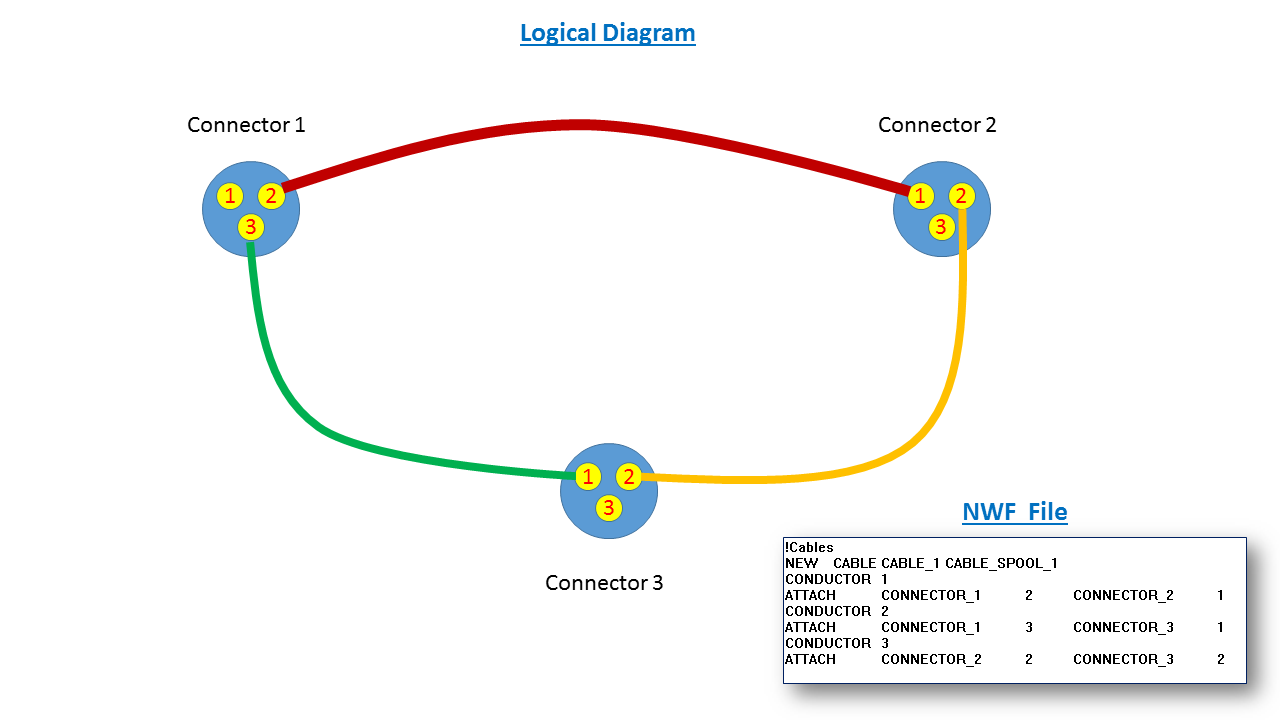
  • If you're using a cable, those conductors will be bundled together as a single entity. The way your NWF reads though... each of the three conductors goes to a different connector. I've created a logical diagram of what's occuring in your NWF. See below (click for a larger image). My point here is that you wouldn't use a cable for this type of connection. You'd only want to use a cable for instances where it makes sense to have multiple conductors bundled together. In this case, it doesn't appear to (unless I am misunderstanding your application).

logical_diagram.png

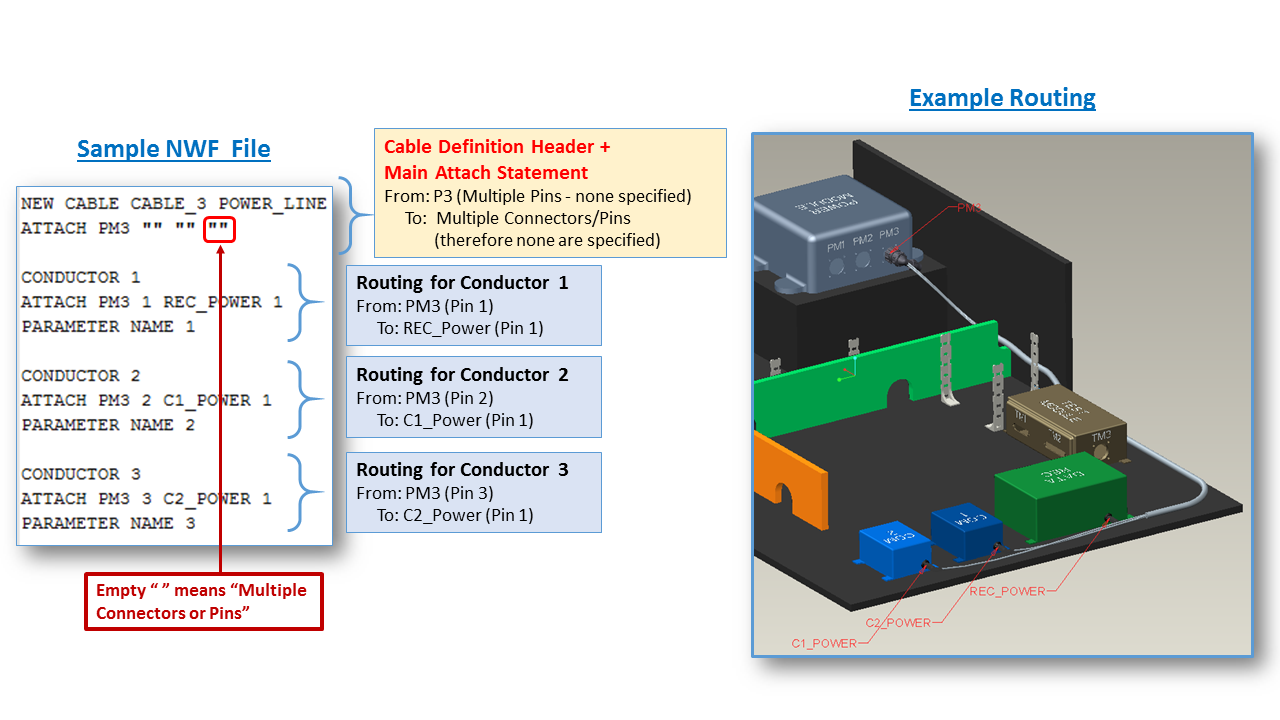
The second issue is more of a formatting issue with the NWF file itself. The link you provided to the PTC.com article is correct. You can autoroute from a cable definition. But I think you're missing a bit of data that's required. I think you are missing the data in the light orange box (with the red text - in the image below). Also, you do not need the Parameter Name data, but you may add it if you wish. Click the image below for a larger version.

cable_nwf_details.png

I think if you correct the logic error and change the NWF file to incorporate that "Main Attach Statement", your cable will autoroute. Note in the example above, the only common connection that could be specified in my Main Attach Statement was the From connector "P3". On the From side, the cable attached to multiple pins so none could be specified. An empty "" was included to denote that none could be specified on the From side. On the To side, neither a common connector nor pin could be specified. This is why there are two more empty "" sets.

Still, for a cable to make sense... there has to be one common denominator. In this case, the connector P3 was a common starting point. Without this, I don't think you can get the cable to route the way you wish. I could be wrong though.

I'd start by adding a Main Attach Statement to your NWF as shown above and per the example in the PTC.com article. For your current NWF, I guess you'd use four "" empty statements because there's no connector common to all conductor attachments. I don't think this will work, but it's worth a try. Next, I'd try making all of the cables originate from one connector and have it branch to the other two. I believe this will get your cable routing properly.

There's a whole other lesson on how to use the network to keep the conductors together in a bundle or have them break out into individual, discrete conductors. That part is tricky and there aren't a lot of options. Still, I think this will get you going in the right direction.

I'm really sorry it took so long to get this to you... but I hope this gets you moving again!

Thanks,

-Brian

1 reply

1-Visitor
September 2, 2014

If you manually route the cables with their conductors and you export the design logic to neutral, does it look the same as the neutral file would have looked, that you want to import?

sully714-AlexandriteAuthor
14-Alexandrite
September 2, 2014

Nope. If I manually create the cable and export it to neutral, it only shows "NEW CABLE CABLE_1"... and that's whats interesting about it. It doesn't include any connectivity information for that cable or its conductors at all.

Just to explain a little more, if I export out a cable with a single conductor, it will show

NEW CABLE CABLE_1 B

ATTACH SULLY_WG_SKEL "" SWITCH11 ""

But the second I include a 2nd or 3rd conductor, the exported definition becomes:

NEW CABLE CABLE_2 C

It seems to me like it is a functionality that was never actually finished, and so Creo knows that the cable exists, and that it has information about it (visible through spool definition etc), but for some reason it cannot actually route the connectivity for each individual conductor.

sully714-AlexandriteAuthor
14-Alexandrite
September 2, 2014

I did find this document, that supports that this capability SHOULD be possible:

https://support.ptc.com/appserver/cs/view/solution.jsp?n=122559&posno=1&q=NWF%20File