
Turn on suggestions
Auto-suggest helps you quickly narrow down your search results by suggesting possible matches as you type.
Showing results for
Please log in to access translation
Turn on suggestions
Auto-suggest helps you quickly narrow down your search results by suggesting possible matches as you type.
Showing results for
Community Tip - Did you know you can set a signature that will be added to all your posts? Set it here! X
- Community
- Creo+ and Creo Parametric
- 3D Part & Assembly Design
- Re: Creo 4 linear diameter dimension - how to rota...
Translate the entire conversation x
Please log in to access translation
Options
- Subscribe to RSS Feed
- Mark Topic as New
- Mark Topic as Read
- Float this Topic for Current User
- Bookmark
- Subscribe
- Mute
- Printer Friendly Page
Creo 4 linear diameter dimension - how to rotate


Dec 08, 2020
03:49 PM
- Mark as New
- Bookmark
- Subscribe
- Mute
- Subscribe to RSS Feed
- Permalink
- Notify Moderator
Please log in to access translation
Labels:
- Labels:
-
2D Drawing
- Tags:
- dimensions
- howto
ACCEPTED SOLUTION
Accepted Solutions


Dec 08, 2020
04:18 PM
- Mark as New
- Bookmark
- Subscribe
- Mute
- Subscribe to RSS Feed
- Permalink
- Notify Moderator
Please log in to access translation
Dec 08, 2020
04:18 PM
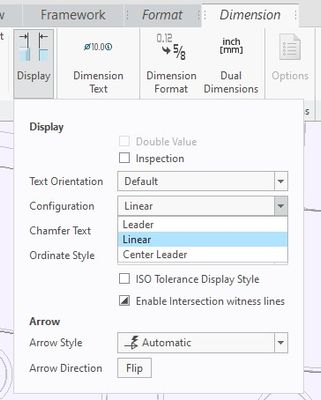
Change the configuration under display button in the dimension tab to leader. Rotate till arrow(s) are in the desired orientation and change back to linear. A bit of a round about way to do it, but that is the way many things go in CREO.
There is always more to learn in Creo.
3 REPLIES 3
Dec 08, 2020
04:18 PM
- Mark as New
- Bookmark
- Subscribe
- Mute
- Subscribe to RSS Feed
- Permalink
- Notify Moderator
Please log in to access translation
Dec 08, 2020
04:18 PM
Change the configuration under display button in the dimension tab to leader. Rotate till arrow(s) are in the desired orientation and change back to linear. A bit of a round about way to do it, but that is the way many things go in CREO.
There is always more to learn in Creo.
Dec 08, 2020
04:53 PM
- Mark as New
- Bookmark
- Subscribe
- Mute
- Subscribe to RSS Feed
- Permalink
- Notify Moderator
Please log in to access translation
Dec 08, 2020
04:53 PM
Thank you kdirth! That worked fine.


Dec 09, 2020
02:20 AM
- Mark as New
- Bookmark
- Subscribe
- Mute
- Subscribe to RSS Feed
- Permalink
- Notify Moderator
Please log in to access translation
Dec 09, 2020
02:20 AM
Hi,
- select dimension
- press right mouse button
- use Edit Attachment command from context menu
- move dimension to requested position
Martin Hanák


