
12-Amethyst
March 19, 2021
Solved

Creo drawing create centre line

  • March 19, 2021
  • 3 replies
  • 11314 views

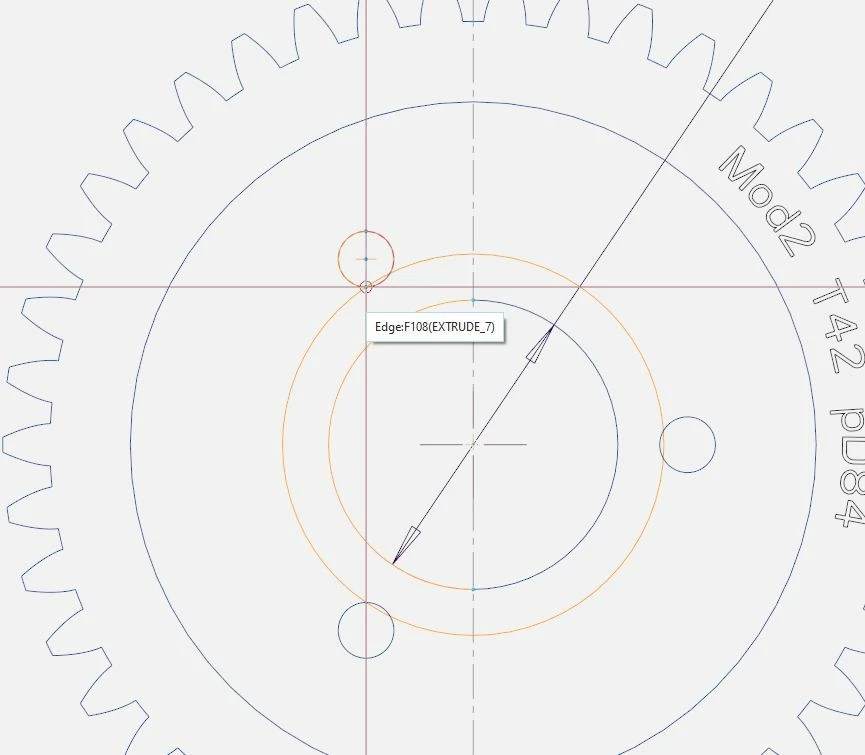
How do I create a centre line in Creo drawing for eg. a wheel-rim? This sounds ridiculous but I cant both snap to the heart of the circle and a the heart of one of the 3 holes, see drawing. It always snaps towards the edge of the second circle (why would you ever want to do that anyway..). Any help would be appreciated.
 

Clipboard03.jpg

Best answer by kdirth

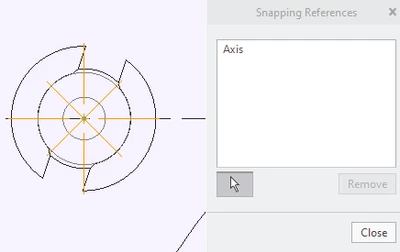
Select the axis as a snapping reference by selecting the selection arrow for snapping references before placing.

kdirth_0-1616164031415.png


3 replies

21-Topaz II
March 19, 2021

I take it you are trying to draw a bolt circle onto a drawing view?

We do a lot of parts that are based on rotating machines, and this is one of my huge annoyances, the "snap to the end of the circle not the center" phenomena.

A thing that works for me is I pick the center of the circle I want the bolt circle to go through, start drawing a circle, but then cancel it with the middle mouse button. Now if I pick the center of the (gear for you) object, it will usually let me select the center of the hole I want the bolt circle on.

Also, in case no one has mentioned it, once you have drawn the bolt circle, select it and right mouse button to pick "Relate to View", then pick the view your bolt circle is in. Otherwise, the drawn circle is just an independent object on the drawing. If you move the view or change the drawing scale it will stay at the position and size you defined it.

kdirth
21-Topaz I
21-Topaz I
March 19, 2021

If you have created the holes by a rotational pattern, Change the drawing option radial_pattern_axis_circle to yes and when you show the axis of the holes the bolt circle axis will be created.


There is always more to learn.
BJP12-AmethystAuthor
12-Amethyst
March 19, 2021

its a cut-extrude actually (with all four holes), centre-axis are automatically created for each hole, so thats not related to creo drawing not willing to snap to the center lines..

kdirth
21-Topaz I
21-Topaz I
March 19, 2021

The method I described allows Creo to make the bolt circle for you. 


Create first hole with an radial dimensions (radius from center axis and angle).  Pattern the hole.  In the drawing show the axis for each hole.  With the option set to yes, the first axis shown will create the bolt circle.


Your method creates a sketch on the drawing that will not update with the model.  If I need sketch in the drawing (bolt circle or other), I prefer to make a parametric cosmetic sketch in the model and show it in the drawing.

There is always more to learn.
kdirth
21-Topaz I
kdirth21-Topaz IAnswer
21-Topaz I
March 19, 2021

Select the axis as a snapping reference by selecting the selection arrow for snapping references before placing.

kdirth_0-1616164031415.png


There is always more to learn.