
Solved
External parameters in assembly
Hi all
is it possible to link parameters to a notebook or excel in assemblies?
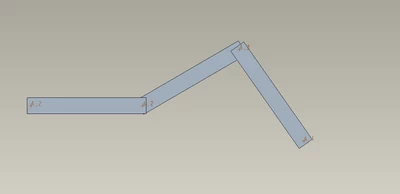
For example i would like to control the angles in this system of linkages (see picture) by changing values in a table.

Hi all
is it possible to link parameters to a notebook or excel in assemblies?
For example i would like to control the angles in this system of linkages (see picture) by changing values in a table.
Yes, layouts can be declared to assemblies and skeleton models. The main function of Notebooks is to define global parameters and then propagate them in a top down design. The example I posted above is used to drive multiple internal combustion engine architectures that employ skeletons, assemblies, and mechanism definitions.
With the notebook in session, open a part or assembly.
For a part, click Model Intent ▶ Image Declare. For a part or an assembly, click File ▶ Manage File ▶ Image Declare. The DECLARE menu appears.
Click Declare Nbk. A menu with a list of notebooks active in the current session appears.
Select the name of the notebook to which you want to declare the model. The model now references the notebook
No account yet? Create an account
Enter your E-mail address. We'll send you an e-mail with instructions to reset your password.