
13-Aquamarine
July 11, 2025
Solved

How to force imported geometry solidify the geometry?

  • July 11, 2025
  • 3 replies
  • 906 views

Whichever file I import into Creo (I tried two separate vendors with Inventor, random Grabcad models, and even exporting simple block from Creo and then reimporting it back) - it only imports as a surface. The geometry is fine (no errors) and I can easily solidify it, but I don't seem to be able to find a way how to do this automatically. I am importing large assemblies made by subcontractors with hundreds of parts, so turning each part into solid isn't an option. 


I have all geometry "enhancements" disabled, and all the other settings seemingly correct:
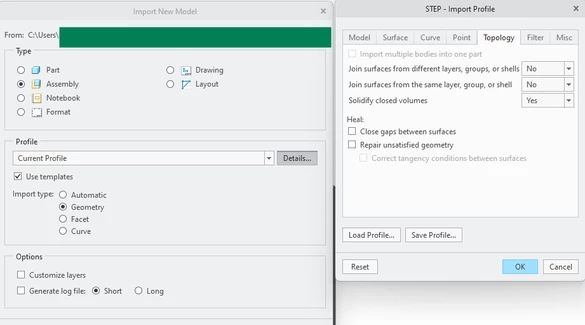
 

Ben8_0-1752239901883.png


Regardless, the Import feature always defaults to "Add Surfaces".

Most often I am able to just change it to "Add bodies", or Solidify the geometry outside the "Import" feature - so there are no issues with the geometry I assume:
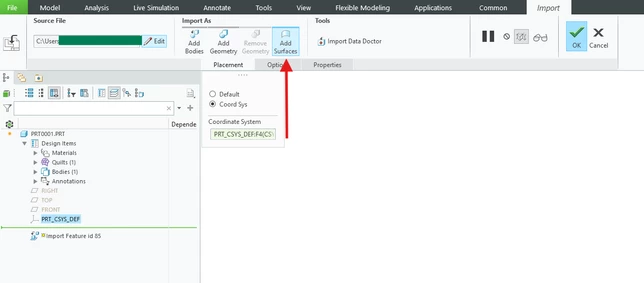
 

Ben8_1-1752240055756.png


I looked but I couldn't find a config.pro setting to force Creo to default to "Add bodies" instead of "Add Surfaces" (or other means to solidify the geometry). Is there any way to do so?


Many thanks
 

Best answer by StephenW

Here's my go to list of things I try (I believe I have seen other suggestion here on the commmunity also):


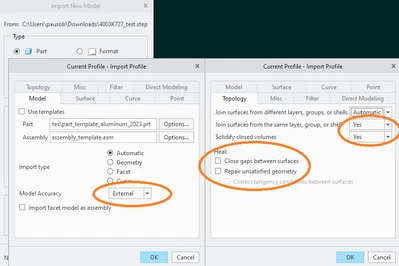
Offline (outside of PDMlink) and I adjusted import settings as below:


The next step is to set the import profile details.

  • Set Model accuracy to external. If you impose a conflicting accuracy on the import, it will likely have issues
  • In the topology tab, Uncheck Heal options, set Join surfaces from the same layer, group, or shell to yes, and set Solidify closed volumes to yes.

StephenW_0-1752241277042.png


Other things I have done is imported the files in to solidworks or inventor and re-exported to other export types. My experience is solidworks and inventor either handle the import process better or make lots of assumptions to automatically get the solidification, but that's just my opinion, I have no documented evidence.

Also, most of my large assembly imports are for purposes of checking interface and clearance of my equipment to other equipment and generally not for precise design type purposes that require high fidelity geometry of unquestioned accuracy. If I need that sort of import, I am generally provided specific interface/fit information that is fully dimensioned and toleranced so I can independently verify accuracy of an import.

3 replies

StephenW23-Emerald IIIAnswer
23-Emerald III
July 11, 2025

Here's my go to list of things I try (I believe I have seen other suggestion here on the commmunity also):


Offline (outside of PDMlink) and I adjusted import settings as below:


The next step is to set the import profile details.

  • Set Model accuracy to external. If you impose a conflicting accuracy on the import, it will likely have issues
  • In the topology tab, Uncheck Heal options, set Join surfaces from the same layer, group, or shell to yes, and set Solidify closed volumes to yes.

StephenW_0-1752241277042.png


Other things I have done is imported the files in to solidworks or inventor and re-exported to other export types. My experience is solidworks and inventor either handle the import process better or make lots of assumptions to automatically get the solidification, but that's just my opinion, I have no documented evidence.

Also, most of my large assembly imports are for purposes of checking interface and clearance of my equipment to other equipment and generally not for precise design type purposes that require high fidelity geometry of unquestioned accuracy. If I need that sort of import, I am generally provided specific interface/fit information that is fully dimensioned and toleranced so I can independently verify accuracy of an import.

21-Topaz I
July 11, 2025

I will concur with @StephenW 's experience that Solidwork's import engine is more likely to produce solid geometry from a variety of other CAD sources.

tbraxton
22-Sapphire II
22-Sapphire II
July 11, 2025

If you intend to insert the geometry of the imported features as solids, you must set Solidify closed volumes to Yes in the import profile. You must also explicitly set Import type to Geometry in the import profile or the File dialog box as you cannot create surfaces and solids from curves or facet geometry.


Refer to the help files for specifics on how to save and designate default import profiles.

About Creating Format-Specific Profiles for Data Exchange Tasks

24-Ruby III
July 11, 2025

Hi,

check whether intf3d_in_enable_imp_validation config.pro option is set to no. If this is true then set it to yes.