

I am using CREO 4; Part is active; I have copied geometry from another part; Model tree and FIND...
Guy's its been 5 to 10 years sense I have log-on to this website. I have no excuses..
I am using CREO 4 and have an assembly open.
I have 2 parts within the assembly.
I activated part number (2) from WITHIN the assembly.
I copy a surface [from] PART 1 [to] PART 2. The Surface in PART 1 is a quilt of which I only need a specific area.
The surface is copied into PART 2. Good so far...
The feature in the model tree has a glyph. It looks like 2 sheets of paper. good so far...
In my model tree, I have selected in my Model Tree to show "FEATURE TYPE".
The problem is when I try to use the FIND/SEARCH function for all "external copied" geometry. I get nothing. I tried numerous selections, only to get nothing.
I need the FIND/SEARCH function to gather a list so we can work. The number 2 part (.prt) has 1158 features.
Below is a picture of my model tree. There are 2 features highlighted that are "Copied Geometry" from another part file - PART (1).
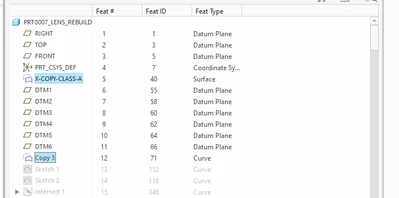
The goal is to use the FIND function to get a list of "COPIED GEOMETRY"; I know there are copied surfaces/Quilts, copied Curves, Coped Planes, Copied Datum Points, etc...
Thanks in advance, Dave Maloy
1 616 990 1704