Turn on suggestions
Auto-suggest helps you quickly narrow down your search results by suggesting possible matches as you type.
Showing results for
Please log in to access translation
Turn on suggestions
Auto-suggest helps you quickly narrow down your search results by suggesting possible matches as you type.
Showing results for
- Community
- Creo+ and Creo Parametric
- 3D Part & Assembly Design
- Re: Length section curve
Translate the entire conversation x
Please log in to access translation
Options
- Subscribe to RSS Feed
- Mark Topic as New
- Mark Topic as Read
- Float this Topic for Current User
- Bookmark
- Subscribe
- Mute
- Printer Friendly Page
Length section curve


May 27, 2022
12:14 PM
- Mark as New
- Bookmark
- Subscribe
- Mute
- Subscribe to RSS Feed
- Permalink
- Notify Moderator
Please log in to access translation
May 27, 2022
12:14 PM
Length section curve
I'm a mechanical design,
I need to measure a lenght of section curve.
Actually I work with PROE WF4 or CREO8
Why with a singolar measure, exact with geometrical calculate, is different of a measure with
section curve.
On example 2667.4601versus 3984.22.
Many thanks for the answer.
Solved! Go to Solution.
ACCEPTED SOLUTION
Accepted Solutions

Jun 02, 2022
04:17 AM
- Mark as New
- Bookmark
- Subscribe
- Mute
- Subscribe to RSS Feed
- Permalink
- Notify Moderator
Please log in to access translation
Jun 02, 2022
04:17 AM
You have a feature with overlapping lines in your model.
Please check feature N° 18 named "EXTR_PASSATE" and delete all 3 overlapping lines in the sketch.
After that the measured length will be correct.
10 REPLIES 10


May 27, 2022
01:25 PM
- Mark as New
- Bookmark
- Subscribe
- Mute
- Subscribe to RSS Feed
- Permalink
- Notify Moderator
Please log in to access translation
May 27, 2022
01:25 PM
It is not clear what you are trying to do and your example images are identical. So please explain again.
May 28, 2022
09:20 AM
- Mark as New
- Bookmark
- Subscribe
- Mute
- Subscribe to RSS Feed
- Permalink
- Notify Moderator
Please log in to access translation
May 28, 2022
09:20 AM
Sorry, in the hurry,
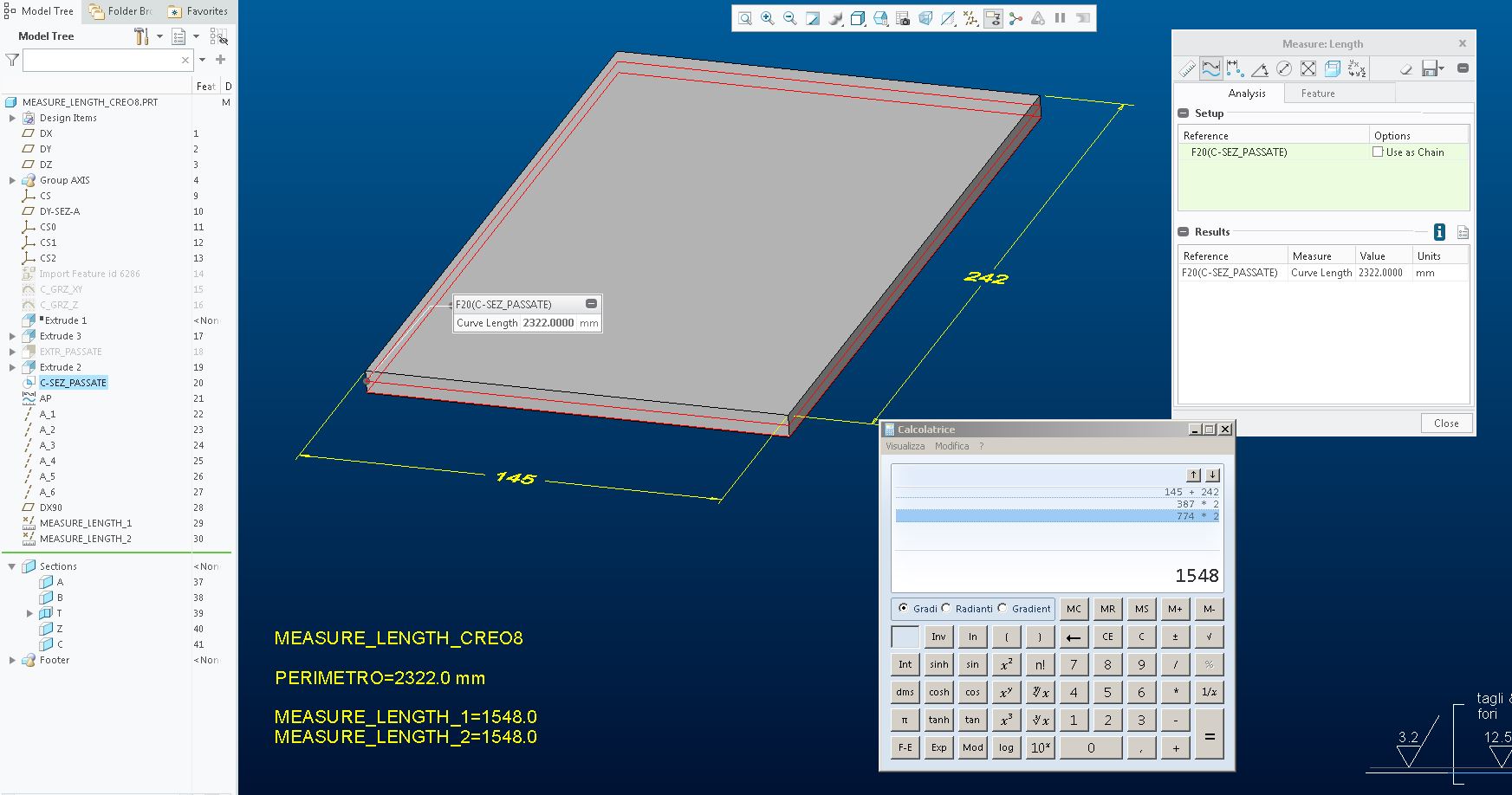
there is two images with different mode to measure length.
May 28, 2022
05:04 PM
- Mark as New
- Bookmark
- Subscribe
- Mute
- Subscribe to RSS Feed
- Permalink
- Notify Moderator
Please log in to access translation
May 28, 2022
05:04 PM
Well, the basic answer is that either method should yield the same number.
e.g., I tried this in Creo4 and I get the same answer in both "modes":

So, from the information you provided, I am not sure what clue to give you about where things have gone strange.
And your pictures still don't quite make sense to me - in that you seem to have 2x the edges selected in the one-to-one example vs the one where the curve from cross section is measured; yet that analysis yields a smaller number?
Jun 01, 2022
05:08 AM
- Mark as New
- Bookmark
- Subscribe
- Mute
- Subscribe to RSS Feed
- Permalink
- Notify Moderator
Please log in to access translation
Jun 01, 2022
05:08 AM
Hi,
made a simplest part tested with Creo8.
The measure is made by directly selecting the feature from the tree.
Jun 01, 2022
05:15 AM
- Mark as New
- Bookmark
- Subscribe
- Mute
- Subscribe to RSS Feed
- Permalink
- Notify Moderator
Please log in to access translation
Jun 01, 2022
03:55 PM
- Mark as New
- Bookmark
- Subscribe
- Mute
- Subscribe to RSS Feed
- Permalink
- Notify Moderator
Please log in to access translation
Jun 01, 2022
03:55 PM
So it seems Creo4 works as expected, but Creo8 gives you strange results?
I don't have Creo8, so I can't offer any further help. You should reach out to PTC for technical support.
Sounds like a bug.
PS. still baffled as to why your "section" curves are "doubled up" like that; typically I think of a section as a slice using a single plane.
Must be something specific to your designs?
Jun 02, 2022
04:17 AM
- Mark as New
- Bookmark
- Subscribe
- Mute
- Subscribe to RSS Feed
- Permalink
- Notify Moderator
Please log in to access translation
Jun 02, 2022
04:17 AM
You have a feature with overlapping lines in your model.
Please check feature N° 18 named "EXTR_PASSATE" and delete all 3 overlapping lines in the sketch.
After that the measured length will be correct.
Jun 03, 2022
03:08 AM
- Mark as New
- Bookmark
- Subscribe
- Mute
- Subscribe to RSS Feed
- Permalink
- Notify Moderator
Please log in to access translation
Jun 03, 2022
03:08 AM
Hi, mf2001_98,
thank you so much for your wit in finding the error.
For "PAUSOB"
I need this to find the milling perimeter by simulating a constant Z path with a depth of pass of 4mm.
So I thought of making an "S" shaperd surface and intersecting the piece.
With a measurement feature that selects all the curve taking only a feature of intersec.
I obtain the perimeter and therefore the milling time.
Many thanks for your time, greeting Luca.
Jun 03, 2022
12:56 PM
- Mark as New
- Bookmark
- Subscribe
- Mute
- Subscribe to RSS Feed
- Permalink
- Notify Moderator
Please log in to access translation
Jun 03, 2022
12:56 PM
Ah, I see. Interesting application of the modeling tools. I suppose in the Creo8 model, instead of "S" curve, you inadvertently sketched a "figure 8" curve?
Jun 06, 2022
04:18 AM
- Mark as New
- Bookmark
- Subscribe
- Mute
- Subscribe to RSS Feed
- Permalink
- Notify Moderator
Please log in to access translation
Jun 06, 2022
04:18 AM
Hi,
it is a series of "S" and inadvertently some lines have overlapped.
If I had enabled sketch diagnostics I would been notified.
Pratically I get some steps for the plates to be milled in contouring.
With this part I would like to have an estimate of the workings.
Many thanks for your time. Greetings Luca.