
1-Visitor
May 18, 2018
Solved

Merge two Parts (surface connect?)

  • May 18, 2018
  • 1 reply
  • 3605 views

Hello Everyone!


I'm trying to merge a wing I made to a fuselage. I figured out how to place the wing in relation to the fuselage (thanks to some very helpful forum folks on here) but it is not flush, of course. I want to merge the two surfaces but I can't figure out how to do so. Attached is a picture of what I'm looking at. As you can see it's just sort of floating there. 
Edit: I figured out the problem! The wing's airfoil is too complicated to do a surface connect. I have to attach it to a simple shape. Then attach that to the fuselage. They do this in most aircraft.
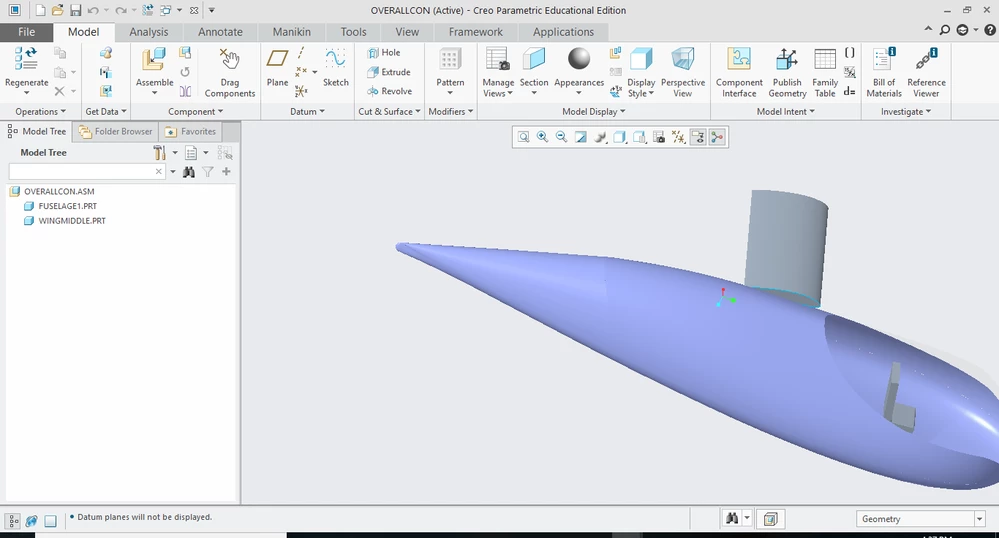
creo q.PNG

Best answer by TomD.inPDX

In the part file, highlight the edge of the surface and the Extend icon will become available.

It is as simple as it sounds, it extends surfaces.

1 reply

17-Peridot
May 20, 2018

Merge from within an assembly is managed under that "Get Data" tab.

You activate the model you want to inherit to. 

Then use the Merge function under the Get Data tab to determine the type of Merge you are after. 

With will send the selected geometry to the active file where is does the Boolean operation requested.

This operation can also fail if there is a problem with the operation. 


To actually have them intersect, you could Extend the surfaces to intersect so they may be joined.


dmojay1-VisitorAuthor
1-Visitor
May 20, 2018

Thank you for the reply. How do I use the Extend tool? 

17-Peridot
May 20, 2018

In the part file, highlight the edge of the surface and the Extend icon will become available.

It is as simple as it sounds, it extends surfaces.