17-Peridot
October 10, 2018
Question

Modelcheck in Creo 5 feedback

  • October 10, 2018
  • 3 replies
  • 31793 views

I've been using Modelcheck in Creo 5 for a few months now, as I configure our setup from Creo 4 and prepare for training and migration. I would like to provide feedback:

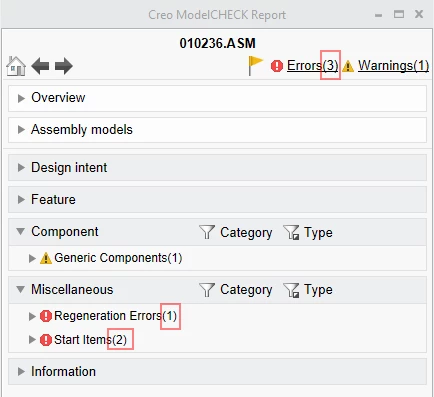
  1. The number on top, next to the Errors and Warnings, would seem to be a cumulative value of all of the numbers of errors and warnings within the subsections, due to the same way they are identified. For instance, in the below picture, if a user was expanding a random section, he would assume there is nothing in Design Intent and Feature as there are already three errors listed and 1 warning:
    b7348735-5649-4944-848a-322f5f81679f.png
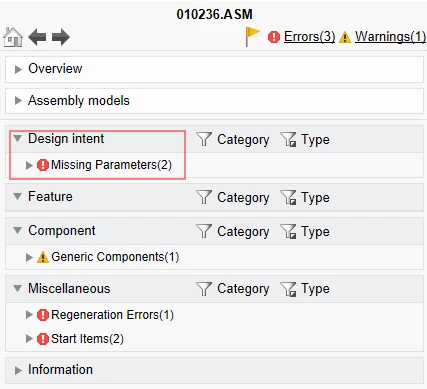
    Rather, if we expand all sections, we see more errors:
    b306113e-a280-4de3-8fcd-2e72d47430d3.png
    Although I understand that the number on top is the check# and the number next to the checks are the quantity #, it is confusing since they are identified the same way 
  2. I'm not sure users care whether errors or warnings are identified as Design Intent, Feature, Component or Misc. Whatever the organization has identified as important will be an error and whatever they identified as not critical, will be a warning. I'm not sure how these categories help.
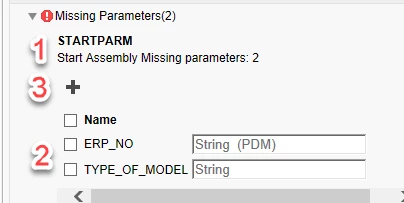
  3. When trying to fix an issue, it appears that the flow is also confusing. In a given check, the description is at the top(step 1),  the field to specify the fix is at the button (step 2), and the button to fix it is in the middle (step 3). It would be equivalent to an online form where the submit button is at the top of the page instead of after the entry fields. Also, I'm not sure if the icons are 100% obvious to the action of the buttons.8c38494e-0bcf-4f63-ba0a-7f43ea009e82.png
    This was probably done for a user who may not realize there is a way to fix an issue if the button is not visible from the beginning. I think a different way of showing the data will help with this.
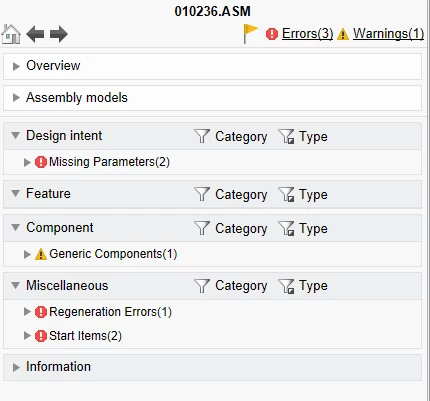
  4. In Creo 4, the default results for a Modelcheck regenerate showed the ALL tab which listed all errors and warnings. Here, not all categories are expanded from the beginning. This introduces a high risk of users missing the checks when they are trying to rush and get out a part by adding extra work for an improved tool. Users aren't a big fan of a tool which finds their mistakes to begin with. Having extra work to hunt for them is not going to go over well. Furthermore, now they can say they didn't see the checks when the report came up since it was buried. I can't even use a mapkey to show all checks since the commands are not mapkey sensitive. It goes without saying that the Overview and Information section should NOT be expanded by default. At this time, I am not sure if there is enough benefit to migrate to Creo 5 if this last issue does not get addressed before then.
    f57df9be-55d4-4809-844c-e7afc2488a13.png

    @Mahesh_Sharma and @lwestbrook

3 replies

22-Sapphire I
October 12, 2018

@jwagh

Thanks for sharing feedback. We will review the points.... 

17-Peridot
October 17, 2018

I provided some of the same feed with the Creo 5 Sneak Peak - see my video from back in January 2018.

  • Why are only some categories expanded by by default even though they have errors and warnings in them? I would suggest any category with errors/warning would be expanded by default. Or provide a count of errors/warning for each category? At the same time... It's a little confusing to have both a 'Missing Parameter' and 'Start Parameter' errors for 1 missing parameter. Not sure if this is why some categories are hidden by default but it has always been a little confusing for users.
  • Thinking about it more... I probably agree with  @jwagh... What's the value of the categories? The categories end up confusing people and wasting time collapsing menus and search. Option to turn off categories?
  • Glad you took some of my feedback and added the error/warning icons at the top. Smiley Happy

https://community.ptc.com/t5/video/gallerypage/video-id/Q1NGh4ZDE6ucAval57YyTFn-8oSSNNKT

jwagh17-PeridotAuthor
17-Peridot
October 17, 2018

we really need, as a minimum, an option to expand all categories by default. Otherwise, I'm not sure we can move to Creo 5 without major pushback.

17-Peridot
October 17, 2018

I probably agree with the icons as well. The old "Add" and "Update" buttons were more obvious that ModelCheck could help users add missing info than + sign and a pencil. Not near as much of a problem as the categories though.

Creo 4 Add Parameter Icon.jpg

5-Regular Member
October 25, 2018

@lhoogeveen @jwagh


Thanks for the feedback, gentlemen, and for your patience in awaiting a response. In order:


1. I agree with you: that's confusing. We're looking into ways to mitigate that confusion. Possibly reformatting how we display the numbers so that they aren't shown in the same way. Or perhaps having the top level numbers mean the same as the individual check numbers: the total number of errors and warnings found, rather than the total number of checks in which errors and warnings were found. Any preferences here?


2. I'm not sure I understand the concern here. The groups are there to better organize the checks, so users can more quickly find a certain check if needed, especially if there are a large number of errors or warnings. But perhaps you're saying that that's not all that useful? That being said, we are wanting to implement functionality to allow customers to customize the groupings in the report. Won't be in Creo 6.0, but maybe Creo 7.0. Thoughts?


3. I agree with you on this one as well. However, the reason that the buttons are above the list of features/parameters/layers/etc. is for situations in which that list is long, in which a user might not realize that there is an action that can be taken. From your perspectives, would having the buttons at the bottom of the list be an acceptable change?


4. A few thoughts on this one: (a) You may already know this, but clicking the top Errors or Warnings link will expand all of the groups in which Errors or Warnings are found. (b) Currently, only Design Intent gets expanded by default. I don't really like this. I'd rather have all groups with errors/warnings expanded by default. The only potential problem here is that in cases in which there are many errors/warnings, seeing all of them would require users to scroll. Personally, I think that's fine, but I'd love to validate that. Thoughts? (c) There's a hidden config that you can use to show all of the errors/warnings in an "All" category. They are still listed in their respective groups, which means that technically they are listed twice in the report. But you may still find it useful. (MC_REPORT_SHOW_ALL_TAB    YN)

jwagh17-PeridotAuthor
17-Peridot
October 25, 2018

Thanks for your response!


1. If you want to differentiate between checks and errors, I would actually spell it out next to the numbers. For example the top would saw "Errors (1 Checks)". And next to Geometry Check, it would say "Geometry Check (4 Issues)". I am not against getting rid of the Check count all together, since the issue count is more important. It is also a little more meaningful with the Windchill parameters. However, we just need to be careful for some of the checks that list more issues than necessary. If it is one issue, it should only be flagged as one. I'm going to submit a ticket for a scenario where it comes in as issues for one error when using mc_regen.mcr, in preparation for this.


2. Customizeable groups will be great! This way we can match the groups to our company checklist groups.


3. I understand. My concern is that it isn't even noticeable that some of these are buttons. I would update the GUI to make it obvious it is a button and replace the icon with the actual task name, or include the icon with the name, like every other button in Creo (by default). If you really want to revamp the GUI :(, after a check is expanded, the information should be split vertically. The issues on the left with a nice obvious big task button to the right. As you scroll through the list, the task buttons do not scroll as well.


4. Hidden config - AWESOME! It is now part of the company standard. Now we can push out Creo 5 when ready :). In order for a user to scroll, they would have to have upwards of 20 errors and warnings, which (I should imagine) is highly unlikely. Rather, a typical user would see a handful of issues and would like to see them at once. Getting users to run modelcheck was a long and tedious journey that we are still very much a part of. Having users press extra buttons to see mistakes they made is not something anyone would want to do. As it is, we have an advanced mapkey that does so much more than modelcheck, which they use; just so that our users save as much time as they can. Otherwise they won't use it.


Thanks again!