Turn on suggestions
Auto-suggest helps you quickly narrow down your search results by suggesting possible matches as you type.
Showing results for
Please log in to access translation
Turn on suggestions
Auto-suggest helps you quickly narrow down your search results by suggesting possible matches as you type.
Showing results for
Community Tip - When posting, your subject should be specific and summarize your question. Here are some additional tips on asking a great question. X
- Community
- Creo+ and Creo Parametric
- 3D Part & Assembly Design
- Re: Unable to Hide Hidden Lines in 2D (CREO 12.4.2...
Translate the entire conversation x
Please log in to access translation
Options
- Subscribe to RSS Feed
- Mark Topic as New
- Mark Topic as Read
- Float this Topic for Current User
- Bookmark
- Subscribe
- Mute
- Printer Friendly Page
Unable to Hide Hidden Lines in 2D (CREO 12.4.2)


Jan 12, 2026
07:04 AM
- Mark as New
- Bookmark
- Subscribe
- Mute
- Subscribe to RSS Feed
- Permalink
- Notify Moderator
Please log in to access translation
Jan 12, 2026
07:04 AM
Unable to Hide Hidden Lines in 2D (CREO 12.4.2)
Hi folks,
I've built a pretty simple front panel and I'm trying to make a drawing out of it.
When I placed the Front and Right view I noticed that it's showing me all the hidden lines, even though my Display mode is Shaded with Edges (I've triple checked this and I have also tried to change it to No Hidden, no luck).
View Display for each view are set to Follow Environment and all Layer elements are hidden. I've even tried to manually hide them via Edge Display and that doesn't work either (doesn't hide anything, but Show Modified Edges does highlight my targeted lines).
Lastly Force_wireframe_in_drawings is set to off,
I've looked around for previous topics and found no resolution, so here we are.
I've attached an image of the drawing (front view and right view as Section) and the 3D model from the front and back view so you can see where the issue is appearing: the rear-of-panel-cut out is showing up in the front view and the side view is showing every cut through the panel.
Any help would be appreciated!
Labels:
- Labels:
-
2D Drawing
7 REPLIES 7


Jan 12, 2026
08:36 AM
- Mark as New
- Bookmark
- Subscribe
- Mute
- Subscribe to RSS Feed
- Permalink
- Notify Moderator
Please log in to access translation
Jan 12, 2026
08:36 AM
In drawings, use view properties to control the view display.

There is always more to learn in Creo.
Jan 12, 2026
09:13 AM
- Mark as New
- Bookmark
- Subscribe
- Mute
- Subscribe to RSS Feed
- Permalink
- Notify Moderator
Please log in to access translation
Jan 12, 2026
09:13 AM
Hello kdirth,
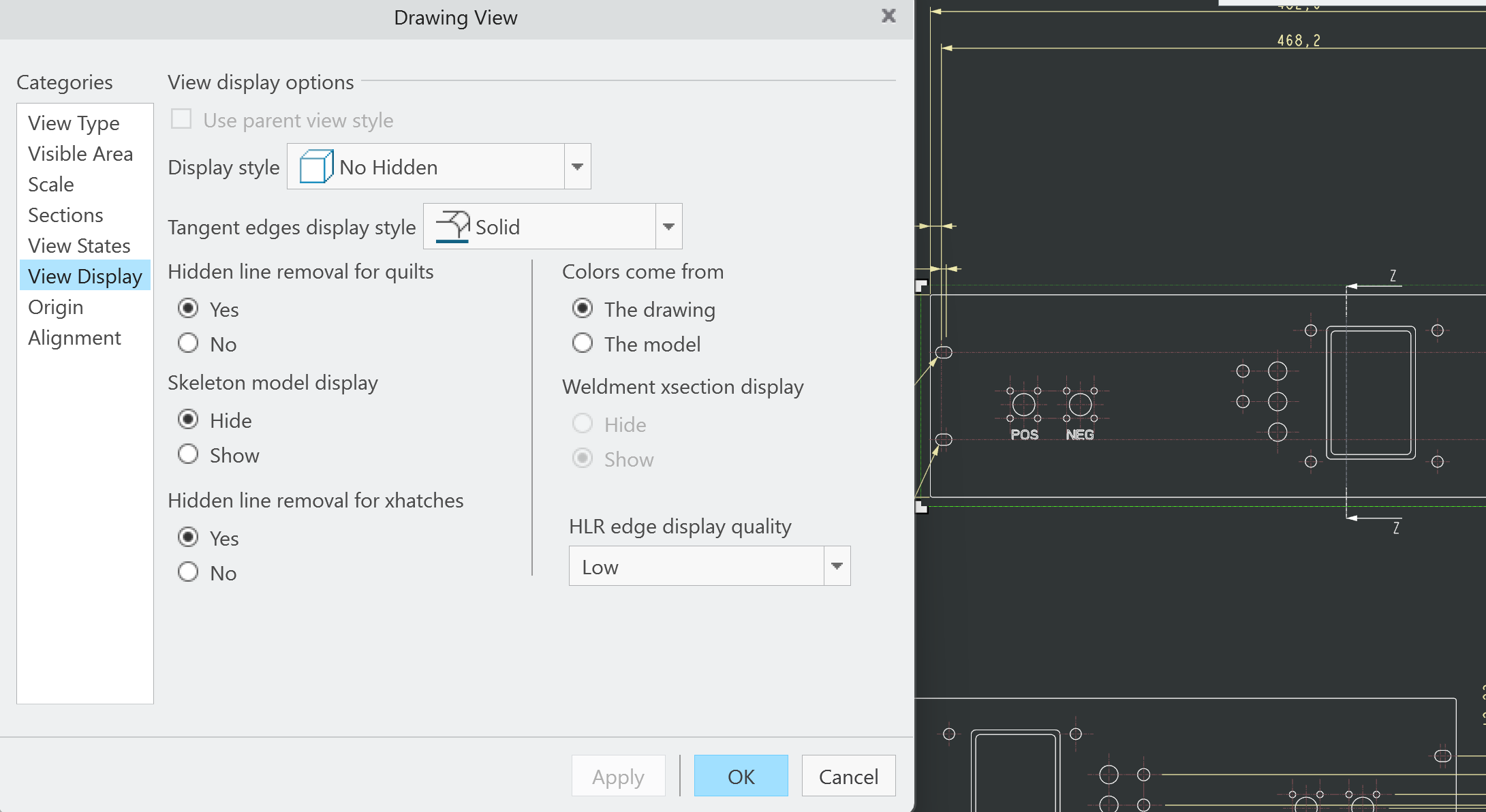
As per my initial post, I have played with modifying View Display. I've tried to modify it both in the quick access bar above the drawing itself as well as in the View Display tab of the Drawing Views (moving from Follow Environment to both Shaded with Edges and No Hidden, neither worked after pressing apply). I've added an image of applied No Display, in Drawing Views in case of verification needed, and I also exited that menu and regenerated in case that would change something — it did not.
As you say, there's always more to learn in Creo. I've been using Creo for a bit less than a decade now and there's always something that breaks when you don't expect it to. This is, however, the first time I'm using it without a built-up infrastructure of admins or experienced colleagues as I'm a one-man mechanical design army at my current job. I suspect that it might be something in my configuration.
I appreciate any further solutions or ideas you may have.

Jan 12, 2026
09:29 AM
- Mark as New
- Bookmark
- Subscribe
- Mute
- Subscribe to RSS Feed
- Permalink
- Notify Moderator
Please log in to access translation
Jan 12, 2026
09:29 AM
Configuration settings is generally the initial state but will be over-ridden by view specific settings.
Have you restarted creo since this began? Might be a glitch.
I'll be honest, I don't see hidden lines in view that it looks like you have selected but maybe I'm just not recognizing them since I don't see the part.
I see them in an original images attached on another view.
It's very difficult to troubleshoot something like this without access to the files. Can you share the model and drawing? zip it and attach.
Jan 13, 2026
04:44 AM
- Mark as New
- Bookmark
- Subscribe
- Mute
- Subscribe to RSS Feed
- Permalink
- Notify Moderator
Please log in to access translation
Jan 13, 2026
04:44 AM
Hello StephenW
Unfortunately a restart didn't resolve my issue. I will consider uploading a file and drawing if no other solution pans out.
Thank you for your input!


Jan 12, 2026
12:41 PM
- Mark as New
- Bookmark
- Subscribe
- Mute
- Subscribe to RSS Feed
- Permalink
- Notify Moderator
Please log in to access translation
Jan 12, 2026
12:41 PM
Have you tried the following config settings?
model_display_for_new_views no_hidden
tan_edge_display_for_new_views no_disp_tan
Jan 13, 2026
06:40 AM
- Mark as New
- Bookmark
- Subscribe
- Mute
- Subscribe to RSS Feed
- Permalink
- Notify Moderator
Please log in to access translation
Jan 13, 2026
06:40 AM
Hello Arnold,
I've adjusted those settings but nothing changed with the new Views I've placed to verify.
Thanks for the idea!


Jan 22, 2026
08:15 AM
- Mark as New
- Bookmark
- Subscribe
- Mute
- Subscribe to RSS Feed
- Permalink
- Notify Moderator
Please log in to access translation
Jan 22, 2026
08:15 AM
Hi @BAK_1995 ,
I wanted to see if you got the help you needed.
If so, please mark the appropriate reply as the Accepted Solution or please feel free to detail in a reply what has helped you and mark it as the Accepted Solution. It will help other members who may have the same question.
Of course, if you have more to share on your issue, please pursue the conversation.
Thanks,
Catalina
PTC Community Moderator