
Turn on suggestions
Auto-suggest helps you quickly narrow down your search results by suggesting possible matches as you type.
Showing results for
Please log in to access translation
Turn on suggestions
Auto-suggest helps you quickly narrow down your search results by suggesting possible matches as you type.
Showing results for
Community Tip - Visit the PTCooler (the community lounge) to get to know your fellow community members and check out some of Dale's Friday Humor posts! X
- Community
- Creo+ and Creo Parametric
- 3D Part & Assembly Design
- Visual Control of Datum Reference Frames on a draw...
Translate the entire conversation x
Please log in to access translation
Options
- Subscribe to RSS Feed
- Mark Topic as New
- Mark Topic as Read
- Float this Topic for Current User
- Bookmark
- Subscribe
- Mute
- Printer Friendly Page
Visual Control of Datum Reference Frames on a drawing

Jul 08, 2020
05:41 PM
- Mark as New
- Bookmark
- Subscribe
- Mute
- Subscribe to RSS Feed
- Permalink
- Notify Moderator
Please log in to access translation
Jul 08, 2020
05:41 PM
Visual Control of Datum Reference Frames on a drawing
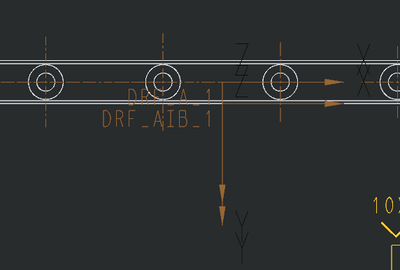
While using GD&T Advisor the DRF's get completed under each Feature Control Frame.
They work great to show what surfaces are associated to what datums.
The issue being seen is they are being displayed on the drawing views.
Is there a DTL setting to control their display on the drawing.
Using CP4 M120 and
GD&T Advisor 3.2.2.60.
Labels:
- Labels:
-
2D Drawing
- Tags:
- CP4 DRF
- gd&t advisor
0 REPLIES 0


