13-Aquamarine
April 10, 2014
Solved

Wrap in WF5 - what am I doing wrong?

  • April 10, 2014
  • 2 replies
  • 2303 views

Following on from Antonius' spring tutorial:

http://communities.ptc.com/docs/DOC-3864

I tried to do something similar in WF5, but couldn't make the wrap work.

In the attached version I've even brought the edges of the sketch in so that they're clearly within the surface.

I'm sure I'm missing something obvious - would someone please show me what?

Best answer by TomD.inPDX

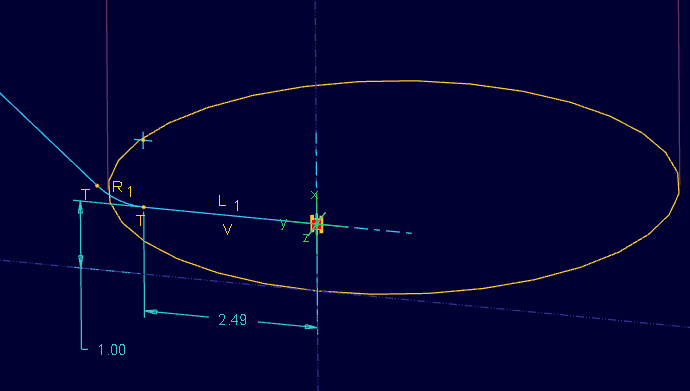
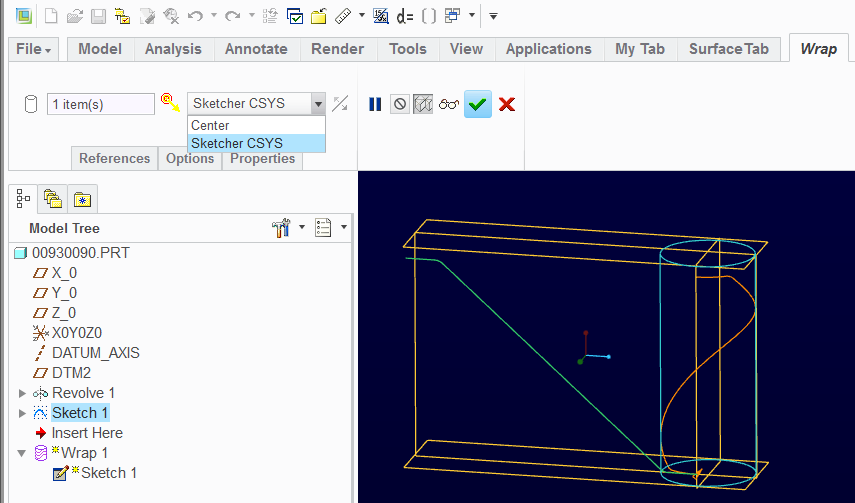
That is an easy one, Jonathan. You missed putting in the coordinate system in the sketch itself. By default, the Wrap looks for this and it it doesn't find it, it centers the sketch and re-arranges the mapping (in a bad way for the most part). So I recommend you -always- use the CS method.

CS_in_Warp_sketch.PNG

CS_in_Warp.PNG

2 replies

Patriot_1776
22-Sapphire II
April 10, 2014

I can't look at the file since I'm on WF5/creo, but the #1 thing people misss is that you need a CS in the sketcher for the curve. Also, I like to make my surfaces a little larger than the curve to be wrapped so that you don't have a wrap on an edge, or falling off the surfacce. Also, depending on the complexity or ratio between the smallest feature and largest, you may (should) go to absolute accuracy of .0001 or smaller.

Screen shot would be helpful for those of us backward types that can't access the model.

17-Peridot
April 10, 2014

That is an easy one, Jonathan. You missed putting in the coordinate system in the sketch itself. By default, the Wrap looks for this and it it doesn't find it, it centers the sketch and re-arranges the mapping (in a bad way for the most part). So I recommend you -always- use the CS method.

CS_in_Warp_sketch.PNG

CS_in_Warp.PNG

Patriot_1776
22-Sapphire II
April 10, 2014

Figured that was it, its easy to forget!