Turn on suggestions
Auto-suggest helps you quickly narrow down your search results by suggesting possible matches as you type.
Showing results for
Please log in to access translation
Turn on suggestions
Auto-suggest helps you quickly narrow down your search results by suggesting possible matches as you type.
Showing results for
Community Tip - Learn all about PTC Community Badges. Engage with PTC and see how many you can earn! X
- Community
- Creo+ and Creo Parametric
- 3D Part & Assembly Design
- set datum won't display correctly
Translate the entire conversation x
Please log in to access translation
Options
- Subscribe to RSS Feed
- Mark Topic as New
- Mark Topic as Read
- Float this Topic for Current User
- Bookmark
- Subscribe
- Mute
- Printer Friendly Page
set datum won't display correctly


Jun 04, 2010
01:51 PM
- Mark as New
- Bookmark
- Subscribe
- Mute
- Subscribe to RSS Feed
- Permalink
- Notify Moderator
Please log in to access translation
Jun 04, 2010
01:51 PM
set datum won't display correctly
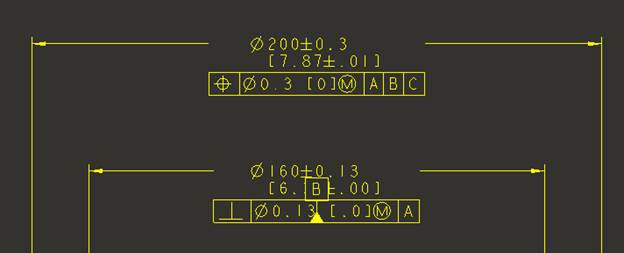
I have datum B attached to the Ø160 dimension. When I add the gtol the datum flips as shown. If I drag the datum below the gtol box the datum base moves to the top of the gtol box. It is determined to cross the gtol box no matter what I do. Aaaargh!!! However, if I redefine the datum and select the Ø200 dimension it looks fine. Do you have any ideas on what is happening and how I can fix before I put my fist through the monitor? 🙂
Thanks,
Eric
Wildfire 4.0 Datecode m090
Windchill 9.0 Datecode m030
This thread is inactive and closed by the PTC Community Management Team. If you would like to provide a reply and re-open this thread, please notify the moderator and reference the thread. You may also use "Start a topic" button to ask a new question. Please be sure to include what version of the PTC product you are using so another community member knowledgeable about your version may be able to assist.
Thanks,
Eric
Wildfire 4.0 Datecode m090
Windchill 9.0 Datecode m030
This thread is inactive and closed by the PTC Community Management Team. If you would like to provide a reply and re-open this thread, please notify the moderator and reference the thread. You may also use "Start a topic" button to ask a new question. Please be sure to include what version of the PTC product you are using so another community member knowledgeable about your version may be able to assist.
0 REPLIES 0