

Mechanism Dynamics, Integration Settings, Frame Rates, and Trace Curves: Observations and Questions
Creo 4, M100
I was playing around with trace curves in a toy mechanism model I created to understand how they behave and I noticed a few things I didn't expect.
The mechanism I created is a rotating double pendulum - a double pendulum attached to a pivoting center component. The analysis type is dynamic and the only load I have is gravity. There's no friction or damping so no energy loss.
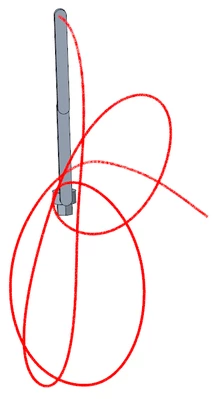
Because the trace curve tool requires a .pbk file and because I understood .pbk files to only be a record of each frame, I wondered how frame rates would affect the trace curve accuracy. So I ran several analyses with different frame rates (1, 10, 100, & 1000, all starting from the same arbitrary snapshot), created trace curves for them, and compared the differences. After 1 second, the difference between 1 FPS & 1000 FPS was less than 1 millimeter. After 2 seconds, the difference was so great that the curves ended on different sides of the assembly.
At first, I was surpised to see that even with a frame rate of 1 FPS the trace curve point array had 75 points when I expected only two. The 1000 FPS trace curve had 1001 points like I expected. That made me think that Creo was interpolating between frames in the .pbk so it created as many datum points as necessary to create an accurate trace curve. Pretty neat, I thought - PTC made this tool so it's relatively insensitive to frame rate. But there's no way to accurately interpolate 75 points between just two frames even if you know the positions, velocities and accelerations for them. And why did the 1000 FPS run have the same number of datum points as the frame rate plus one? So what is the .pbk file really recording?
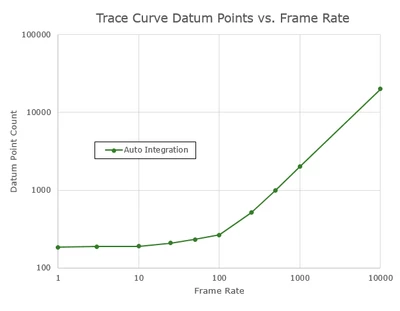
I repeated the above experiment with more FPS settings (1, 3, 10, 25, 50, 100, 250, 500, 1000, 10000) over two seconds and made trace curves for them. When I plotted (log-log) the datum point counts against the frame rates (see the plot below) I saw a curve with two distinct regions: 1) flat at low frame rates with little to no correlation and 2) positive correlation at high frame rates. The curve transitions between 25 FPS & 250 FPS.
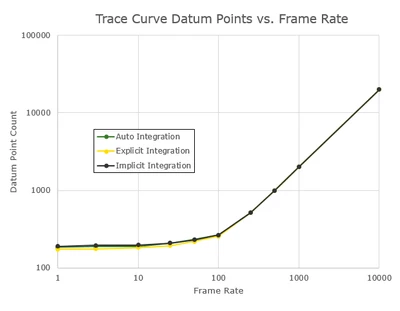
The experiments in the last paragraph were done with the default mdo_integration_method setting: "auto". I repeated the experiments with that config option set to "implicit" and "explicit", created trace curves for them, and plotted the datum point counts against the frame rates. See the data and plot below. Although the different integration methods did have an effect on the number of datum points, this was not significant and the three plotted curves (auto, implicit, explicit) were nearly identical.
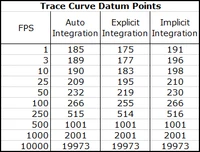
Another metric I used to study this was the lengths of the trace curves. The three 10K FPS trace curves had nearly the same lengths and so I used those values to calculate % error on the other trace curve lengths. When I plotted those % errors I saw significant differences between the three integration methods. See the data and plot below. Explicit integration had the most error at low frame rates and implicit had the least error. It's interesting to note that there was no significant difference after 500 FPS.
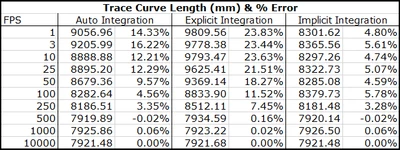
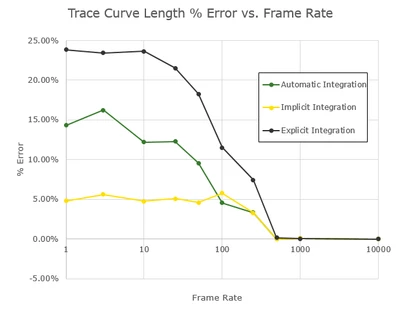
I think what's happening here is that at low frame rates the dynamic analysis is automatically lowering (adapting) the analysis time step depending on what the mechanism is doing - during brief moments of high velocity or acceleration for example. The small frame increments with high frames rates are fine enough that Creo never needs to lower the analysis time step below them.
I think the source of my confusion is that the term "frame rate" is misleading. It sounds like the frame rate is just setting how frequently the .pbk file is written, and while that's true, the frame rate also affects the analysis step size. But apparently only at high frame rates and depending on what the mechanism is doing. I understand that my mechanism is a chaotic system in that small changes in initial conditions can wildly affect results, but I'm surprised to learn that "frame rate" can be one of those small changes. In other words, I expected the frame rate to be independent from the analysis time step, but that's not the case.
So, you have the analysis time step which Creo adapts as necessary and you have the frame rate which is the only thing the user has control over. I searched Creo's help file and support.ptc.com, but I didn't find any info on this. I found very little content on frames rates and nothing on the adaptive time stepping.
I should mention that the experiments above were done with a relative mechanism tolerance of 0.001. I may investigate the effect of cranking that up by several orders of magnitude. I also may investigate if kinematic analysis results are affected by frame rates and integration methods as well.
Questions:
What are the rules governing the adaptive time stepping in dynamic analyses?
Is there a way for the user to control the adaptive time step other than through the frame rate?
Is there a way to turn off the adaptive time stepping and have the frame rate be the only control?
Is adaptive time stepping a feature of dynamic analyses only (including static and force balance) or does it work for kinematic analyses as well?
What are the rules governing the number of datum points in trace curves?
What are some examples of situations where one might want to use only implicit integration or only explicit integration?
What are the rules governing when the automatic integration setting switches between implicit and explicit integration?
For the automatic integration setting, will Creo switch between implicit and explicit the middle of an analysis or does it pick one at the beginning of an analysis and use only that?
Is the .pbk file a record or every time step in the analysis or only of each frame?
In summary, these tools are doing things that aren't expected and there's no documentation to explain why. This makes it difficult to trust the results they give. I'd love to hear from PTC on this, but I am prepared to be disappointed.