cancel
Showing results for 
Search instead for 
Did you mean: 
cancel
Showing results for 
Search instead for 
Did you mean: 

Community Tip - Need help navigating or using the PTC Community? Contact the community team. X

Translate the entire conversation x

Mesh problem in assembly

ptc-961510
3-Newcomer

Mesh problem in assembly

I am using Creo Parametric Release 12.4 and Datecode12.4.2.0

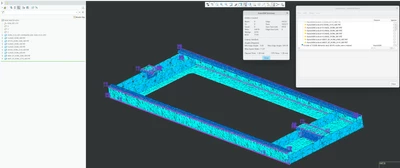
Meshing problem. I have 2 assembles. Each are messing fine. But when I combine them it fails.

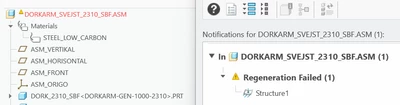
Here are the errors that I faced
Could not complete creating elements on all the seleted entities.
3 REPLIES 3

Only in case you provide geometry community will be able to help you.

Shots to the air. Check connection interface between models if there are any tangent edges/sufraces, check model tolerances. 
If creo doesn't show any error try changing geometry tolerance settings use absolute/relative and play with that untill creo shows you at least some edges.

ilyachaban_0-1770304797962.png


This is pretty vague. This problem is not unusual that combining fails meshing when individually works.

Here are some tips, but for sure I do not have time to explain in full details, because there are many.

-->It is usually related to geometry quality and mesh quality and settings.

There should be more feedback in the diagnosis when meshing than just this error.

Check tools - geometry checks to see if bad geometry

Check for geometry interferences and remove them.

Make sure model accuracy is absolute and consistent for all components.

Make mesh global tolerance setting absolute instead of relative.

Gradually assemble component by component to find the trouble component.

Make sure global simulation settings like default interface are not different between sessions that work and don't work.

If some geometry is imported and not native Creo those are first to check.

Check for short edges, sliver surfaces and fix them.

last resort - simplify geometry... start with removing most of the small rounds to make sharp corners. (unless in critical area)


Conventional meshing = loose approximation to supplied geometry = more forgiving mesh step and results more dependent on meshing.

Creo Simulate meshing = tight capture of supplied geometry = more difficult when geometry has bad conditions. but results less dependent on meshing.


@SweetPeasHub 's suggestions are great. I would add: Manually creating the FEM from scratch rather than allowing the FEM to be created as part of the study sometimes fixes the issue. Its an easy thing to try. It it meshes outside of the study you can save it and then run the study.

Announcements

Top Tags