
Turn on suggestions
Auto-suggest helps you quickly narrow down your search results by suggesting possible matches as you type.
Showing results for
Please log in to access translation
Turn on suggestions
Auto-suggest helps you quickly narrow down your search results by suggesting possible matches as you type.
Showing results for
- Community
- Creo (Previous to May 2018)
- Creo Modeling Questions
- how to make model dimensions larger
Translate the entire conversation x
Please log in to access translation
Options
- Subscribe to RSS Feed
- Mark Topic as New
- Mark Topic as Read
- Float this Topic for Current User
- Bookmark
- Subscribe
- Mute
- Printer Friendly Page
how to make model dimensions larger


Jan 08, 2015
09:28 AM
- Mark as New
- Bookmark
- Subscribe
- Mute
- Subscribe to RSS Feed
- Permalink
- Notify Moderator
Please log in to access translation
Jan 08, 2015
09:28 AM
how to make model dimensions larger
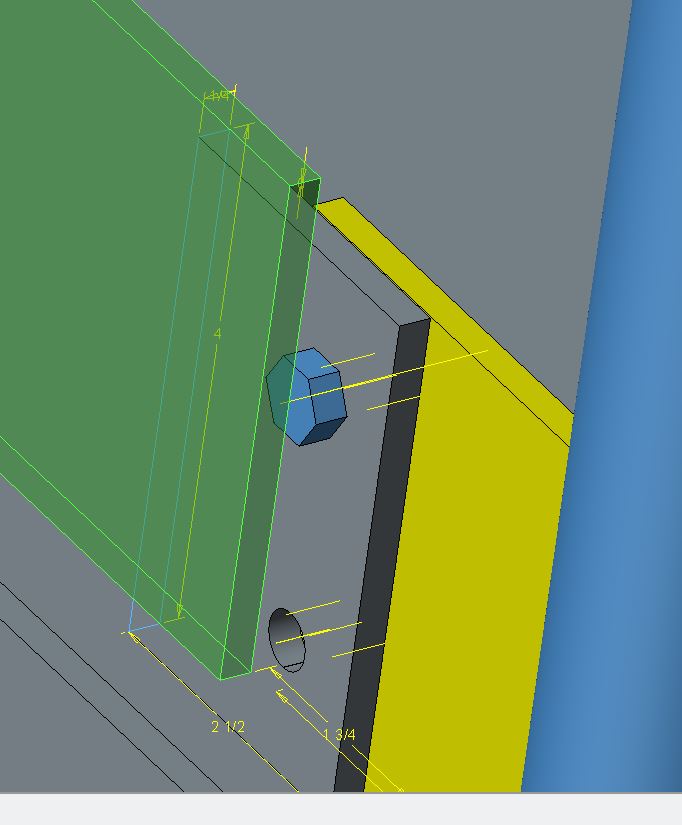
this should be an easy one for all you guys out there.
How do I make these dimensions larger?
Solved! Go to Solution.
Labels:
- Labels:
-
Parametric
ACCEPTED SOLUTION
Accepted Solutions


Jan 08, 2015
04:46 PM
- Mark as New
- Bookmark
- Subscribe
- Mute
- Subscribe to RSS Feed
- Permalink
- Notify Moderator
Please log in to access translation
Jan 08, 2015
04:46 PM
Doesn't the hidden config control this?
Found it - again. http://www.synthx.com/tom/sy_tip_0307.htm
TEXT_HEIGHT_FACTOR 40
7 REPLIES 7


Jan 08, 2015
01:36 PM
- Mark as New
- Bookmark
- Subscribe
- Mute
- Subscribe to RSS Feed
- Permalink
- Notify Moderator
Please log in to access translation
Jan 08, 2015
01:36 PM
This might help read the text better:
enable_transparent_text_bg *yes/no
Jan 08, 2015
04:46 PM
- Mark as New
- Bookmark
- Subscribe
- Mute
- Subscribe to RSS Feed
- Permalink
- Notify Moderator
Please log in to access translation
Jan 08, 2015
04:46 PM
Doesn't the hidden config control this?
Found it - again. http://www.synthx.com/tom/sy_tip_0307.htm
TEXT_HEIGHT_FACTOR 40
Jan 08, 2015
05:00 PM
- Mark as New
- Bookmark
- Subscribe
- Mute
- Subscribe to RSS Feed
- Permalink
- Notify Moderator
Please log in to access translation
Jan 08, 2015
05:00 PM
David, that is not doing anything for me in Creo 2.0... at least not in session.
edit: I take it back... it takes affect after a while 


Jan 08, 2015
05:07 PM
- Mark as New
- Bookmark
- Subscribe
- Mute
- Subscribe to RSS Feed
- Permalink
- Notify Moderator
Please log in to access translation
Jan 08, 2015
05:07 PM
Isnt this controlled in the .dtl file in the part or assembly? I dont have access to Creo right now to look but i think you can control it there or in the properties menu for the dims.
Jan 09, 2015
12:20 PM
- Mark as New
- Bookmark
- Subscribe
- Mute
- Subscribe to RSS Feed
- Permalink
- Notify Moderator
Please log in to access translation
Jan 09, 2015
12:20 PM
You might add an addendum to your support case 
It wouldn't be the first time CS was up for learning something new... or old... whatever.
Jan 12, 2015
12:51 PM
- Mark as New
- Bookmark
- Subscribe
- Mute
- Subscribe to RSS Feed
- Permalink
- Notify Moderator
Please log in to access translation
Jan 12, 2015
12:51 PM
The only response to that is "WOW!"
Why bother implementing a good idea.
Jan 09, 2015
09:58 AM
- Mark as New
- Bookmark
- Subscribe
- Mute
- Subscribe to RSS Feed
- Permalink
- Notify Moderator
Please log in to access translation
Jan 09, 2015
09:58 AM
I can confirm that it does work. I'm using Creo 3.0 M020.
Although you can't search for it, you can enter it manually into the configuration options.
I love this group.
Thanks to all of you that help.
-Joe

