
10-Marble
June 18, 2024
Question

Error PRIME 10: This function accepts at most 18 arguments but is applied to 19

  • June 18, 2024
  • 4 replies
  • 5133 views

When running a Mathcad file in PRIME10 created in PRIME 9, I get an error:

“This function accepts at most 18 arguments but is applied to 19”

This restriction was not present in Mathcad 15 and earlier versions of PRIME.
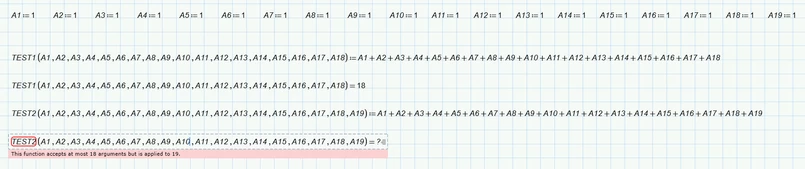
 

TNOHTH_0-1718701240348.png

How to solve this?


added: 
Thanks for your reactions. The problem can be solved with future developments.

However, what about the existing MC sheets with locked areas with passwords where changes are not possible? This means these worksheets are unusable . Without an update from the author/owner of the sheet, this remains a serious problem. I would call it a bug, and Mathcad users should be warned about this problem before updating. In my opinion, the limit should be changed in a service pack P10.

4 replies

19-Tanzanite
June 18, 2024

Use subscripted variables:


Sums.png


Alan

25-Diamond I
June 18, 2024

@TNO-HTH wrote:

When running a Mathcad file in PRIME10 created in PRIME 9, I get an error:

“This function accepts at most 18 arguments but is applied to 19”

This restriction was not present in Mathcad 15 and earlier versions of PRIME.


I can confirm that you found yet another a new bug in Prime 10.

Functions defined for more than 18 arguments don't work!

Feel free to go through the hassle and report it to PTC support.


Werner_E_0-1718711937478.png

The attached file is in Prime 9 version where the bug does not yet occur, so if you open the sheet in Prime 10, you have to recalculate the sheet to see the difference and the error occurring.


A workaround, as Alan already suggested, is to use a vector with all 19 or more arguments as the only function argument.  If you need more meaningful variable names in you calculations (you would have to use indexed vector name) you could do it (a bit awkward) as shown here:

Werner_E_0-1718712616178.png

Additional benefit of this approach is that neither the function definition nor the function call take up much horizontal space and don't spill over the right page margin 😉


19-Tanzanite
June 18, 2024

Yes, few moments ago I wanted to post also me this, but I was busy in meanwhile.
@DJNewman another bug was found in PRIME 10...

Cornel_0-1718713254461.png


Cornel_1-1718713267539.png

DJNewman
18-Opal
June 18, 2024

I agree that it's weird, especially because I can replicate that Prime 9 accepts many more arguments than Prime 10 does, but I disagree that it's a bug, given that this is documented in Help:

https://support.ptc.com/help/mathcad/r10.0/en/index.html#page/PTC_Mathcad_Help/about_built-in_functions.html#


"All PTC Mathcad functions, built-in or user-defined, are limited to accepting a maximum of 16 arguments."


(I guess you could say Help is wrong in that it seems to be 18 arguments and not 16, but I won't press the issue.)


The same quote is on the same page in Prime 9's Help:

https://support.ptc.com/help/mathcad/r9.0/en/index.html#page/PTC_Mathcad_Help/about_built-in_functions.html#


Edit: You have a few courses of action...
1. You can email feedback to the Mathcad Documentation team and say they should repeat the argument limitation number (and maybe use the correct number) on the page about defining user-defined functions by clicking the envelope in the corner

2. You can submit a Mathcad Idea asking the development team to increase the number of arguments for user-defined functions; though you'll have to give some kind of use case justification for why you need so many

PTC Marketer for Creo and Mathcad. I run their YouTube channels, some Creo campaigns, and all Mathcad campaigns and communications.
Community Moderator
June 25, 2024

Hello @TNO-HTH


It looks like you have some responses from some community members. If any of these replies helped you solve your question please mark the appropriate reply as the Accepted Solution. 

Of course, if you have more to share on your issue, please let the Community know so other community members can continue to help you.

Thanks,

Vivek N.
Community Moderation Team.

23-Emerald IV
June 25, 2024

I guess the problem of the OP is not solved. It could be solved if:

PTC corrects the documentation to become in line with the implementation, and I strongly recommend an error message on the function definition, where the number of arguments is above the limit.

Better still would be to remove the limitation from the implementation ( keep it as it was before Prime 10) and from the documentation.


Success!

Luc

DJNewman
18-Opal
October 9, 2024

This has been fixed in Mathcad Prime 10.0.1.0.

This screenshot is of Werner's example with the function defined with 19 arguments. Note that in 10.0.0.0, using it with 17 arguments failed (as it should), the 18 arguments passed (as it shouldn't), and the 19 arguments failed (as it shouldn't).

In 10.0.1.0, 17 arguments fail, 18 arguments fail, and 19 arguments passed, which is expected behaviour.

DJNewman_0-1728479380017.png


(And if you give it 20 arguments it fails again, as it should.)

PTC Marketer for Creo and Mathcad. I run their YouTube channels, some Creo campaigns, and all Mathcad campaigns and communications.
19-Tanzanite
October 9, 2024

Message deleted by author

DJNewman
18-Opal
October 9, 2024

I'm not sure I understand...?


Because the user-created function in the example takes 19 arguments.
If the user wanted some other "X" amount of arguments, then replace 19 with that amount.

It wouldn't make sense for the user-created function to take less than "X" or more than "X".

No one thinks that 10.0.0.0 failing at this was a good thing, so 10.0.1.0 fixed it.
If you're asking why 10.0.0.0 happened to break at this amount of arguments, I have no idea, but obviously it wasn't intended behaviour.

PTC Marketer for Creo and Mathcad. I run their YouTube channels, some Creo campaigns, and all Mathcad campaigns and communications.