1-Visitor
April 11, 2016
Solved

How to define multiple variables from the results of a single IF statement?

  • April 11, 2016
  • 4 replies
  • 5209 views

A simplified example probably illustrates my question best:
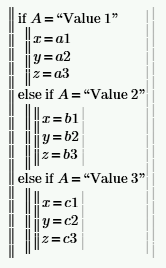
question.PNG

I would like to set multiple variables based on the value of A in my example above.

Thanks,

Kevin

Best answer by LucMeekes

You're using the 'equals' operator "=" where you should use the assignment operator for programs "<-".

So do like this:

You use:

to test if A equals the string "Value1". The result is either True (nonzero) or false (zero).

You use:

to assign a value of 3 to the variable x, outside of programming.

Inside of a program, the assignment should look like:

Success!
Luc

4 replies

LucMeekes23-Emerald IVAnswer
23-Emerald IV
April 12, 2016

You're using the 'equals' operator "=" where you should use the assignment operator for programs "<-".

So do like this:

You use:

to test if A equals the string "Value1". The result is either True (nonzero) or false (zero).

You use:

to assign a value of 3 to the variable x, outside of programming.

Inside of a program, the assignment should look like:

Success!
Luc

23-Emerald V
April 12, 2016

Kevin Wadley wrote:

A simplified example probably illustrates my question best:

question.PNG

I would like to set multiple variables based on the value of A in my example above.

Luc's answer is the correct one.  Here's another way of assigning values en masse that I sometimes use to make a program more visually compact.  Given that Mathcad can do calculations inside an array, you can also use a variant of this method to attach comments to an expression (to ensure they remain aligned).

Stuart

1-Visitor
April 14, 2016

Luc & Stuart-

Thank you for the reply, but I'm still not exactly there.

I want to use my results of my IF statement outside of the program, so I need to define multiple variables outside the program as well.

For example, I need to define variables X, Y, & Z from the results of my program:

Capture.PNG

where X = x+y+z

          Y = 2x

          Z = 4y

Thanks again,

Kevin

25-Diamond I
April 14, 2016

Maybe that way:

You may also consider turning the routine into a function with A as argument.

WE

kwadley1-VisitorAuthor
1-Visitor
April 17, 2016

Thanks all!

I thought you might like to see my final program:

Complete.PNG

Comments are appreciated if you see something I could do better.

Kevin