6-Contributor
January 10, 2023
Solved

How to get the correct answer if the equation have multiple solutions ?

  • January 10, 2023
  • 2 replies
  • 1795 views

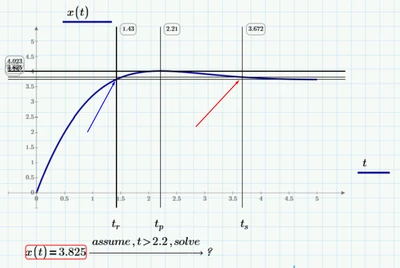
I have a function like this.

Ackurdeeve_0-1673369112771.png

And I want to get the solution when t>2.21. if I use SOLVE only, it get the answer shown in blue arrow.

How can I get the answer in red arrow? Thanks.

Ackurdeeve_1-1673369168444.png


Best answer by Werner_E

Actually unfortunately the symbolic "solve"  very often ignores an "assume" modifier, but I am surprised that it states "no solution found" instead of just returning the solution 1.5... which it also finds without "assume".


But never mind, you don't need an "exact" symbolic solution anyway, just a numeric value. So its better to use a numeric method to get it.

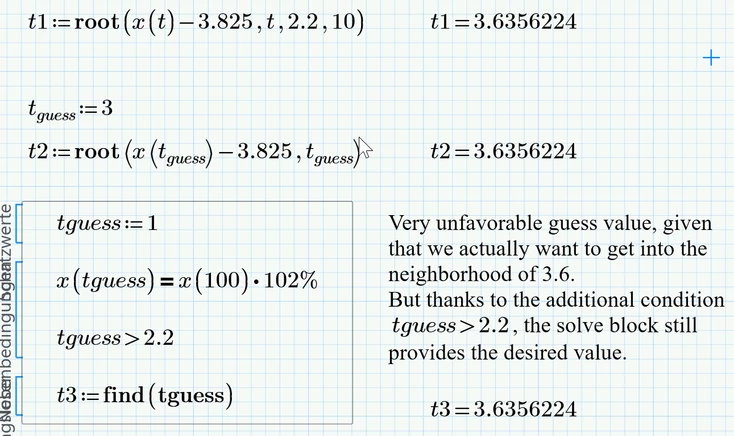
Prime offers the "root" function which can be used in two ways (either by providing an interval or by providing a guess value) and a solve block to do the job. The picture shows the three ways to obtain the desired solution

Werner_E_2-1673373498855.png


2 replies

Werner_E25-Diamond IAnswer
25-Diamond I
January 10, 2023

Actually unfortunately the symbolic "solve"  very often ignores an "assume" modifier, but I am surprised that it states "no solution found" instead of just returning the solution 1.5... which it also finds without "assume".


But never mind, you don't need an "exact" symbolic solution anyway, just a numeric value. So its better to use a numeric method to get it.

Prime offers the "root" function which can be used in two ways (either by providing an interval or by providing a guess value) and a solve block to do the job. The picture shows the three ways to obtain the desired solution

Werner_E_2-1673373498855.png


DJNewman
18-Opal
January 10, 2023

Though Werner demonstrated this is easily solvable numerically, I don't believe the symbolic engine/keyword "assume" should be behaving this way, so I submitted a case to PTC Support on your behalf and attached your worksheet. Hopefully R&D can use this information to fix the issue in a future release of Mathcad Prime.

PTC Marketer Creo and Mathcad. I run their YouTube channels, some Creo campaigns, and all Mathcad campaigns and communications.
25-Diamond I
January 10, 2023

Thanks!

I agree that "assume" is not behaving correctly in this example.

As I wrote this was an annoyance even in real Mathcad that "assume" often was ignored, mostly when the symbolics had to switch to its numeric mode because no algebraic solution could be found.
But it got even worse in Prime. Here a simpler example (the error message still is "no solution found")
Its a screenshot from Prime 6

Werner_E_0-1673375809414.png

and here the same using the legacy symbolic engine in Prime 6

Werner_E_1-1673375886863.png

It was all done in Prime 6 and maybe the symbolics has been improved in the meantime ???


The original problem of @Ackurdeeve  can't be solve using the old engine, either. The behaviour is different, though - instead telling us that no solution could be found, muPad simply ignores the assume modifier which is what I am used from real Mathcad but of course it isn't any better:

Werner_E_3-1673376187114.png