
1-Visitor
October 20, 2019
Solved

I can't seem to get the summation function to work properly in mathcad using pre-defined vectors.

  • October 20, 2019
  • 2 replies
  • 4206 views

mathcadvectors.JPGmathcadsum.JPG


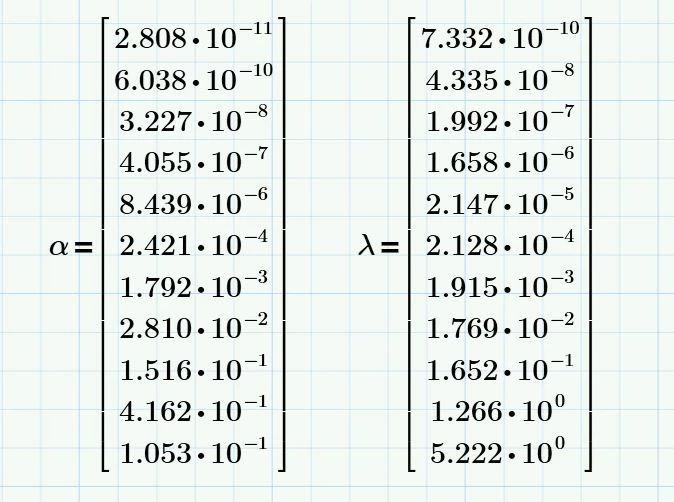
Here is the issue, I've tried every which way to get this summation to work, but it keeps giving me an "undefined variable" error.  I tried adding the matrix vector operator "[" to indicate the "i" index, but that didn't seem to work either. 

 

mathcadsum2.JPG


Can someone point me in the right direction here?  
Best answer by Werner_E

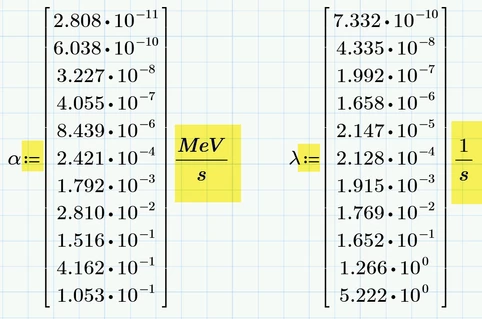
1) You used the wrong equal sign when you tried to define alpha and lambda. You must use the assignment (:=) and not the boolean (the bold equal sign)


2) At least lambda must also be assigned the correct unit (1/s) as otherwise you get an error because the exponent lambda*t2 must be dimensionless. You may consider assigning alpha a correct unit, too, so the outcome Gamma.total can be shown with the correct unit.

B1.png

B2.png

Gamma normally will be shown in W. If you want MeV/s to be seen, you simply overwrite W by the unit you want to see and Prime adjusts the rest as needed.


2 replies

21-Topaz II
October 20, 2019

Hi,

Matrix indexing is first element is numbered zero by default.  Your summation interval is 1 to 11.


Two options.

One change the indexing to 0 to 10

Two set the worksheet variable ORIGIN := 1


Cheers

Terry


21-Topaz II
October 20, 2019

Hi,


You also need to add the indexing [i to each instance of alpha and lambda in the summations


Cheers

1-Visitor
October 20, 2019

So, I added '[' index i's to all of the lambda and alpha terms and changed the summation bounds from i=0 to 10, but MATHCAD is still giving me the same error.  


MAATHCADSUM3.JPG

25-Diamond I
October 20, 2019

Your first approach can't work the way you had set it up but there might be a simples way doing it using vectorization


Your second approach should work if you have set ORIGIN to 1 and if you used the correct subscript (matrix index as you said you have done) and if the various P.. and t.. are defined above.

The error message you describe ("undefined variable") indicates that the problem is not a wrong ORIGIN setting but rather a problem with Prime's infamous auto-label feature. Check if all lambda and all alpha are labelled the same (either "variable" or "-").


It's hard to debug just a picture and so it would be a good idea if you attach your worksheet as well.

If you don't use the latest version of Prime you should also state which version you are using.


1-Visitor
October 20, 2019

I'm not really sure what you mean by "setting ORIGEN:=1."  I attached my worksheet and made corrections to the indexing range.  The problem starts on page #4.  I'm using Prime 5.0.  

Werner_E25-Diamond IAnswer
25-Diamond I
October 20, 2019

1) You used the wrong equal sign when you tried to define alpha and lambda. You must use the assignment (:=) and not the boolean (the bold equal sign)


2) At least lambda must also be assigned the correct unit (1/s) as otherwise you get an error because the exponent lambda*t2 must be dimensionless. You may consider assigning alpha a correct unit, too, so the outcome Gamma.total can be shown with the correct unit.

B1.png

B2.png

Gamma normally will be shown in W. If you want MeV/s to be seen, you simply overwrite W by the unit you want to see and Prime adjusts the rest as needed.
