8-Gravel
February 12, 2025
Solved

Keep adjacent matrix row data when filtering a separate related matrix for min values in Mathcad

  • February 12, 2025
  • 2 replies
  • 1465 views

Please see the attached file for more information. This is related to my previous post from 11-Feb-2025. Essentially, I have several single column matrices that when augmented form a table of data. Data for one column in the large table is contained in Matrix A which has repeated values. Thus, Matrix A was filtered (my previous post) such that only unique values from Matrix A were used to populate Matrix C. The minimum values in Matrix B for a repeated Matrix A value were extracted and contained in Matrix D (again covered in my previous post).

Please help to produce another matrix (Matrix "Gkeep") that contains the data in an adjacent column (i.e., another separate related matrix called Matrix G) that has the same row entry value as the row kept after filtering for unique values in A and minimum values in Matrix B. Hence, the original large table would be made by augmenting Matrices A, G & B. The summary table would be Matrices C, Gkeep & D.
I plan to use this for several columns, but a single case I can use repeatedly to create the summary table would be fine.   

I am using Mathcad Prime 10.
Best answer by Werner_E

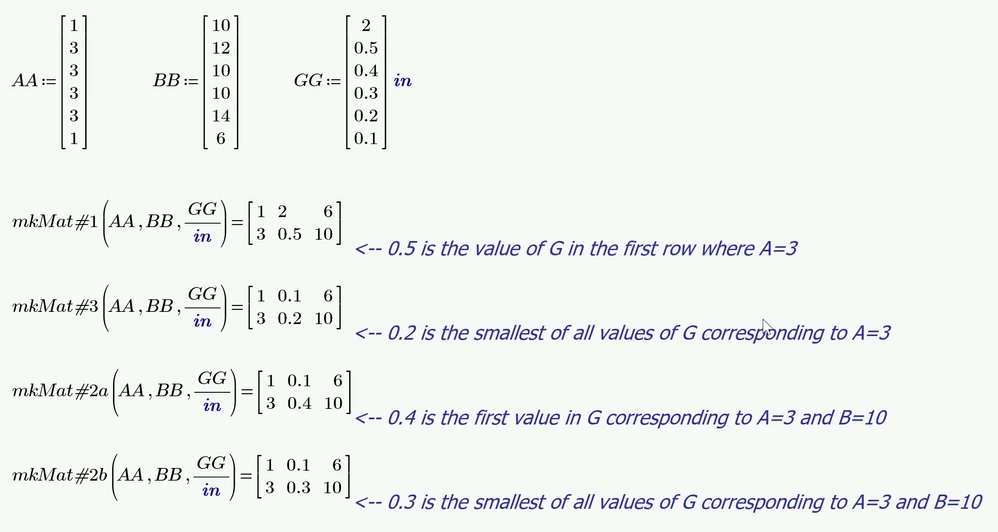
Here are functions creating the matrices in one go for all four mentioned interpretations of your demand.

#3 could be written much shorter but I used the same basic approach for all four.

Using your test data all four functions return the very same final matrix. This is mainly because the data in your vectors is fairly sorted in ascending order.

Werner_E_3-1739456438715.png


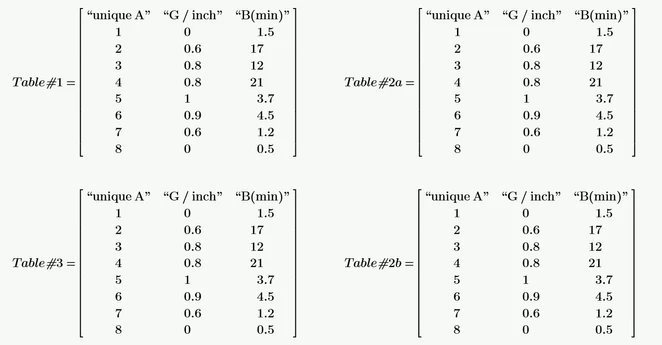
So here is some test data to demonstrate the difference of the functions. Numbering #1, #2a, #2b and #3 was done to match the numberin in my last answer here in this thread.

My best guess is that you are looking for #2b, right?

Werner_E_2-1739456275943.png


2 replies

14-Alexandrite
February 12, 2025

If "A" is your array that you use to find duplicates in and you want to use that to filter arrays B, C , D, E, F, G, etc., the repeat your program but replace array "B" for whatever other array you want filtered.  It would be even better if you made one generic function so that you do not need to duplicate the program every time.

SPauliszyn_0-1739401409403.png


8-Gravel
February 13, 2025

Thank you.

25-Diamond I
February 13, 2025

Its not clear to me which value in vector G you would like to keep in case of the following demo data

Werner_E_0-1739414951819.png

All values correspond to A=3. In B 10 remains because its the smallest value in B corresponding to A=3.

But which value of vector G should remain?

  1. 5 in, because its the value of the first row with A=3
  2. 4 in, because this value corresponds to the smallest value in B
  3. 3 in, because its the smallest value in G


The solution of @SPaulis  gives you option #3.

From your description I got the impression that you mean option #2

Unfortunately with your test data the result would be the same for all three options.


Furthermore, if #2 is meant, you have to specify which value of G should remain in a case as in your test data with A=4. The minimum value in vector B is 21 but this value is present twice. The corresponding values in G are different (0.8 in and 2.3 in). In you sheet you write that you want to keep the 0.8 in. Why? Because its the smallest of the two values or because its the value in the first row with A=4 and B=21?


BTW, Prime can deal pretty well with units. You don't have to divide by "m" and then multiply 39.37.... Simply divide by the unit you want to see the values displayed in:

Werner_E_1-1739416286078.png

Instead of using text boxes outside of the matrix you may add a header row

Werner_E_2-1739416661207.png


Werner_E25-Diamond IAnswer
25-Diamond I
February 13, 2025

Here are functions creating the matrices in one go for all four mentioned interpretations of your demand.

#3 could be written much shorter but I used the same basic approach for all four.

Using your test data all four functions return the very same final matrix. This is mainly because the data in your vectors is fairly sorted in ascending order.

Werner_E_3-1739456438715.png


So here is some test data to demonstrate the difference of the functions. Numbering #1, #2a, #2b and #3 was done to match the numberin in my last answer here in this thread.

My best guess is that you are looking for #2b, right?

Werner_E_2-1739456275943.png


8-Gravel
February 13, 2025

Thank you. This is awesome!!!

The solution I was after was #2a. I have implemented it into my calculation and everything is working perfectly.


The reason that I wanted #2a is that when it is used on many columns (i.e., matrix H, I, J, K, etc.), the values that result are consistent across a row (index number) from the original table of values.

If I had used #2b, it would have the potential to select results for the summary of "H" that are from a different row (case) to those in the summary of "J" if the issue discussed earlier were to occur (i.e., multiple cases of the same Dmin combined with the same unique A). 

Superb solution set. Thanks again. Very much appreciated.