24-Ruby IV
February 1, 2020
Solved

Not only a man, but also Mathcad Prime can be mistaken
  • February 1, 2020
  • 3 replies
  • 3644 views
Best answer by LucMeekes

There's no maybe here, it's exactly clear what's going on. In Mathcad (11 or 15) there are two division operators that work exactly the same, but look different. You have : and you have /.

If you change the : to / you immediately understand:
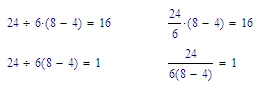
LucMeekes_0-1580835487707.png

The mathcad 15 xmcd sheet can be explored easily, since it is an xml file. In there you will find that for the second case (the lower left expression) the 6 and (8-4) are together surrounded by (implicit) brackets. wheras in the first case there are explicit brackets, only around (8-4).

Advice: do not use : for divisions.

Note that further confusion is possible due to the 6(8-4) wherein 6 could be viewed as a function. In fact you can actually define a function  6 (that is: 6 with a space in front of it, or even a non-printing character) that you can have perform any function you like, thus adding to the confusion.


Success!
Luc


3 replies

23-Emerald IV
February 1, 2020

It gets worse, this is Mathcad 11. Admitted, you have to be persistent to get this, but it's possible:

LucMeekes_0-1580578271132.png

I guess Mathcad 15 will show the same...


Luc

24-Ruby IV
February 1, 2020

I have download your Mathcad 11 sheet and add new operator with the changing a dot to no space!

bug-15.png


25-Diamond I
February 1, 2020

Hmm, and I thought that the answer to everything would be 42 .... Werner_E_1-1580598454847.gif


Werner_E_0-1580598024675.png


24-Ruby IV
February 2, 2020

@Werner_E wrote:

Hmm, and I thought that the answer to everything would be 42 .... Werner_E_1-1580598454847.gif


My example is without cheating!

It is a Prime bug!


25-Diamond I
February 2, 2020

@ValeryOchkov wrote:

@Werner_E wrote:

Hmm, and I thought that the answer to everything would be 42 .... Werner_E_1-1580598454847.gif


My example is without cheating!

It is a Prime bug!


I know and it's terrifyingly easy to achieve this effect in Prime. As Luc has shown, it is also possible to do it in Mathcad, but it does require much more effort there and hardly could be done accidently.

We have a lot of bugs in Prime, some of them are already present in Mathcad, too, some are newly introduced.

But IMHO the new symbolic engine (FriCAS) in Prime 6 is significantly more threatening and a much bigger problem in upcoming Prime versions which will not include muPad any more.

7-Bedrock
February 4, 2020

Maybe it has to do with multiplication by juxtaposition:


LucMeekes23-Emerald IVAnswer
23-Emerald IV
February 4, 2020

There's no maybe here, it's exactly clear what's going on. In Mathcad (11 or 15) there are two division operators that work exactly the same, but look different. You have : and you have /.

If you change the : to / you immediately understand:

LucMeekes_0-1580835487707.png

The mathcad 15 xmcd sheet can be explored easily, since it is an xml file. In there you will find that for the second case (the lower left expression) the 6 and (8-4) are together surrounded by (implicit) brackets. wheras in the first case there are explicit brackets, only around (8-4).

Advice: do not use : for divisions.

Note that further confusion is possible due to the 6(8-4) wherein 6 could be viewed as a function. In fact you can actually define a function  6 (that is: 6 with a space in front of it, or even a non-printing character) that you can have perform any function you like, thus adding to the confusion.


Success!
Luc