

24-Ruby III
March 25, 2016
Question

PTC Mathcad Prime Roadmap (2015/2016 update)

  • March 25, 2016
  • 30 replies
  • 26776 views

At the last event "PTC LiveWorx Europe 2015" in November of 2015 it was presented a roadmap for the development of Mathcad Prime 4.0 and some future steps (themes) for Prime direction. PDF "PTC Mathcad Roadmap_2015" can be found in attachment. You can see what updates are planned for version 4.0 (now the release of version 4.0 is scheduled for the 4th quarter of 2016 year) and is scheduled for subsequent releases after 4.0.


Update_June 2016: New timeline (at time of June 2016) for Mathcad/Mathcad Prime product:
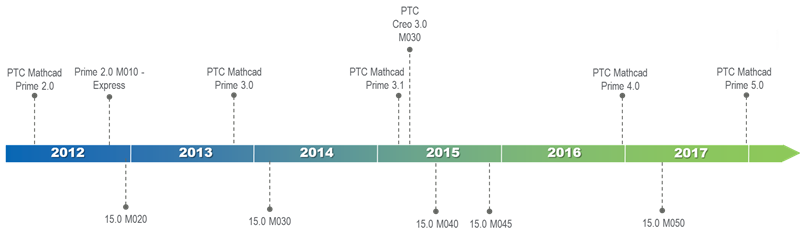

Roadmap.png


Update_Jule 2016: In June of 2016 year within an annual meeting conference "PTC LiveWorx 2016" the new program of development for Mathcad Prime was submitted. For future release of Mathcad Prime 4.0 the same new planned features were shown in the program about which I wrote earlier here (except for expanded options of creation of 2D plots - this feature is transferred it for 5.0 version😞 Mathcad Prime 4.0: some new updates

PDF "PTC Mathcad Roadmap_2016" can be found in attachment.


Update_February 2017: Added the presentation about Mathcad Prime 4.0 from the PTC Forum Europe which was in November 2016.


30 replies

16-Pearl
July 20, 2016

This absolutely stinks.  They have move the plotting enhancements back a whole year to Prime 5.0.

13-Aquamarine
July 22, 2016

For me, plotting is the deal breaker.  I can't insist that my students format plots well while having them use software that can't do it.  Unless I misunderstand its features, I can't format plots for publication using Prime either.  It looks to me like Prime is just going to be a module in Creo.  So, I guess I use V15 until Prime 5.0 comes out?

1-Visitor
July 23, 2016

‌Couldn't agree more. I've more or less stopped using Mathcad (other than for legacy worksheets). I write new stuff in Mathematica. Its far far superior to Mathcad. But does take a little longer to get up to speed with. PTC has effectively killed what used to be a good product.

1-Visitor
July 30, 2016

When is Mathcad Prime usable and has the same functionality then mathcad 15 with same usability and speed.

Is this maybe possible in future or do i need to change to Mathematica?

1-Visitor
July 30, 2016

‌I'd suggest you give Mathematica a try.  I did. And haven't looked back. It's like Mathcad an steroids. The only thing is, it takes a little longer to learn to drive.  But once you get into it, you can do a zillion more things than you can with Mathcad. And it's constantly evolving. And there's heaps of help and examples available. And it's about the same cost as Mathcad.  And Wolfram offer a full blown home version at very low cost for non commercial use. Good luck!

1-Visitor
September 2, 2016

With Mathematica (or any of the other major math/eng. apps for that matter), is it possible to mix text, symbolic calculation, and graphing so that all this data can be easily presented and published in an article or book chapter format?  This is the main reason I use Mathcad.  If I could find this functionality elsewhere I would flush Mathcad in less than 15 picoseconds.  Thanks!

1-Visitor
September 2, 2016

As what i know. Only Mathcad has the feature to mix normal text and a symbolic formula editor / unit calculation possibility. Feature what a calculation report requires. That is the unique feature what only mathcad provides. Not to forget that a symbolic formula input is required to write complicated formulas.

In that way you can forget Matlab or any other programs.....

But im open to suggestions

If other possibility is available ill kill Mathcad in 15 picoseconds too hahahhaha

7-Bedrock
November 11, 2016

Nice features back into Mathcad and other good enhancements.

Keep it up and good luck !

But what about intercommunication of several Mcd files (without Creo or third-party tools) ?

Something like Mathconnex available several Mathcad versions ago, or like Simulink...

Mathconnex was a great tool and seemed to me a quite value-added component.

Best regards, Liv.

1-Visitor
December 3, 2016

I have all of the "M" languages (MathCad, MatLab, Maple, and Mathematica) installed on my work PC.  When I want to write some "mathematics", particularly for students or to work on a particular physical problem (how to make a ceiling-mounted 2-axis Galvo system move a laser beam on a cylindrical screen at a certain elevation with respect to a viewer without drawing "smiley" faces, for example), I turn to MathCad.  This was especially true a decade (or more) ago in the days before MathCad Prime (which, for pure MathCad, seems to be a step backwards).  I have largely abandoned MatLab (except, again, when colleagues need my input), and have not (yet) warmed up to Maple (I find the UI awkward).  I appreciate the power of Mathematica, but find its insistence on doing it "My Way or the HighWay" annoying (so I write my own functions to force it to follow more normal mathematical conventions).

After several phone calls and some hand-holding from Tech Support, I was able to install MathCad Prime 3.1 on my Windows 7 system, and to get it activated.  None of these steps were easy or intuitive -- I sent a followup message to PTC describing the User-Unfriendly Interface that makes installation so problematic.  I am about to do a second install, but I realize that I've seen no "Official" mention of the Microsoft Operating System known as Windows 10!  Indeed, the (outdated) on-line documentation that I could find for MathCad Prime talks about Windows 7, Windows 8, and Windows 8.1, but not Windows 10.  Forgive me if I'm wrong, but hasn't this OS been out for a while?  Didn't we just get the "Anniversary" Update?

So, here's a question -- has anyone successfully installed MathCad Prime 3.1 on a Windows 10 (x64) system?  Did it work?  Are all the features active?  [I noted a mention of Windows 10 in the Community with regard to MathCad 14, one of the last "full" versions, and there seemed to be a few problems ...].

Bob Schor

1-Visitor
December 3, 2016

‌Hi Bob,

I've been running Prime 3.1 under Win 10 Pro 64 bit for about a year. So far no problems. But, since MCAD went backwards I've also invested in Maple and Mathematica (MMA). Both of which are way better than MCAD. Maple is a great MCAD replacement.  And can do so much more. MMA isn't ideal if what you want is a simple to use computerised calc pad. But, if you've got the time and the will to learn how to use it, it can do some ridiculously impressive things. Personally, I've found the Maple UI much better than Prime 3.1. Might be worth you persevering a bit? I now only use MCAD for legacy worksheets. Sadly, I think PTC has probably killed MCAD.

All the best,

Ian