
1-Visitor
December 20, 2011
Solved

Populating a matrix with a programming loop.

  • December 20, 2011
  • 1 reply
  • 8370 views

Hello everyone,

I'm severely new to Mathcad and I am trying to use the programming toolbar to clean up my worksheet.

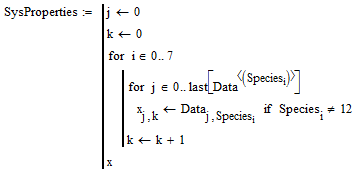
Currently I have a large matrix full of chemical property data and I want to extract some of that data into a new matrix based on combo boxes. I'm not up to the level of scripting combo box or listbox behavior yet, so I was trying the following workaround.

Data = The large matrix that has mountains of data.

Species(i) = The column number that corresponds to the correct data. If no chemical species was selected Species(i) = "None"

Test = New matrix that I would like to create with just the extracted data from the larger matrix.

See attached for a screenshot of the command. Is there something wrong with my syntax? Can I not use the subscripts in that way?
Best answer by seetheforest

Thanks for the response. I tried using your general flow and I'm still having issues. The problem is that I am pulling columns of data from a 2-D array and trying to make a new 2-D array column by column. Mathcad doesn't seem to like that and I'm not sure how to work around it.

Edit: Will revise once I fix some things.

Edit2: Got it.

Final solution for my problem:

Mathcad Help 2.png

1 reply

24-Ruby IV
December 20, 2011

Maybe so:

filter.png

seetheforest1-VisitorAuthorAnswer
1-Visitor
December 20, 2011

Thanks for the response. I tried using your general flow and I'm still having issues. The problem is that I am pulling columns of data from a 2-D array and trying to make a new 2-D array column by column. Mathcad doesn't seem to like that and I'm not sure how to work around it.

Edit: Will revise once I fix some things.

Edit2: Got it.

Final solution for my problem:

Mathcad Help 2.png

1-Visitor
December 20, 2011

Please post a worksheet.

Mike