

Private Character Editor
You can make your own private character using Windows Private Character Editor, see help on the Character Map.
So if you need a circumflex over, say an x, you can make your own, and use it as you would any other character.
For example I made the following character, an x with a freehand circle around it: (You could do a logo also)
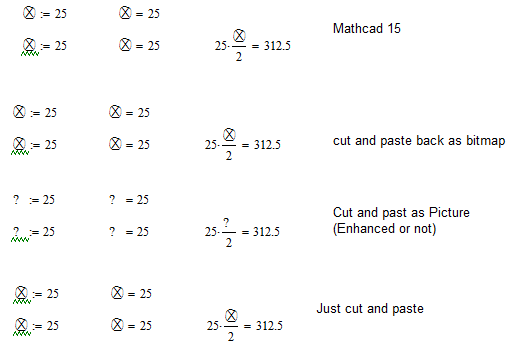
The character will copy and paste as a Bitmap just fine,
But the character will not copy as a Picture?
It will print and it will print as a pdf.
I can copy the character and use it, so don't have to keep inserting from the Character Map.
Questions (I am leary about testing this sort of thing on a work computer)
I don't see how to delete a character, I can replace though, so maby that's OK, just replace after goofing around.
The character will only work on a compuer with the character in the Character Map, I am guessing there will be an error about no character exisiting. Or if there is a private character with the same number, it will use whatever that character is.
If I wanted others to use the file, I would need to privide a Private Character Map, How would this be done?
(If not too many, they could make their own, they don't need to match, just have the same position or number.
Any Thoughts?
Thanks, Wayne
PS I am attaching the Mathcad 15 file as well, What happens?