Community Tip - Your Friends List is a way to easily have access to the community members that you interact with the most! X
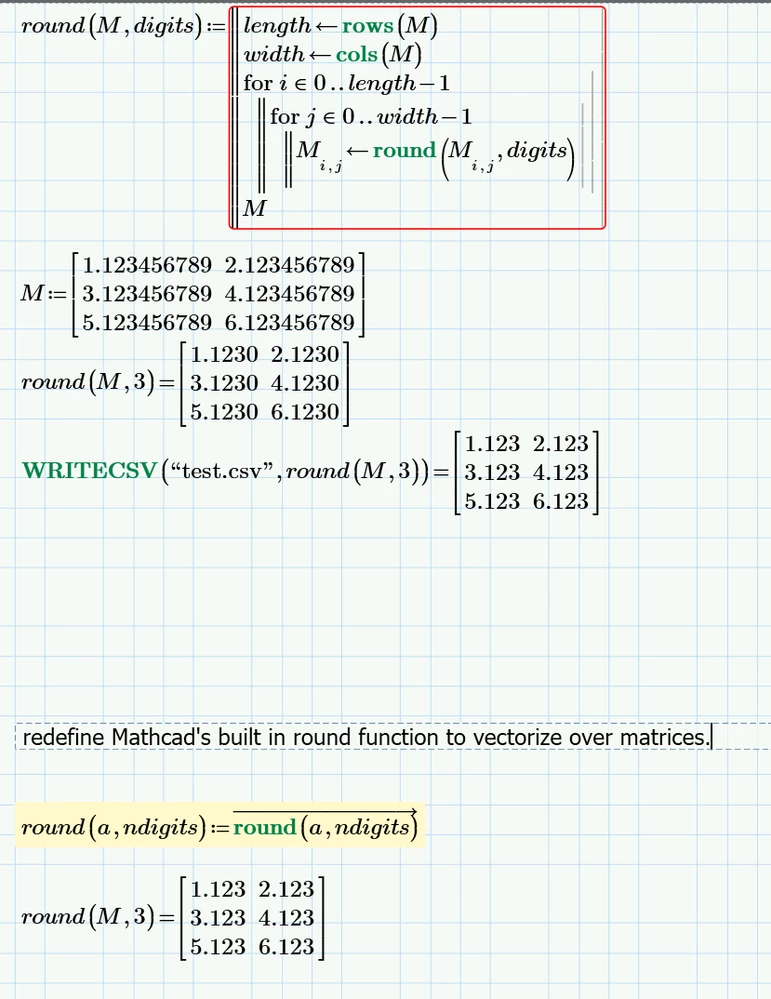
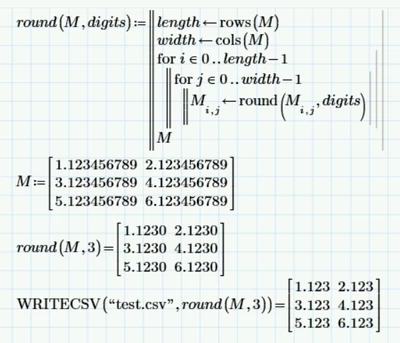
I'm using WRITECSV to write the contents of a matrix to a .CSV file. The WRITECSV function writes the contents with full precision, giving me numbers with 18 decimal places. I want to round the elements to a few decimal places. I wrote a function to do this, but it feels kind of clunky. Is there a native way to accomplish what I'm trying to do? I'm using Prime 11.
Solved! Go to Solution.
Oops, I realized that I redefined the native function "round". Not good. But my basic question remains.
@MJ_10071773 wrote:
Oops, I realized that I redefined the native function "round". Not good. But my basic question remains.
I wouldn't worry unduly about redefining the native function. I do it almost all the time when I want the native function to do something different.
By default, Mathcad will assign the "Variable" Label to your redefined function. The original function is still available with different labels.
To see or change a name's label, click on the name, then look in either the Math tab for Labels or in the Math Formatting tab (as seen in the image below).
The tab should indicate the name's label. The formatting tab lets you change a label's formatting to display it in a different colour or with a different attribute (bold, italic). Unfortunately, you can't change a label's font or font size independently of the other labels.
I usually choose bold, green for the Function label, but I've changed it to red to make it stand out a bit better (hopefully).
You should be able to see in my previous post how it allows you to distinguish between the built-in round and both our redefined rounds.
Stuart
Thank you! I learned more about Mathcad than I thought I would with this question.
@MJ_10071773 wrote:
Thank you!
No worries.
@MJ_10071773 wrote:
I learned more about Mathcad than I thought I would with this question.
There's always something to learn, even if it's only through changes between versions.
Funnily enough, I didn't realise (or, rather, had forgotten) that round doesn't work over matrices until a couple of weeks ago. It was rather frustrating hunting down the error in my program because I (naturally, IMO) expected the rounding functions to vectorise over matrices. It didn't occur to me that they only operated over scalars and vectors of scalars! So, I added suitably modified versions of round, ceil, floor, etc, to my library of functions ... only to discover shortly afterwards that I already had versions in some older worksheets!
There are a few other functions that don't behave intuitively for me. For example, stack and augment don't work with ranges or functions. I also miss the empty-array feature found in many other programming languages, so I've emulated it as well.
This next one probably doesn't interest many people, but I was again taken by surprise when I realised that the random number functions can't generate random complex variates, nor do they have a matrix-generation option, just a vector one. Still, soon fixed.
The functions shown all run in Mathcad Express and Mathcad Prime. (You might notice that I use a modified round function in imunif)
Stuart
Unfortunately, the element-wise rounding didn't accomplish my end goal. I wanted it to round the mantissa when working with numbers in scientific notation. Do you see an elegant way to accomplish that?
Here was Chatgpt's solution to my question
I couldn't figure out how to incorporate the vectorization (element-wise) operator into the function definition.
And after discovering a divide-by-zero limitation, I landed on this:
If you want to modify your function to vectorize over arrays, I'd use turn your function into a local function (roundsci, say) within roundSci, then vectorize over the call to it inside roundSci. Unfortunately, I can't even create a program inside Mathcad Express so I can't show what I mean.
However, here's another possibility that explicitly splits a number into the mantissa and exponent, rounds the mantissa and then combines them again.
Stuart
Aber natürlich.
I wouldn’t mind, but I was only playing with complex numbers yesterday!
And that’s Zen 3 and Zen 16 broken within an hour of posting the Zen of Mathcad! 🙄
Stuart
I was working in my lab, late last night
When my eyes beheld an eerie sight
For my monster from his slab, began to rise
And, suddenly, to my surprise
(He did the mash)
He did the Monster Mash ...
Actually, he didn't.
He wandered over to the drinks cabinet and poured himself an 18-year-old Macallan single-malt.
"I think Igor must have wired me up incorrectly, again.", he remarked, conversationally.
"Probably," I noted, "but what makes you think so?".
.
"Well, it's Igor. That's usually sufficient.", he said, "But it's just that I thought there was a simpler way to carry out mantissa rounding. And what with my brain still being in beta test, I'm not sure I should be having such thoughts."
"Oh.", sayeth I.
"Yes.", sayeth he, "Still, perhaps you'd like to try the idea out ... but I'd make your testing a bit more comprehensive, this time."
"Ah, yes. The villagers. The pitiful screams."
"No. That goes with the territory, along with the pitchforks and burning torches.", he said, "I was referring to The Curious Case of the Complex Logarithms that Bayed in the Night".
"Oh.", I said.
"Quite.", he said,
"You don't find that kind of thing going on in Schloß Werner", he added reproachfully.
"Here be roundoff errors ":
More numerical shenanigans.
Stuart
Asking if x=0 is better done in round4, otherwise .... 👿
According fractional part of a number.
The fractional part of x=9.99 clearly is 0.99 -> floor(x) + 0.99 = x
But what should be considered the fractional part of x=-9.99 ??
Should it be
+0.99 as sign(x)*(floor(|x|)+0.99) = x
or
-0.99 as sign(x)*floor(|x|) -0.99 = x
or
+0.01 as floor(x)+0.01 = x
According to aunt Wiki (Fractional part) its -0.99 (as your function correctly returns) while +0.01 would be denoted by curly braces.
Also uncle Wolfram (Fractional Part) uses -0.99 and so I guess we can say that your implementation follows the main stream.
Looks like nobody likes my first intuition which would have been frac(-0.99)=+0.99 (just looking at the numbers after the decimal point and including the latter) 😞
Yes, it would have been better to include the x=0 part in round4. TBH, I thought I had done, as well as adding the x=0 to some of the other round{n} functions.
I've corrected them in the attached Mathcad Express 10 worksheet ... I hope.
I chose trunc for frac on the basis that trunc(z) + frac(z) = z.
Oh, and I've moved frac to another worksheet entirely as part of a Mathcad Enhancement Proposal to extend the truncation and rounding functions (and mod) to matrices and with all complex arguments.
Stuart
Thanks, I really appreciate the time that you folks put into this! I ran into another problem. The rounding function didn't properly round complex numbers in scientific notation if the real and imaginary parts had different exponents. This is what I landed on. I went with the more verbose form so I wouldn't have to remember later what the native product function was 😉
??
It looks to me that your picture shows that the numbers are correctly rounded to 3 significant digits, aren't they?
EDIT: Ah, I see. You were referring to Stuarts original roundSci function.
You may fix it a little bit shorter that way: