Best answer by Fred_Kohlhepp

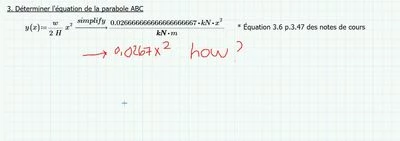
You can (but it's "cheating"!)

FredKohlhepp_0-1592226030784.png

The attached file shows you how.  There are three varieties of "y(x)" below yours.  The yellow one works just fine, you don't have to simplify every function.  The middle (grey) function works.  The pink function works BUT it will lie to you because the units won't balance, because 0.0267 is only valid because it requires all lengths to be meters.  That function will result in y(x) being reported in meters squared.


2 replies

23-Emerald I
June 15, 2020

You can (but it's "cheating"!)

FredKohlhepp_0-1592226030784.png

The attached file shows you how.  There are three varieties of "y(x)" below yours.  The yellow one works just fine, you don't have to simplify every function.  The middle (grey) function works.  The pink function works BUT it will lie to you because the units won't balance, because 0.0267 is only valid because it requires all lengths to be meters.  That function will result in y(x) being reported in meters squared.


1-Visitor
June 15, 2020

Thank's a lot !!

Have a great day


Camille

25-Diamond I
June 15, 2020

As you are working with units you should not suppress the correct unit when evaluating expressions. But you sure can do something against the too many decimals and the fact, that the symbolic engine does not cancel the unit kN.

The symbolic does not know anything about units and autolabelling in Prime is rather faulty, so some kN are seen as unit and some as variable. Thats the reason why in the symbolic evaluation the kN are not cancelled. There is an option which sometimes can help in this situation - turn on "Units/Constants in symbolic calculation" as shown in the picture. This will allow the cancelling of the unit kN.

To display less decimals you might use the "float" modifier. But it should be handled with care, as it does not only apply to the display of the result but it applies to the whole calculation! Thats the reason I first assign the expression to y(x), preserving full precision and then I evaluated y(x) in a separate region with just 4 significant digits.

You may use the "collect" or the "factor" modifier if you like the displayed result better.
If you really don't wan to see the unit 1/m you may simply evaluate y(x)*m as shown in the lower right.

Werner_E_0-1592229777982.png


1-Visitor
June 15, 2020

Thank's for the tips. It works just fine 🙂