
1-Visitor
October 27, 2021
Solved

[Mathcad Prime 2.0] - Struggeling to solve newtonian differential equation of 2nd order

  • October 27, 2021
  • 5 replies
  • 10968 views

Hi everyone,

I am currently trying to solve a differential equation in Mathcad. However, after watching a bunch of Youtube-Tutorials on how to use the solve-block with ODEs, I am still not able to get the result.  What am I doing wrong? Your help is much appreciated 🙂


greetings
nerphan

Best answer by Werner_E

If you don't mind  the red errors from the numeric engine when defining your functions, you can leave your worksheet unchanged and just add the two regions with the substitute commands and change the first line in your solve block (and of course lower the time end value). And you may use different function names for the new functions if you don't want to overwrite the old definitions.

But personally I would prefer avoiding the errors by adding the function as a second argument to the functions as shown above.
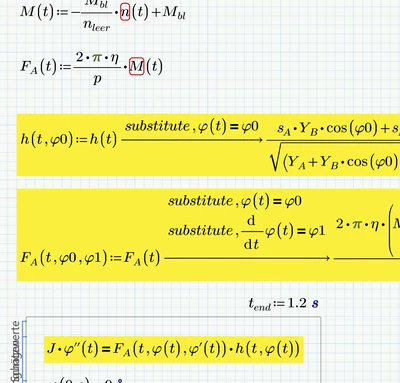
Werner_E_0-1635379874832.png

BTW, when you try to duplicate the regions with the substitute commands you will notice that ever so often Prime infamous "auto-labelling feature" comes in the way. You have to try to give the various phi the label which finally works. Sometimes its necessary to change the label from "-" (meaning "automatic") to "variable", sometimes you have to do just the opposite. Prime auto-labelling sure is a PITA, especially when you use the symbolic engine.


5 replies

23-Emerald IV
October 27, 2021

See if it works with this. (I cannot check, I'm limited to Prime Express).


Success!
Luc

1-Visitor
October 27, 2021

Hi Luc,

thx for you answer. Mathcad still gives me an error unfortnately 😞

NS_10096872_0-1635346776414.png


23-Emerald I
October 27, 2021

First problem:

Screenshot 2021-10-27 100158.jpg

Which propagates:

Fred_Kohlhepp_0-1635343500108.png

You need to reformulate the solve block equations to reflect the true expression for the function you're solving for.

Fred_Kohlhepp_1-1635343707732.png

I can't run it (constrained to Express), but attached file is an attempt at an edit.

1-Visitor
October 27, 2021

Hi Fred_Kohlhepp,


I can't open your document, as my Prime 2.0 does not seem to be compatible with it. But I think your answer is identical to that, what luc did (see screenshot in my reply to him)

23-Emerald IV
October 27, 2021

Fred saved the file from Prime 7 (There's no way in Prime to save to the format of a previous version), so you cannot open that in Prime 2.

I've created a translation to Prime 2 of Fred's file, so you can see for yourself.

I've also built the system in Mathcad 11, and it will not solve. Mathcad 11 complains "Cannot evaluate this accurately at one or more of the values you specified"... whatever that may mean.


Success!
Luc


25-Diamond I
October 27, 2021

Here is my try.

It works, but not up to 6 seconds. Can't get it farther than 1,2 seconds. As you can see in the plot the values for phi shoot high up.

Guess you should check your equations.

I attach a pdf print and the worksheet in Prime 6 format.

Luc seems to have found a method to convert sheets back to older versions so maybe he can convert the sheet to Prime 2 format for you.

Werner_E_0-1635378528727.png

I could not make it work without redefining F.a and h by substituting the function phi(t) and its derivative by simple variables. Thats a bit awkward but at least I could avoid having to copy and paste expressions.


Werner_E25-Diamond IAnswer
25-Diamond I
October 28, 2021

If you don't mind  the red errors from the numeric engine when defining your functions, you can leave your worksheet unchanged and just add the two regions with the substitute commands and change the first line in your solve block (and of course lower the time end value). And you may use different function names for the new functions if you don't want to overwrite the old definitions.

But personally I would prefer avoiding the errors by adding the function as a second argument to the functions as shown above.

Werner_E_0-1635379874832.png

BTW, when you try to duplicate the regions with the substitute commands you will notice that ever so often Prime infamous "auto-labelling feature" comes in the way. You have to try to give the various phi the label which finally works. Sometimes its necessary to change the label from "-" (meaning "automatic") to "variable", sometimes you have to do just the opposite. Prime auto-labelling sure is a PITA, especially when you use the symbolic engine.


1-Visitor
October 28, 2021

Hallo Werner,

thanks alot man, your solution worked for me and you were right about the equations, I found the mistake and now the solution looks more plausible.

NS_10096872_0-1635421494856.png


How can you evaluate the time needed to travel to 90°?

I tried this, but it didn't work:

NS_10096872_1-1635422655229.png


"Sometimes its necessary to change the label from "-" (meaning "automatic") to "variable","

I did not understand that, could you show me an explample please?


19-Tanzanite
October 28, 2021

Seems to work ok if you make n have the same dimensions as nleer, and if you change the functions to be functions of phi not t.

g0.JPG.

1-Visitor
October 28, 2021

Hi AlanStevens,

thanks for the answer mate :). As I had a mistake in one of the equation (see below)

NS_10096872_0-1635423367388.png

the diagramm after the corrected equation does not seem to represent the expected solution. I think it matters, if i make all the functions depended on phi instead of t.

1-Visitor
October 28, 2021

forgot to post the diagramm:


NS_10096872_0-1635428781131.png


1-Visitor
November 1, 2021

Thanks alot to you guys! Wouldn't be able to make this progress without your help.


Could you please explain me the following things?

  1.  So I have added a transmission-ration "i" to the equation. The next thing I want to find is the corresponding "i"...
    1. which leads to the shortest time t_90deg (the time needed to travel to 90 deg)
    2. which leads to a specified t_90deg (e.g. t_90deg should be 3.5 s)
  2. What kind of constraint do I have to add, to tell the system to stop @90deg (phi'(t_90deg=0), (angular velocity)

NS_10096872_1-1635729134675.png


25-Diamond I
November 1, 2021

ad 1) Asking for the shortest t.90 time seems senseless as the larger you chose i, the shorter the time

Werner_E_0-1635741386777.png


ad 2) not clear what you mean.  What exactly do you want to "stop"?


pdf of the modified file attached.


P.S.: I had to play around with the definition of n to get it to work finally as of big troubles with Primes auto-label "feature". Really looks like this problem was introduced after the version you are using.


1-Visitor
November 30, 2021

Hi Werner_E,

thanks alot. All your answers helped me to successfully complete my calculations! 🙂

Could you please explain what you did here? This is something I could never think of.

NS_10096872_0-1638303611454.png