4-Participant
April 24, 2023
Solved

Automatically Transfer Documents from ThingWorx to Windchill

  • April 24, 2023
  • 1 reply
  • 854 views

How can I transfer documents automatically from Thingworx application to a windchill application and delete the document afterwards from thingworx? Is there an API I can use for it or any other available code? Thank you in advance! 

Best answer by Velkumar

Hi @JM_10218548 


You can use Windchill Rest Services to Create / Check In / Check Out documents in the Windchill system from Thingworx
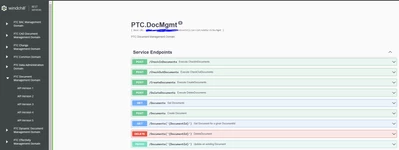
 

Velkumar_0-1682312108722.png


To access WRS documentation - https://<<HOST>>:<<PORTNUMBER>>/Windchill/netmarkets/html/wrs/doc.html


If Thingworx Navigate is configured in your Thingworx Instance, you can directly consume Windchill API using Navigate ODataConnector (which will take care of authentication ) or you can use ContentLoader Function in Thingworx to consume Windchill API. 


To delete documents from your Thingworx Repository, you can use the 'DeleteFile' or 'DeleteFolder' (to delete the entire folder) service from your Repository Thing. 


/VR

 

1 reply

Velkumar19-TanzaniteAnswer
19-Tanzanite
April 24, 2023

Hi @JM_10218548 


You can use Windchill Rest Services to Create / Check In / Check Out documents in the Windchill system from Thingworx


Velkumar_0-1682312108722.png


To access WRS documentation - https://<<HOST>>:<<PORTNUMBER>>/Windchill/netmarkets/html/wrs/doc.html


If Thingworx Navigate is configured in your Thingworx Instance, you can directly consume Windchill API using Navigate ODataConnector (which will take care of authentication ) or you can use ContentLoader Function in Thingworx to consume Windchill API. 


To delete documents from your Thingworx Repository, you can use the 'DeleteFile' or 'DeleteFolder' (to delete the entire folder) service from your Repository Thing. 


/VR