7-Bedrock
November 21, 2023
Solved

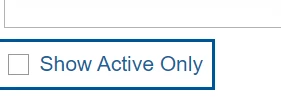
Facing issue in removing border in checkbox widget

  • November 21, 2023
  • 3 replies
  • 1583 views

Facing issue in removing border in checkbox widget in thingworx 9.4
AC_10460579_0-1700558848836.png


Best answer by PEHOWE

@AC_10460579 ,


I asked one of the experts and I got a solution which should work for ThingWorx 9.4.0.

ptcs-checkbox {
  --ptcs-focus-overlay--border-style: none; 
}


Please give this a try in the Custome CSS tab. You will need to disable the "linting" in the editor to save the update.


Let me know how it works for you.
Pehowe

3 replies

16-Pearl
November 21, 2023

Hi @AC_10460579 ,

Either you must be using OOTB style theme or there must be a custom one. Go to the Style Theme that is being used in your application and do the below highlighted changes. 


StyleTheme.jpg


Thanks,

Shirish

PEHOWE17-PeridotAnswer
17-Peridot
December 5, 2023

@AC_10460579 ,


I asked one of the experts and I got a solution which should work for ThingWorx 9.4.0.

ptcs-checkbox {
  --ptcs-focus-overlay--border-style: none; 
}


Please give this a try in the Custome CSS tab. You will need to disable the "linting" in the editor to save the update.


Let me know how it works for you.
Pehowe

11-Garnet
March 13, 2025

Hi @PEHOWE 

NJ_10144761_3-1741868463449.png


not working in thingworx version 9.6

NJ_10144761_0-1741868220987.png

can you suggest something on this 


17-Peridot
March 14, 2025

Hello @NJ_10144761 ,
Please review Configuring Mashup Properties in the entry for "LegacyFocus"
If you have this check box unchecked the CSS you have should function as you expect.
Because there may be differences in presentation, What is the environment where you are not getting the look you desire? 

Please review Article - CS439465 - ThingWorx Web Components Customization with CSS


In the screen capture, "Linting" is checked. You can not save the CSS with errors. Please turn off this feature. You will then be able to save the CSS update.

Let me know 

Pehowe

17-Peridot
March 14, 2025

Hello @AC_10460579
With the change in version there has been updates to the UI. 
One of the changes was the addition of a new control for the definition of the Mashup. Please review the properties on the mashup. Look for the LegacyFocus. (See screen Capture)


If this property is unchecked. the original CSS should work.


ptcs-checkbox {
 --ptcs-focus-overlay--border-style: none; 
}

Please let me know

Regards,
Pehowe
